在本文中,你将了解:
- 为什么 GLM-5.3 和 GLM-5.3-Flash 代表了 LLM 驱动的网页抓取任务的一次重大进步。
- 构建网页数据提取系统时面临的核心障碍,以及 Bright Data 网络解锁器 API 如何应对这些障碍。
- 如何使用 Python 和 GLM 逐步实现 AI 驱动的网页抓取。
- 如何利用 GLM-5.3 的多模态能力执行基于视觉的网页抓取。
让我们开始吧!
GLM 模型在网页数据提取方面的优势
现代 LLM 彻底改变了网页抓取的方式。你无需再实现手动解析流程来处理原始 HTML 标记,而是可以利用 AI 模型自动完成提取。这消除了基于 CSS 选择器的方法和 XPath 表达式匹配所固有的脆弱性。
你只需要精心编写一个提示词,明确指定需要检索的数据元素。只需几行代码,就能指示 LLM 从任何网页中识别并提取有组织的数据。这种 AI 驱动的方法可以构建出在页面结构发生变化时更加稳健的网页爬虫工具。
在这种情况下GLM-5.3 尤其擅长基于文本的信息检索和结构化数据生成。此外GLM-5.3-Flash 具备视觉功能,可用于分析网页截图和图形元素。
如需更多背景信息,请参阅以下相关资源:
- AI 驱动网页抓取方法的一般原则。
- 通过 GPT Vision 使用 AI 进行视觉数据提取。
AI 网页抓取的主要挑战
基于 AI 的提取降低了对页面标记变化的敏感度。尽管如此,AI 网页抓取中遇到的主要技术挑战与传统网页抓取基本相同。
主要问题仍然包括 JavaScript 渲染、反机器人检测系统、设备指纹识别技术、请求速率限制、CAPTCHA 和 IP 信誉问题。毕竟,在 LLM 能够处理网页之前,你必须先获取其内容。这就需要应对各种旨在阻止程序化访问的保护措施。
因此,AI 驱动的提取并没有消除大规模获取网页内容这一根本难题。可以肯定的是,在此过程中加入 AI 还会带来额外的考量,尤其是 token 消耗会成为关键因素。
将大型 HTML 文档传输给 GLM-5.3 等高级模型可能会迅速产生高额成本。最佳解决方案是将原始 HTML 转换为针对 LLM 优化的 Markdown 格式。
将网页转换为结构化 Markdown,可以保留必要信息和布局层级,同时大幅减少不必要的 token 消耗。这种转换会以 LLM 能够高效处理的格式保留标题、编号列表、图片 URL 和说明文字以及超链接。如需了解更多详情,请阅读我们的 HTML 转 Markdown 教程。
Bright Data 网络解锁器 API:解决方案
Bright Data 的网络解锁器 API 为网页抓取的底层挑战提供了一体化解决方案。无论你希望应用传统解析还是 AI 驱动的解析,都是如此。
网络解锁器 API 作为端点运行,接收目标 URL 并返回其渲染后的内容,同时处理所有反机器人保护。具体而言,它可以绕过 CAPTCHA 保护、处理大量使用 JavaScript 的页面、规避浏览器指纹检测、为你轮换 IP 等。进一步了解 Bright Data 绕过反机器人机制的方法。
此外,网络解锁器 API 还可以灵活地以多种输出格式返回检索到的数据,包括:
因此,网络解锁器 API 请求的响应数据可作为后续使用 GLM-5.3 和 GLM-5.3-Flash 等 LLM 进行基于文本或视觉的数据提取时的理想输入。
注意:网络解锁器 API 包含在 Bright Data 免费套餐中,每个自然月提供 5,000 次免费提取请求。
网络解锁器 API 与其他网页爬虫 API的不同之处,在于 Bright Data 提供的底层企业级基础设施。其中包括超过 4 亿个住宅 IP 地址、无限并发、99.99% 的正常运行时间和 99.95% 的成功率。这样的基础设施能够支持可靠且高度可扩展的程序化数据提取。
如何使用 Python 和 GLM-5.3 构建 AI 驱动的网页抓取工具
在本节的指导下,你将学习如何开发一个利用 GLM-5.3 进行 AI 驱动数据解析的 Python 脚本。
该脚本重点采集这个特定 IKEA 产品页面的数据:
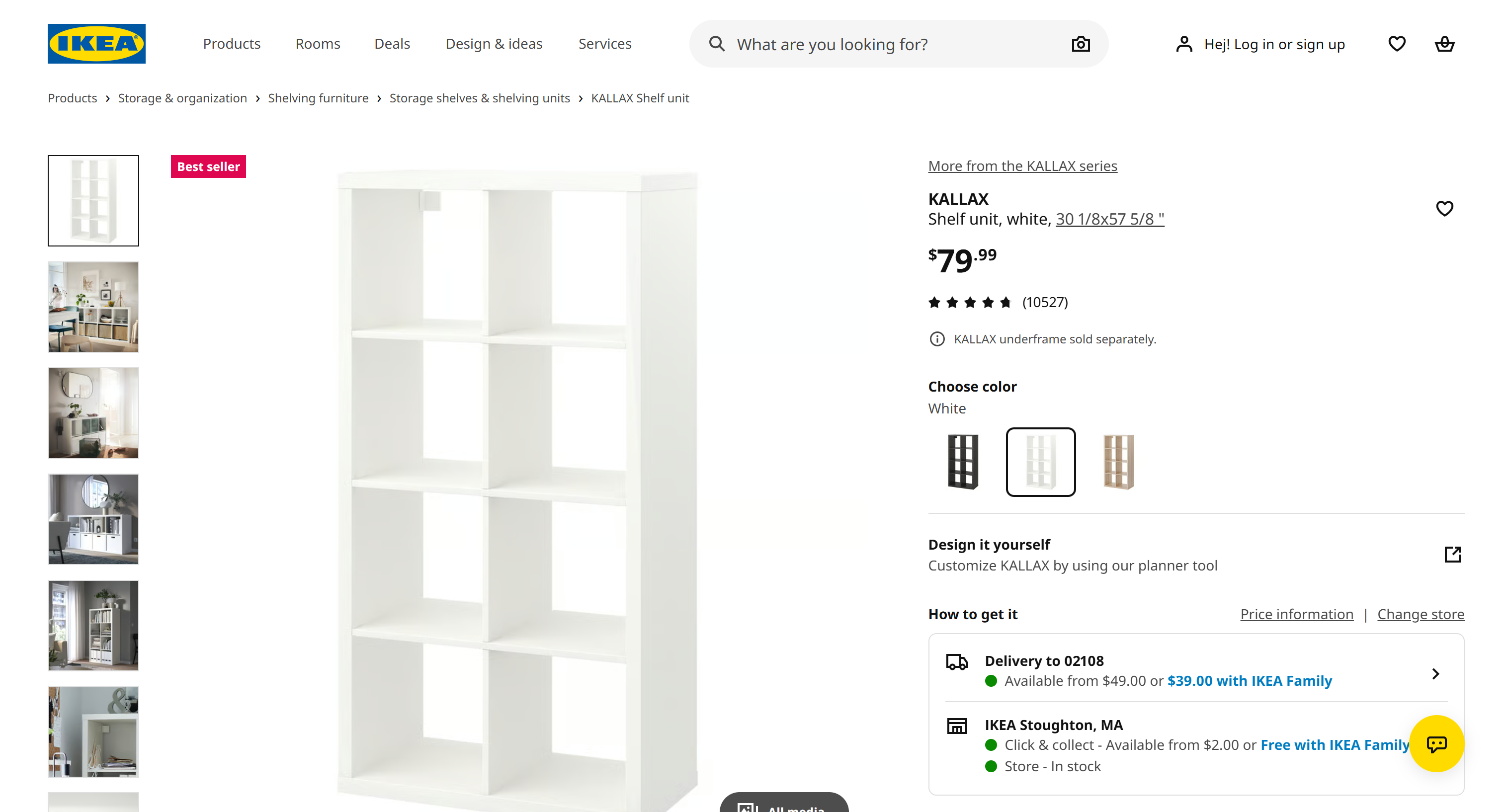
不过,基于 AI 的数据解析具有一项关键优势:相同的代码可以应用于所有 IKEA 产品页面,无论各个页面的布局或设计有何差异。
工作流程如下:
- Bright Data 网络解锁器 API 检索目标 IKEA 产品页面,并以针对 LLM 优化的 Markdown 格式输出其内容。
- GLM-5.3 通过兼容 OpenAI 的 Z.ai API 接收 Markdown 内容并提取产品信息。
- 符合预定义 JSON schema 的结果输出将导出到磁盘。
注意:对于需要大规模获取结构化 IKEA 产品数据的生产系统,请考虑使用 Bright Data 的 IKEA 爬虫 API。
请按照以下说明操作!
前提条件
请确保具备:
- 系统中已安装 Python 3.10 或更高版本。
- 一个拥有可用余额且已配置 API 密钥的 GLM 账户。
- 一个已设置网络解锁器 API 和 API 密钥的 Bright Data 账户。
– 请参阅网络解锁器设置文档。
– 按照官方指南获取 Bright Data API 密钥。
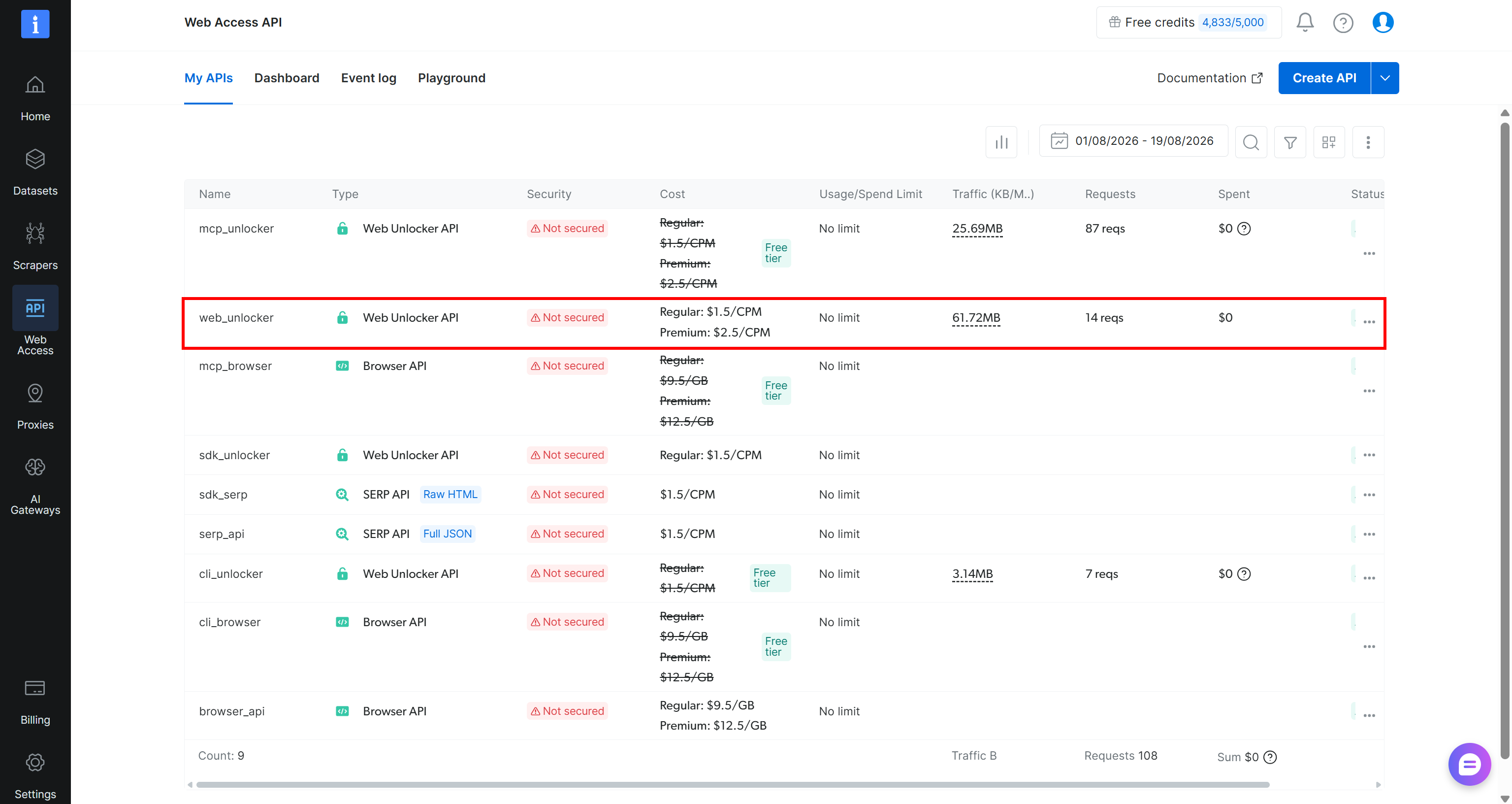
在本指南中,我们假设你的网络解锁器 API 区域名为 web_unlocker:
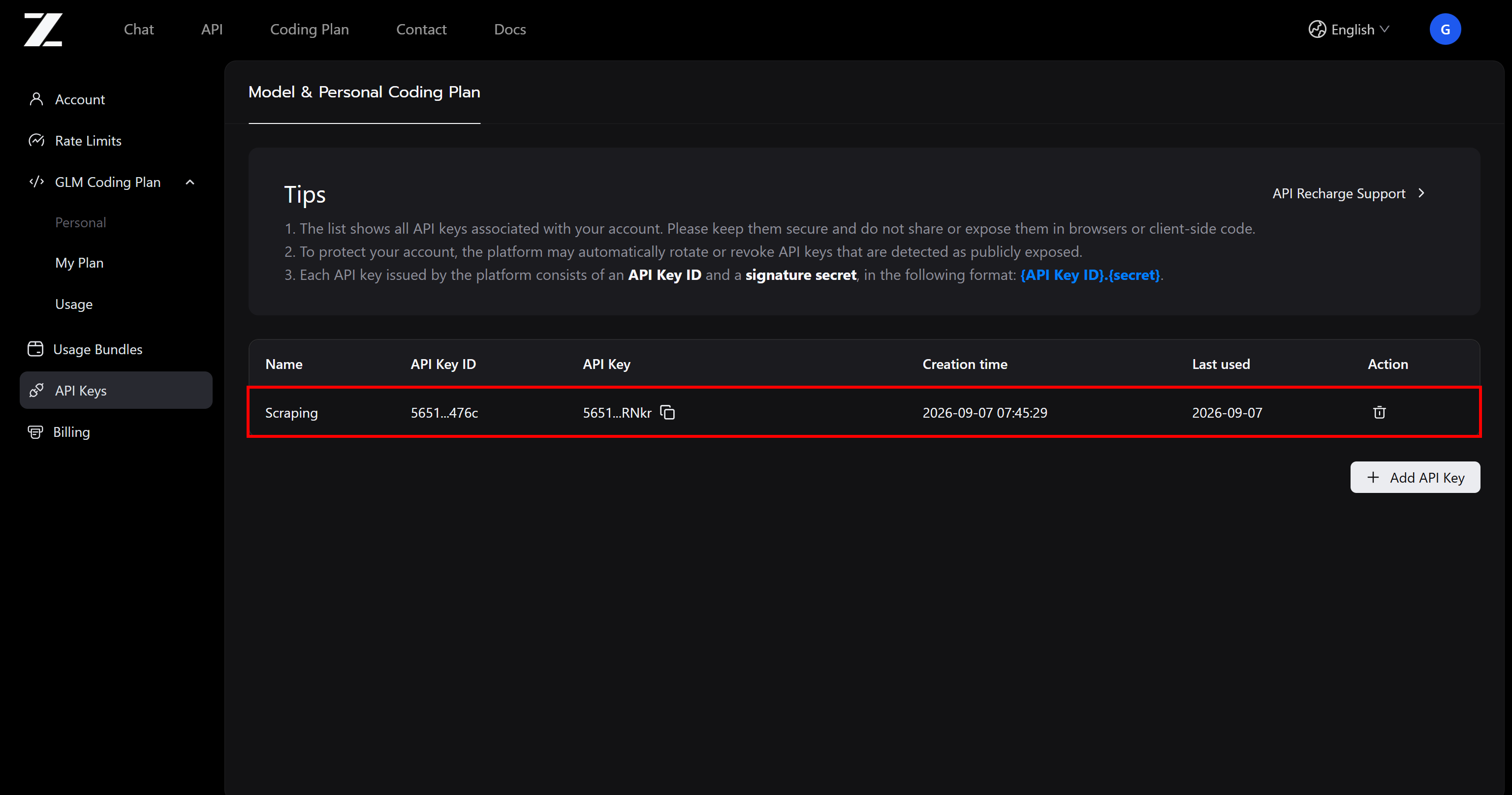
此外,你的 Z.ai API 密钥将如下所示:
第 1 步:初始化 Python 项目
为你的 GLM 抓取项目创建一个新目录:
mkdir glm-scraper进入该目录,并在其中添加一个 Python 虚拟环境:
cd glm-scraper
python -m venv .venv
在你偏好的 Python 编辑器中加载项目目录,例如 Visual Studio Code 或 PyCharm。
在项目根目录中添加一个 scraper.py 文件:
glm-scraper
├─── .venv/
└─── scraper.py # <-----
该文件将包含使用 GLM 模型进行 AI 驱动数据提取的 Python 代码。
接下来,启用虚拟环境。在 Linux 或 macOS 系统上运行:
source .venv/bin/activate在 Windows 平台上执行:
.venv\Scripts\activate激活完成后,安装项目所需的所有依赖项:
pip install dotenv requests openai pydantic所需的软件包包括:
dotenv`:用于存储 API 密钥的环境变量管理工具。requests:用于与 Bright Data 网络解锁器 API 通信的 HTTP 客户端。openai:兼容 OpenAI 的客户端,用于访问兼容 OpenAI 的 Z.ai API,从而调用 GLM。pydantic:用于定义数据模型和验证输出 schema 的框架。
很好!你的 Python 项目现在已经可以使用 GLM 进行网页抓取了。
第 2 步:添加环境变量读取功能
你的 GLM 抓取工具需要通过身份验证才能使用 Bright Data 和 Z.ai API 等外部服务。这些集成需要 API 密钥。出于安全原因,切勿在源代码中暴露这些密钥。
你应将 API 密钥保存在环境配置文件中,并在执行时加载。python-dotenv 软件包允许你从 .env 文件中读取环境变量,从而简化这一过程。
要开始使用 python-dotenv请将以下代码添加到 scraper.py 的开头:
from dotenv import load_dotenv

# Load the environment variables from the .env file
load_dotenv()
然后,在项目根目录中创建一个 .env 文件:
glm-scraper
├─── .venv/
├─── .env       # <-----
└─── scraper.py提示:在实际代码仓库中,请将 .env 添加到 .gitignore 配置中,以防意外泄露凭据。
在其中填入你的 API 凭据:
BRIGHT_DATA_API_KEY="<YOUR_BRIGHT_DATA_API_KEY>"
ZAI_API_KEY="<YOUR_ZAI_API_KEY>"
替换:
- 将
<YOUR_BRIGHT_DATA_API_KEY>替换为你的 Bright Data API 凭据。 - 将
<YOUR_ZAI_API_KEY>替换为你的 Z.ai API 密钥。
接下来,使用 Python 的 os.getenv() 将这些环境变量加载到脚本中:
import os

# Loading the required secrets from the envs
ZAI_API_KEY = os.environ.get("ZAI_API_KEY")
BRIGHT_DATA_API_KEY = os.environ.get("BRIGHT_DATA_API_KEY")
太棒了!现在,你可以在 Python 脚本中安全地访问 API 密钥了。
第 3 步:使用网络解锁器 API 获取 Markdown 格式的目标网页
AI 驱动抓取的第一阶段是获取目标页面,最好采用可供 LLM 直接处理的 Markdown 格式。Bright Data 的网络解锁器 API 提供了最简单的实现方式。
如需有关网络解锁器集成的更多指导,请参阅官方文档或查看 Bright Data 的 Python 集成示例。
使用 requests 库向网络解锁器发送 HTTP POST 请求,并以 Markdown 格式检索渲染后的目标页面:
import requests

# Set up the authentication headers for Web Unlocker
headers = {
    "Content-Type": "application/json",
    "Authorization": f"Bearer {BRIGHT_DATA_API_KEY}"
}

# Define the request payload for the Web Unlocker API call
payload = {
    "zone": "web_unlocker", # Replace with your Web Unlocker zone name
    "url": "https://www.ikea.com/us/en/p/kallax-shelf-unit-white-20631663/", # The IKEA product page URL you want to scrape
    "format": "raw",
    "country": "us",
    "data_format": "markdown" # Request Markdown-formatted output
}

# Retrieve the unlocked content of the target page
web_unlocker_response = requests.post(
    "https://api.brightdata.com/request",
    json=payload,
    headers=headers
)
markdown_page = web_unlocker_response.text
如果你不熟悉 Python HTTP 语法,请阅读我们的完整 Requests 指南。
请注意请求体中的 data_format="markdown" 参数。此配置指示网络解锁器 API 以 Markdown 格式输出网页而不是提供原始 HTML。
打印 markdown_page你将看到:
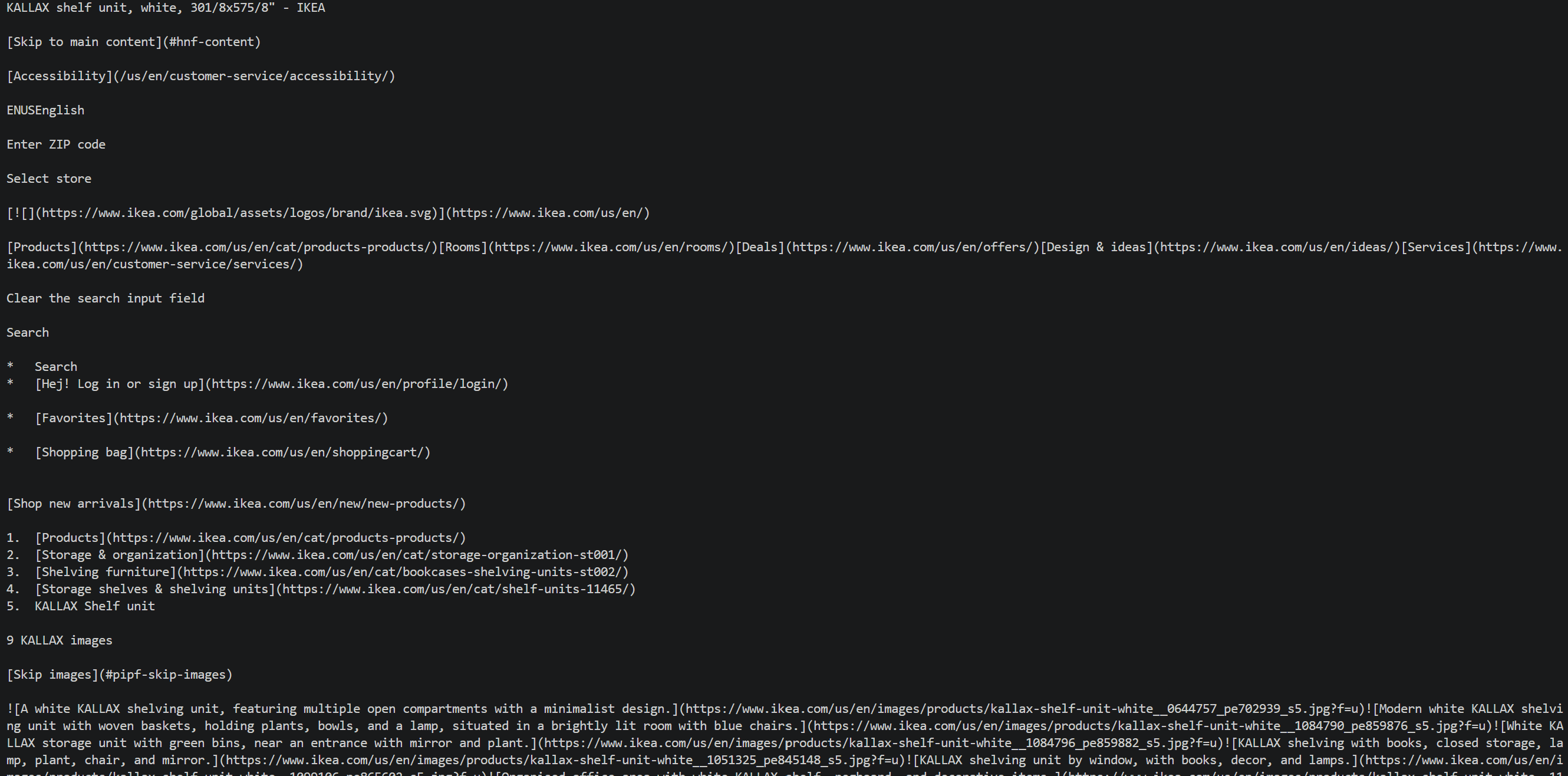
返回的输出是目标 IKEA 产品页面转换为 Markdown 后的版本。
请观察网络解锁器 API 如何处理网页检索过程中的障碍:
- 通过 Bright Data 的住宅代理网络访问目标 IKEA 基础设施。
- 处理常见的反机器人措施,例如 IKEA 的反抓取系统。
- 获取完整渲染后的页面标记。
- 将 HTML 转换为针对 LLM 优化的 Markdown 并返回结果。
现在,你已获得格式非常适合 GLM-5.3 进行文本数据解析的页面信息。在继续之前,先定义 GLM 要生成的输出结构!
第 4 步:定义输出 JSON Schema
与大多数其他 LLM 一样,GLM-5.3 默认生成文本输出。对于旨在将原始网页内容转换为结构化数据的数据提取工作流而言,这并不理想。
幸运的是,GLM-5.3 API 通过 JSON 模式支持结构化输出。此功能允许模型返回纯 JSON 字符串。
注意:虽然你无法像使用 OpenAI 的结构化输出那样直接在 json_schema 参数中指定 schema,但可以在提示词中说明所需的响应结构。这将要求模型生成符合该格式的 JSON 字符串。
在 Python 中定义结构化 JSON schema 最便捷的方法,是使用最流行的数据建模框架 Pydantic。Pydantic 可帮助你通过 Python 类表示数据结构,并将其转换为供 Z.ai API 使用的 JSON Schema 格式。
首先检查目标 IKEA 页面,确定所需的信息字段。在本例中,定义一个用于捕获 IKEA 产品详细信息的 Pydantic 模型:
from pydantic import BaseModel, Field
from typing import List, Optional

class IkeaProduct(BaseModel):
    title: Optional[str] = Field(None, description="Full product title as displayed on the IKEA website")
    product_number: Optional[str] = Field(None, description="IKEA product article number, such as 304.247.75")
    product_type: Optional[str] = Field(None, description="General type of IKEA product, such as armchair, shelf unit, cabinet, or table")
    price: Optional[float] = Field(None, description="Current one-time purchase price")
    currency: Optional[str] = Field(None, description="Currency used for the displayed price, such as USD")
    color: Optional[str] = Field(None, description="Product color or finish, such as birch veneer or dark gray")
    dimensions: Optional[str] = Field(None, description="Overall product dimensions as displayed by IKEA, including width, depth, and height")
    materials: Optional[List[str]] = Field(None, description="Main materials used to manufacture the product")
    rating: Optional[float] = Field(None, description="Average customer rating, typically on a 5-point scale")
    review_count: Optional[int] = Field(None, description="Total number of customer reviews")
    series: Optional[str] = Field(None, description="IKEA product series the item belongs to, such as POÄNG")
    assembly_required: Optional[bool] = Field(None, description="Whether the product requires assembly")
    is_in_stock: Optional[bool] = Field(True, description="Whether the product is currently available for purchase")
此模型将 IKEA 产品信息组织为具有明确类型的 Pydantic 字段。GLM-5.3 将从页面内容中检索匹配的值,并以符合此 schema 的 JSON 字符串响应形式返回。
专业提示:将网络解锁器 API 从页面中检索到的 Markdown 传递给 LLM,并要求它生成一个包含你感兴趣的所有数据点的 Pydantic 模型。
太好了!现在,你已经具备使用 GLM 进行网页抓取所需的全部组件。
第 5 步:使用 GLM-5.3 自动解析数据
Z.ai API 与 OpenAI Chat Completions 和 Responses 接口兼容,因此可以通过 OpenAI Python SDK 进行访问。使用你的 Z.ai API 凭据和正确的 API 基础 URL 配置 OpenAI 客户端。
from openai import OpenAI

# Initialize the OpenAI client for interacting with Z.ai API
glm_client = OpenAI(
    api_key=ZAI_API_KEY,
    base_url="https://api.z.ai/api/paas/v4/", # OpenAI Chat Completions-compatible GLMM API base URL
)
然后,使用 Chat Completions 端点将提取的 Markdown 发送给 GLM-5.3:
import json

# Prepare the scraping prompt with the output schema
scraping_prompt = f"""
Extract the IKEA product information from the given Markdown document and
return it as structured data that conforms to the provided JSON schema.

SCHEMA:
{json.dumps(IkeaProduct.model_json_schema(), indent=2)}

MARKDOWN:
{markdown_page}
"""

# Perform web data parsing with GLM-5.3
response = glm_client.chat.completions.create(
    model="glm-5.3",
    messages=[
        {
            "role": "user",
            "content": [
                {
                    "type": "text",
                    "text": scraping_prompt,
                },
            ],
        }
    ],
    response_format={"type": "json_object"}
)

# Get the parsed data in a string matching the defined schema format
product_data = response.choices[0].message.content
请注意,提示词需要包括:
- 你的网页数据提取指令。
- 目标 JSON schema。
- 来自 Bright Data 网络解锁器 API 的 Markdown 内容。
response_format 参数通过 {"type": "json_object"} 启用 JSON 模式。请记住,GLM-5.3 支持 json_object 格式,而不支持 json_schema。这与某些替代模型存在关键区别,例如使用 Kimi 进行网页抓取时。
注意:可选的 thinking 和 reasoning_effort 参数可激活 GLM-5.3 的扩展推理能力。将 reasoning_effort 设置为 "max"即可为高度复杂的数据解析任务启用深度推理。当页面包含模糊或非标准布局时,这一点尤其有用。
结果为 product_data其中包含一个 JSON 字符串,提取的信息已根据你的 IkeaProduct 模型完成结构化。打印它,你将看到:
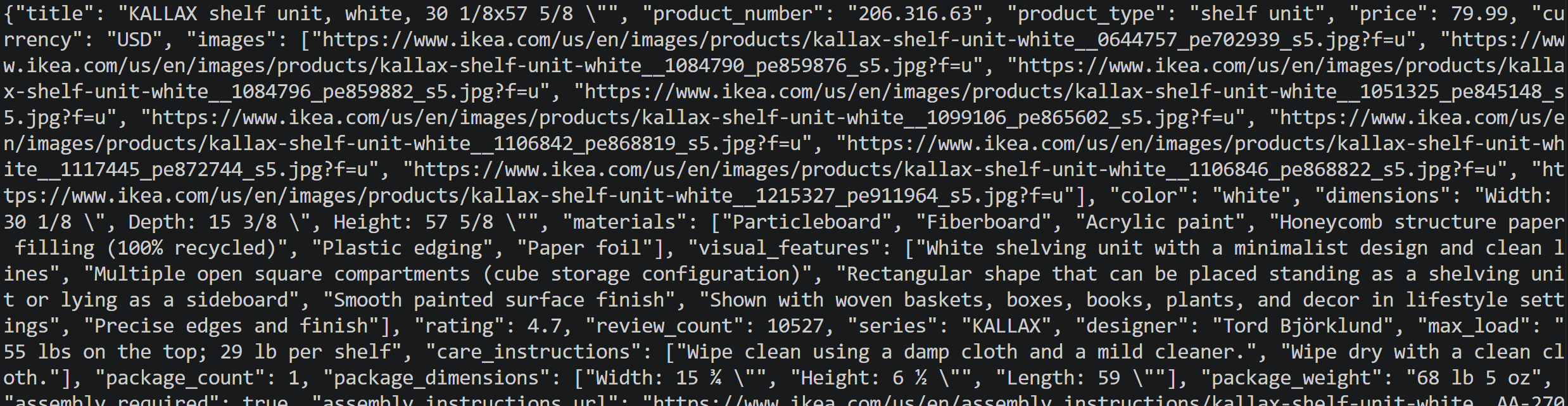
很棒!剩下的唯一步骤就是将这些 JSON 数据保存到磁盘。
第 6 步:将抓取的数据保存到磁盘
在将 product_data 保存到 product.json 文件之前,先根据 IkeaProduct Pydantic 模型验证响应:
# Get the parsed data in the defined schema format
product_data = response.choices[0].message.content

# Validate the JSON string against the IkeaProduct schema
product = IkeaProduct.model_validate_json(product_data)
model_validate_json() 方法会验证 LLM 响应是否符合预期的 Pydantic schema。如果响应包含无效数据或与定义的字段类型不匹配,Pydantic 将引发验证错误,而不是在没有提示的情况下保存格式错误的数据。
然后,将其保存到磁盘:
# Export the validated IkeaProduct object to a JSON file
with open("product.json", "w", encoding="utf-8") as f:
    f.write(product.model_dump_json(indent=2))
此代码片段使用 product.model_dump_json() 序列化经过验证的 IkeaProduct 对象,然后将其写入 product.json。生成的文件将包含由 GLM-5.3 提取的结构化 IKEA 产品数据。任务完成!
第 7 步:整合所有代码
以下是面向 IKEA 产品页面的 GLM 网页爬虫工具完整实现:
# pip install dotenv requests openai pydantic

from dotenv import load_dotenv
import os
import requests
from pydantic import BaseModel, Field
from typing import List, Optional
from openai import OpenAI
import json

# Load the environment variables from the .env file
load_dotenv()

# Loading the required secrets from the envs
BRIGHT_DATA_API_KEY = os.environ.get("BRIGHT_DATA_API_KEY")
ZAI_API_KEY = os.environ.get("ZAI_API_KEY")

# The output schema for the product information
class IkeaProduct(BaseModel):
    title: Optional[str] = Field(None, description="Full product title as displayed on the IKEA website")
    product_number: Optional[str] = Field(None, description="IKEA product article number, such as 304.247.75")
    product_type: Optional[str] = Field(None, description="General type of IKEA product, such as armchair, shelf unit, cabinet, or table")
    price: Optional[float] = Field(None, description="Current one-time purchase price")
    currency: Optional[str] = Field(None, description="Currency used for the displayed price, such as USD")
    images: Optional[List[str]] = Field(None, description="URLs of product images from the IKEA website")
    color: Optional[str] = Field(None, description="Product color or finish, such as birch veneer or dark gray")
    dimensions: Optional[str] = Field(None, description="Overall product dimensions as displayed by IKEA, including width, depth, and height")
    materials: Optional[List[str]] = Field(None, description="Main materials used to manufacture the product")
    visual_features: Optional[List[str]] = Field(None, description="Physical characteristics visible in the supplied product images, such as shape, components, finish, or configuration")
    rating: Optional[float] = Field(None, description="Average customer rating, typically on a 5-point scale")
    review_count: Optional[int] = Field(None, description="Total number of customer reviews")
    series: Optional[str] = Field(None, description="IKEA product series the item belongs to, such as POÄNG")
    designer: Optional[str] = Field(None, description="Designer credited by IKEA for the product")
    max_load: Optional[str] = Field(None, description="Maximum supported load, such as maximum load on a seat, shelf, or tabletop")
    care_instructions: Optional[List[str]] = Field(None, description="IKEA-recommended care and cleaning instructions")
    package_count: Optional[int] = Field(None, description="Number of packages included with the product")
    package_dimensions: Optional[List[str]] = Field(None, description="Dimensions of the product packaging")
    package_weight: Optional[str] = Field(None, description="Weight of the packaged product")
    assembly_required: Optional[bool] = Field(None, description="Whether the product requires assembly")
    assembly_instructions_url: Optional[str] = Field(None, description="URL to the official IKEA assembly instructions")
    safety_information: Optional[List[str]] = Field(None, description="Important safety information, such as wall anchoring or tipping requirements")
    good_to_know: Optional[List[str]] = Field(None, description="Additional IKEA product information and usage recommendations")
    compatible_series: Optional[List[str]] = Field(None, description="IKEA product series or furniture lines that the product is described as coordinating with")
    accessories: Optional[List[str]] = Field(None, description="Accessories or complementary IKEA products shown or recommended on the product page")
    category_path: Optional[List[str]] = Field(None, description="IKEA category breadcrumb path leading to the product")
    available_colors: Optional[List[str]] = Field(None, description="Other color or finish options available for the same product")
    is_in_stock: Optional[bool] = Field(True, description="Whether the product is currently available for purchase")

# Set up the authentication headers for the Web Unlocker API
headers = {
    "Content-Type": "application/json",
    "Authorization": f"Bearer {BRIGHT_DATA_API_KEY}"
}

# Define the request payload for the Web Unlocker API scraping request
payload = {
    "zone": "web_unlocker", # Replace with your Web Unlocker zone name
    "url": "https://www.ikea.com/us/en/p/kallax-shelf-unit-white-20631663/", # The IKEA product page URL you want to scrape
    "format": "raw",
    "country": "us",
    "data_format": "markdown" # To get the web page in Markdown
}

# Retrieve the Markdown content of the unlocked target page
web_unlocker_response = requests.post(
    "https://api.brightdata.com/request",
    json=payload,
    headers=headers
)
markdown_page = web_unlocker_response.text

# Initialize the OpenAI client for Z.ai models
glm_client = OpenAI(
    api_key=ZAI_API_KEY,
    base_url="https://api.z.ai/api/paas/v4/",
)

# Prompt to LLM-powered web data parsing
scraping_prompt = f"""
Extract the IKEA product information from the given Markdown document and
return it as structured data that conforms to the provided JSON schema.

SCHEMA:
{json.dumps(IkeaProduct.model_json_schema(), indent=2)}

MARKDOWN:
{markdown_page}
"""

# Perform web data scraping with GLM-5.3
response = glm_client.chat.completions.create(
    model="glm-5.3",
    messages=[
        {
            "role": "user",
            "content": [
                {
                    "type": "text",
                    "text": scraping_prompt,
                },
            ],
        }
    ],
    response_format={"type": "json_object"},
)

# Get the parsed data in the defined schema format
product_data = response.choices[0].message.content

# Convert the JSON string into a validated IkeaProduct object
product = IkeaProduct.model_validate_json(product_data)

# Export the IkeaProduct object to a JSON file
with open("product.json", "w", encoding="utf-8") as f:
    f.write(product.model_dump_json(indent=2))
在已激活的虚拟环境中,使用以下命令执行 Python 脚本:
python scraper.py通过网络解锁器 API 检索页面并使用 GLM-5.3 进行后续处理需要一些时间。因此,请耐心等待 product.json 文件生成。
文件出现在项目文件夹后,将其打开,你将看到:
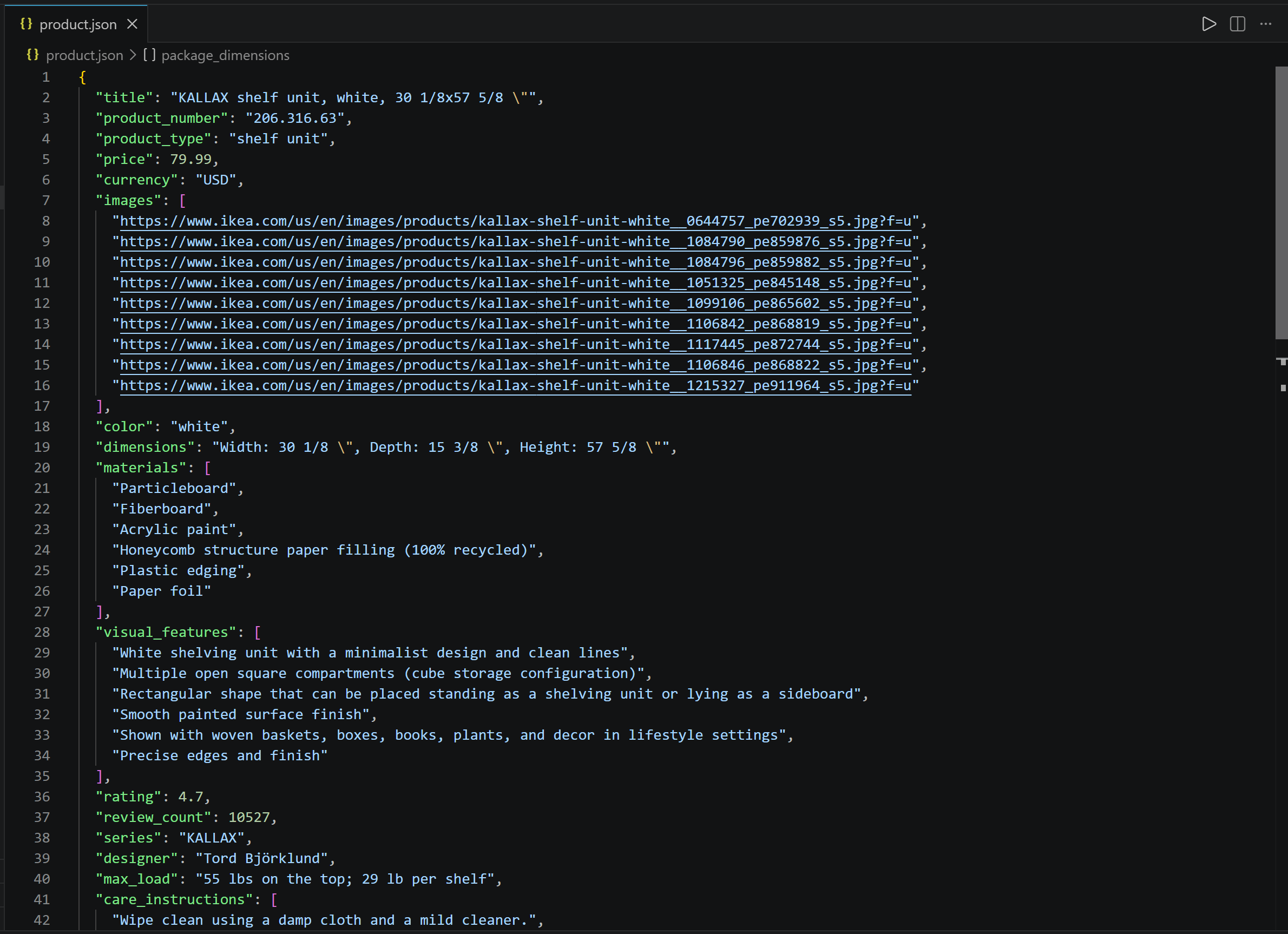
请注意提取的数据与原始 IKEA 产品页面上可用的信息完全对应。
大功告成!网络解锁器 API 处理了 IKEA 的反机器人保护并提供针对 LLM 优化的 Markdown 内容,而 GLM-5.3 成功处理了这些内容,并将其转换为组织良好的结构化数据。
如何使用 GLM-5.3-Flash 执行基于视觉的网页数据提取
GLM-5.3 本身不支持多模态输入,这意味着它只能处理基于文本的输入。不过GLM 系列中的其他模型支持多模态输入其中包括 GLM-5.3-Flash(以及 GLM-4.6V 等)。
你可以向 GLM-5.3-Flash 提供截图或图片,并要求它从中提取结构化信息,而不是向 LLM 提供文本形式的页面内容。
抓取流程基本保持不变:
- Bright Data 网络解锁器 API 捕获目标 IKEA 页面的截图。
- GLM-5.3-Flash 通过 Z.ai API 接收截图,并根据预定义 schema 提取产品信息。
- 提取的数据经过验证并保存为结构化 JSON。
注意:核心工作流几乎没有变化,因此本节重点介绍视觉数据提取所需的修改。前面所述的所有前提条件和设置步骤仍然适用。
第 1 步:检索页面截图
调整网络解锁器 API 请求,以获取页面截图而不是 Markdown:
# Set up the authentication headers for Web Unlocker
headers = {
    "Content-Type": "application/json",
    "Authorization": f"Bearer {BRIGHT_DATA_API_KEY}"
}

# Define the request payload for the Web Unlocker API call
payload = {
    "zone": "web_unlocker", # Replace with your Web Unlocker zone name
    "url": "https://www.ikea.com/us/en/p/kallax-shelf-unit-white-20631663/", # The IKEA product page URL you want to visually scrape
    "format": "raw",
    "country": "us",
    "data_format": "screenshot" # Get a screenshot of the web page
}

# Retrieve the screenshot of the unlocked target page
web_unlocker_response = requests.post(
    "https://api.brightdata.com/request",
    json=payload,
    headers=headers
)

page_screenshot = web_unlocker_response.content
关键修改是 data_format 字段,现在已配置为 "screenshot"。这会指示网络解锁器返回页面截图。API 响应将包含 PNG 格式的截图图像数据,呈现完整渲染后的页面。
将截图导出到磁盘:
with open("screenshot.png", "wb") as f:
    f.write(page_screenshot)
这个可选步骤有助于目视检查检索到的页面,并排查提取工作流中的问题。
输出将是一个 screenshot.png 文件:
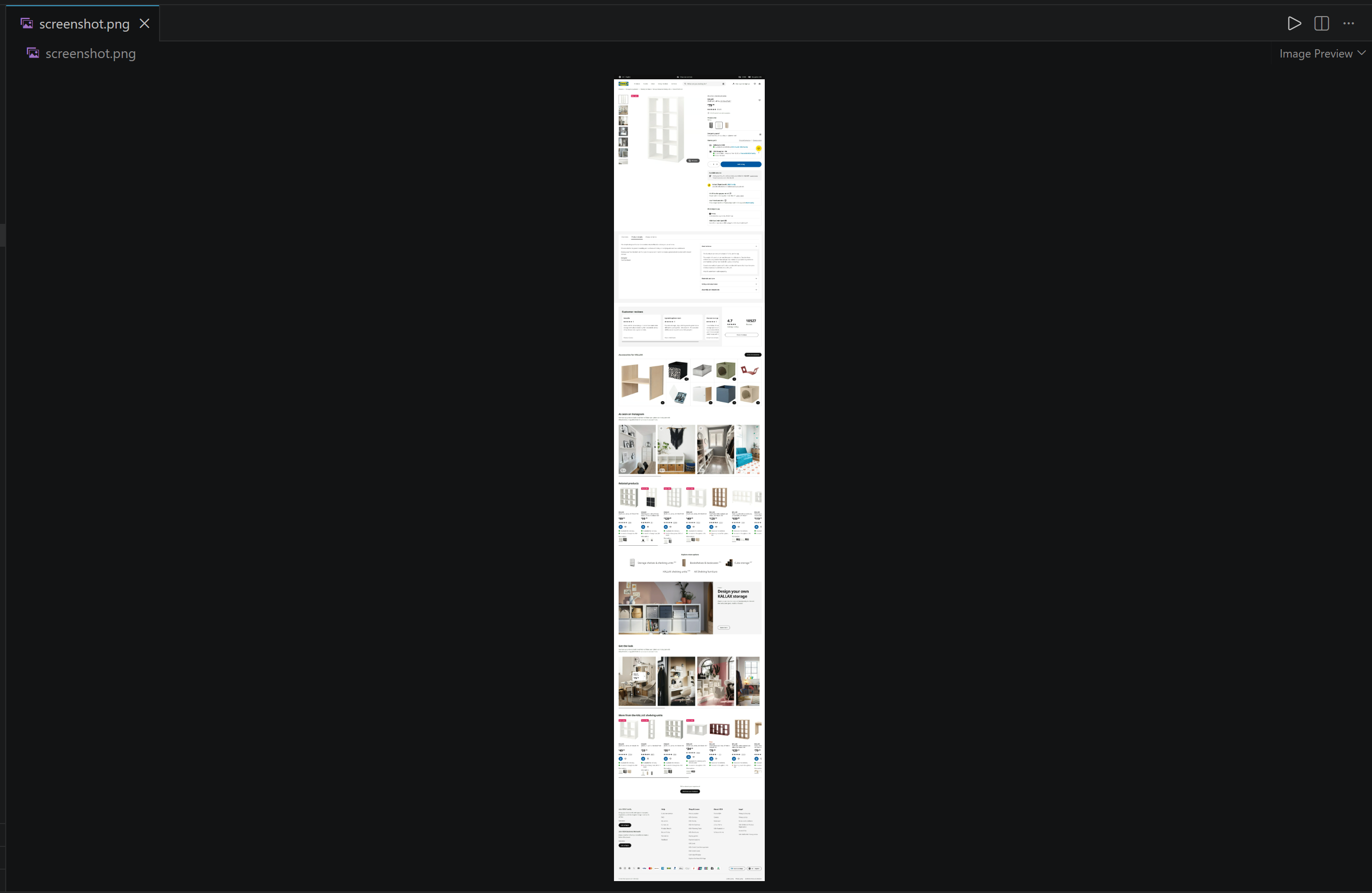
请注意 Bright Data 的网络解锁器 API 如何捕获完整 IKEA 产品页面的截图。继续下一步!
第 2 步:更新 Pydantic 模型
通过分析页面截图,GLM-5.3-Flash 可以识别页面 Markdown 表示形式中没有的视觉信息。例如,它可以解读视觉标签中嵌入的文本(如“畅销商品”标签):
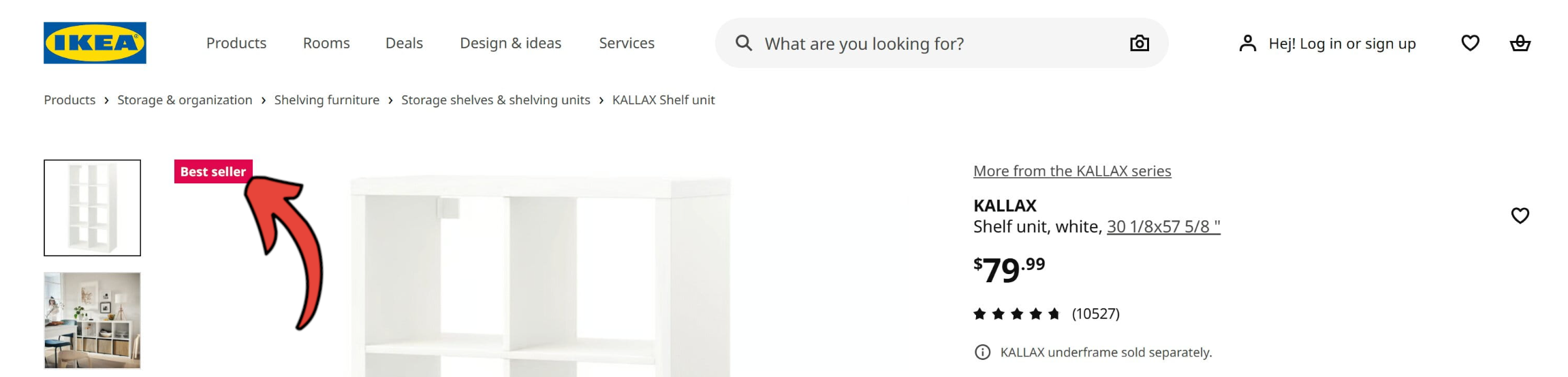
与此同时,截图并不包含页面的全部信息。例如,可通过基于 Markdown 的提取工作流获取的 images 或 assembly_instructions_url 等字段,无法根据视觉数据填充。
因此,请调整 IkeaProduct Pydantic 模型以进行视觉处理:
class IkeaProduct(BaseModel):
    title: Optional[str] = Field(None, description="Full product title as displayed on the IKEA website")
    product_type: Optional[str] = Field(None, description="General type of product, such as an armchair, shelf unit, cabinet, or table")
    price: Optional[float] = Field(None, description="Current displayed numerical price")
    currency: Optional[str] = Field(None, description="Currency used for the displayed price, such as USD")
    is_best_seller: Optional[bool] = Field(False, description="Whether a best-seller or top-seller badge is displayed")
    badge_label: Optional[str] = Field(None, description="Promotional or product badge displayed on the page, such as Top Seller")
    delivery_options: Optional[List[str]] = Field(None, description="Delivery or fulfillment options displayed on the page")
    color: Optional[str] = Field(None, description="Selected product color or finish, such as white or birch veneer")
    visual_aspects: Optional[str] = Field(None, description="Description of the physical characteristics visible in the product images, such as shape, components, finish, or configuration")
    dimensions: Optional[str] = Field(None, description="Overall product dimensions as displayed on the IKEA website")
    rating: Optional[float] = Field(None, description="Average customer rating, typically on a 5-point scale")
    review_count: Optional[int] = Field(None, description="Total number of customer reviews displayed")
请注意新增的 visual_aspects 字段。此字段指示 GLM 描述产品图片中可见的外观特征,从而提取无法通过文本解析获取的信息。此外,还要关注新的 is_best_seller 和 badge_label 字段。
很好!将更新后的 Pydantic 模型和网页截图发送给 Z.ai API,以使用 GLM-5.3-Flash 进行视觉网页抓取。
第 3 步:使用 GLM-5.3 Vision 从图片中抓取数据
与具备视觉能力的 OpenAI 模型一样,GLM-5.3-Flash 通过 image_url 字段接收图片。该字段既接受可公开访问的图片 URL,也接受 Base64 编码的图片表示形式。
由于截图以图片字节的形式存在于本地,因此需要将其编码为 Base64。为此,请使用 Python 的 base64 模块:
import base64

screenshot_base64 = base64.b64encode(page_screenshot).decode("utf-8")
现在,将 Base64 编码的截图与提取指令一起发送给 GLM-5.3-Flash:
# Perform visual web data parsing with GLM-5.3-Flash
response = glm_client.chat.completions.create(
    model="glm-5.3-flash",
    messages=[
        {
            "role": "user",
            "content": [
                {
                    "type": "image_url",
                    "image_url": {
                        "url": f"data:image/png;base64,{screenshot_base64}"
                    },
                },
                {
                    "type": "text",
                    "text": f"""
Extract the IKEA product information from the provided webpage screenshot
and return it as structured data that conforms to the provided JSON schema.

SCHEMA:
{json.dumps(IkeaProduct.model_json_schema(), indent=2)}
""",
                },
            ],
        }
    ],
    response_format={"type": "json_object"},
)

# Get the parsed data in the defined schema format
product_data = response.choices[0].message.content
向 Z.ai API 发出的请求由两部分组成:
- 页面截图图片。
- 一条文本指令,要求 GLM-5.3 使用指定的 Pydantic schema 检索产品信息。
注意:这次的目标模型是 glm-5.3-flash而不是之前的 glm-5.3。之所以需要更改,是因为 GLM-5.3 不具备视觉能力。
结果是一个 product_data 变量,其中存储了包含视觉抓取数据的 JSON 字符串。按照之前所述的方法将其保存到磁盘。太棒了!
第 4 步:测试基于视觉的 GLM 抓取脚本
你的视觉 GLM 网页抓取脚本的最终代码如下:
# pip install dotenv requests openai pydantic

from dotenv import load_dotenv
import os
import requests
import base64
import json
from pydantic import BaseModel, Field
from typing import List, Optional
from openai import OpenAI

# Load the environment variables from the .env file
load_dotenv()

# Loading the required secrets from the envs
BRIGHT_DATA_API_KEY = os.environ.get("BRIGHT_DATA_API_KEY")
ZAI_API_KEY = os.environ.get("ZAI_API_KEY")

class IkeaProduct(BaseModel):
    title: Optional[str] = Field(None, description="Full product title as displayed on the IKEA website")
    product_type: Optional[str] = Field(None, description="General type of product, such as an armchair, shelf unit, cabinet, or table")
    price: Optional[float] = Field(None, description="Current displayed numerical price")
    currency: Optional[str] = Field(None, description="Currency used for the displayed price, such as USD")
    is_best_seller: Optional[bool] = Field(False, description="Whether a best-seller or top-seller badge is displayed")
    badge_label: Optional[str] = Field(None, description="Promotional or product badge displayed on the page, such as Top Seller")
    delivery_options: Optional[List[str]] = Field(None, description="Delivery or fulfillment options displayed on the page")
    color: Optional[str] = Field(None, description="Selected product color or finish, such as white or birch veneer")
    visual_aspects: Optional[str] = Field(None, description="Description of the physical characteristics visible in the product images, such as shape, components, finish, or configuration")
    dimensions: Optional[str] = Field(None, description="Overall product dimensions as displayed on the IKEA website")
    rating: Optional[float] = Field(None, description="Average customer rating, typically on a 5-point scale")
    review_count: Optional[int] = Field(None, description="Total number of customer reviews displayed")

# Set up the authentication headers for Web Unlocker
headers = {
    "Content-Type": "application/json",
    "Authorization": f"Bearer {BRIGHT_DATA_API_KEY}"
}

# Define the request payload for the Web Unlocker API call
payload = {
    "zone": "web_unlocker", # Replace with your Web Unlocker zone name
    "url": "https://www.ikea.com/us/en/p/kallax-shelf-unit-white-20631663/", # The IKEA product page URL you want to visually scrape
    "format": "raw",
    "country": "us",
    "data_format": "screenshot" # Get a screenshot of the web page
}

# Retrieve the screenshot of the unlocked target page
web_unlocker_response = requests.post(
    "https://api.brightdata.com/request",
    json=payload,
    headers=headers
)

page_screenshot = web_unlocker_response.content

# Export the screenshot to a PNG file
with open("screenshot.png", "wb") as f:
    f.write(page_screenshot)

# Convert the screenshot to Base64 for vision processing
screenshot_base64 = base64.b64encode(page_screenshot).decode("utf-8")

# Initialize the OpenAI-compatible client for Z.ai
glm_client = OpenAI(
    api_key=ZAI_API_KEY,
    base_url="https://api.z.ai/api/paas/v4/",
)

# Perform visual web data parsing with GLM-5.3-Flash
response = glm_client.chat.completions.create(
    model="glm-5.3-flash",
    messages=[
        {
            "role": "user",
            "content": [
                {
                    "type": "image_url",
                    "image_url": {
                        "url": f"data:image/png;base64,{screenshot_base64}"
                    },
                },
                {
                    "type": "text",
                    "text": f"""
Extract the IKEA product information from the provided webpage screenshot
and return it as structured data that conforms to the provided JSON schema.

SCHEMA:
{json.dumps(IkeaProduct.model_json_schema(), indent=2)}
""",
                },
            ],
        }
    ],
    response_format={"type": "json_object"},
)

# Get the parsed data in the defined schema format
product_data = response.choices[0].message.content

# Convert the JSON string into a validated IkeaProduct object
product = IkeaProduct.model_validate_json(product_data)

# Export the IkeaProduct object to a JSON file
with open("visual_product.json", "w", encoding="utf-8") as f:
    f.write(product.model_dump_json(indent=2))
启动脚本,它将生成一个包含以下内容的 visual_product.json 文件:
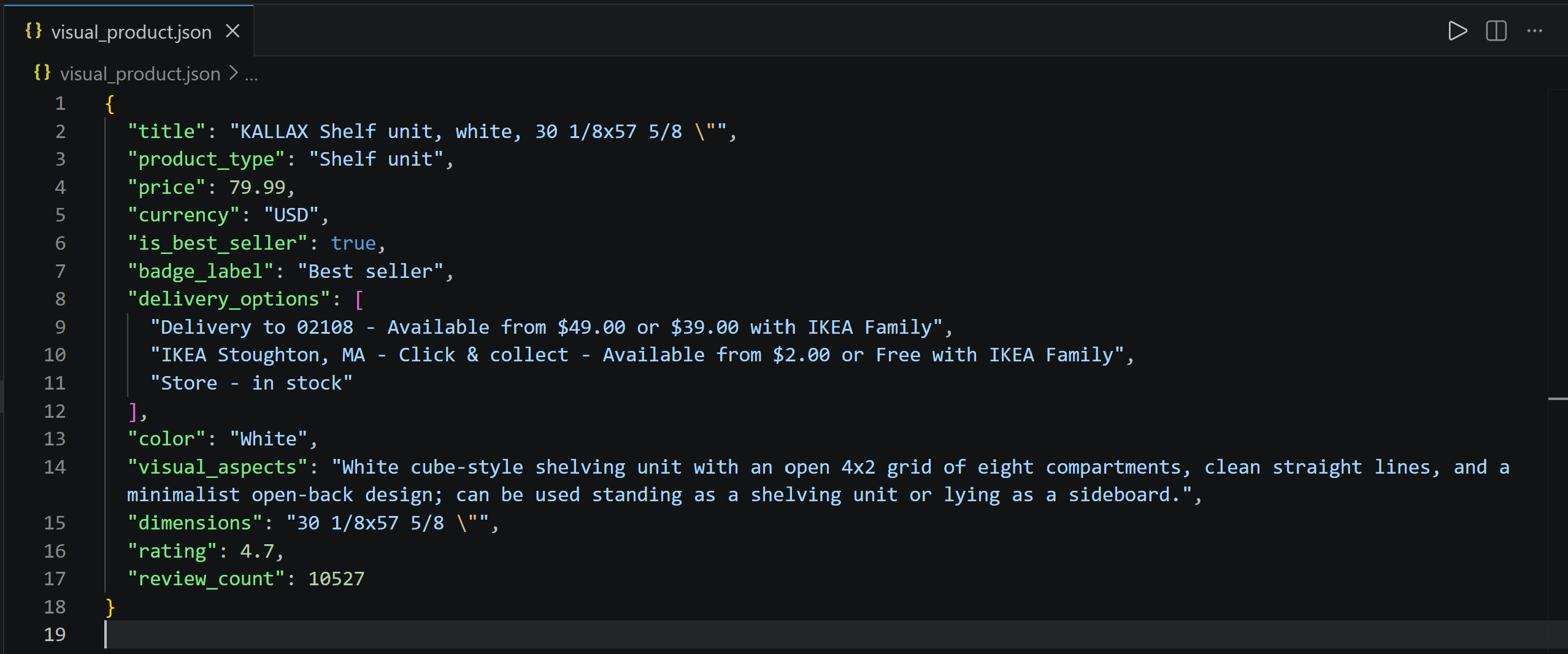
请注意,脚本成功从页面截图中检索了产品信息,包括视觉特征和“畅销商品”标签。非常棒!
总结
在本教程中,你学习了如何使用 GLM-5.3 和 GLM-5.3-Flash 构建由 LLM 驱动的网页数据提取系统。AI 网页抓取的主要挑战(即在不被屏蔽的情况下访问网页内容,并将其转换为可供 LLM 直接处理的格式)已通过 Bright Data 的网络解锁器 API 轻松解决。
如本文所示,将 GLM-5.3 和 GLM-5.3-Flash 与网络解锁器 API 结合使用,可以从网页及其视觉呈现中提取结构化信息。这只是 Bright Data 的 AI 兼容网页访问解决方案所支持的众多用例之一。
立即注册 Bright Data,开始免费试用我们的网页爬虫 API!



技术写作
 5.5 years experience
Antonello是一名软件工程师,但他更喜欢称自己为技术传教士。通过写作传播知识是他的使命。