
DSPy 是一个利用数据改进语言模型程序的 Python 框架。DSPy 从模型上下文协议(MCP)服务器加载智能体工具。借助 Bright Data MCP 服务器,智能体可以搜索 Google 并以 Markdown 格式读取网页,同时由服务器处理反机器人防护。
DSPy 的 MCP 教程模式非常适合单次智能体运行。DSPy 的评估器和提示词优化器 GEPA 会在工作线程上运行智能体;在测试中,异步工具调用会静默失败,智能体则依靠记忆作答。
本指南将向你展示如何构建该智能体、并行运行其工具,以及衡量网页数据带来的价值。
简要总结
- 网页数据提高了准确率。借助 Bright Data MCP 服务器,
gpt-5.4-mini在 60 道题中正确回答了 54–58 道,高于原来的 14 道;对于知识截止日期之后的 8 个事件问题,则从 0 道提升至全部答对。 - 选择 2 个工具并添加信息征询回调。工具越少,提示词越短。该回调会批准被标记为可能存在提示词注入的网页。
- 为线程运行提供同步工具。异步工具在
dspy.Evaluate和 GEPA 中会静默失败或卡住。后台事件循环解决了这两个问题。 - 先修复工具。GEPA 把训练答案复制进了指令,但没有提高得分。对于 6 道涉及长页面的问题,
find参数将提示词 token 数量减少了一半。
准备工作
智能体通过 HTTP 连接到 Bright Data 的 Web MCP(即托管式 Bright Data MCP 服务器),因此只需安装 Python 运行时。该服务器基于网络解锁器 API 运行,为智能体处理代理轮换和反机器人防护。代码方面,配套 GitHub 仓库包含所有脚本和数据文件,其中包括用于评估步骤的 evaluate.py 和 post_cutoff_questions.csv。你需要:
- Python 3.10 或更高版本,以及用于安装软件包的 uv
- 一个免费的 Bright Data 账户,以及从账户设置中获取的 API 密钥
- 一个 OpenAI API 密钥,或
dspy.LM支持且具备工具调用功能的其他提供商密钥
从用户和 API 密钥选项卡的 API 密钥表格中复制 Bright Data 密钥:
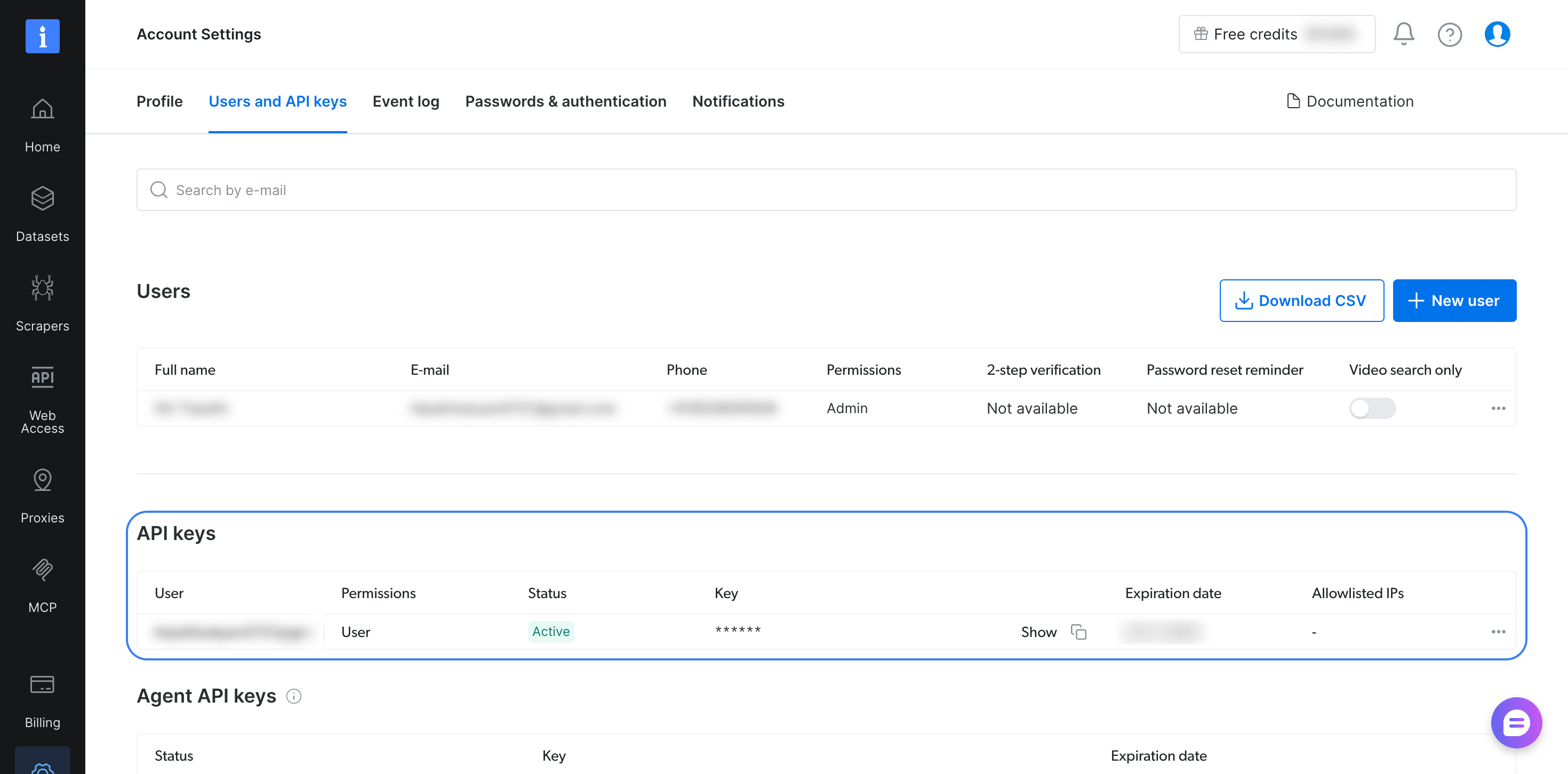
同一个密钥可用于托管服务器和本地服务器。
克隆仓库,安装包含 MCP 扩展的 DSPy 并固定为经过测试的版本,然后导出两个密钥:
git clone https://github.com/triposat/dspy-bright-data-research-agent && cd dspy-bright-data-research-agent
uv venv && source .venv/bin/activate
uv pip install "dspy[mcp]==3.4.1" "mcp==2.3.0"
export BRIGHTDATA_API_TOKEN="your-bright-data-api-key"
export OPENAI_API_KEY="your-openai-api-key"
该命令会将 MCP Python SDK 固定为经过测试的 2.3.0 版本,因为 DSPy 3.4.1 中的 dspy[mcp] 扩展没有固定 SDK 版本。你可以先使用每月免费请求额度,MCP 服务器定价页面列出了当前额度。
将 Bright Data MCP 服务器连接到 DSPy
dspy.Tool.from_mcp_tool 会将 MCP 服务器列出的每个工具转换为 DSPy 工具,因此智能体可以看到每个工具的名称、说明和参数模式。下面的脚本(仓库中的 agent.py)会连接到托管式 Bright Data MCP 服务器,并加载其搜索和抓取工具。随后,它会询问一个发生在模型知识截止日期之后的事件:
import asyncio
import os

import dspy
from mcp import types
from mcp.client import Client
from mcp.client.streamable_http import create_mcp_http_client, streamable_http_client

dspy.configure(
    lm=dspy.LM("openai/gpt-5.4-mini", temperature=1.0, max_tokens=16000),
    adapter=dspy.ChatAdapter(use_native_function_calling=True),
)

SERVER_URL = "https://mcp.brightdata.com/mcp?tools=search_engine,scrape_as_markdown"
HEADERS = {"Authorization": f"Bearer {os.environ['BRIGHTDATA_API_TOKEN']}"}


async def approve_page(context, params):
    # The server asks before returning a page that contains MCP setup
    # instructions. This agent's tools only read the web, so return it.
    return types.ElicitResult(action="accept", content={"return_content": True})


class ResearchQuestion(dspy.Signature):
    """Answer the question with facts found on the web."""

    question: str = dspy.InputField()
    answer: str = dspy.OutputField(desc="a short, direct answer")
    sources: list[str] = dspy.OutputField(desc="URLs of the pages that support the answer")


async def main():
    async with create_mcp_http_client(headers=HEADERS) as http:
        transport = streamable_http_client(SERVER_URL, http_client=http)
        async with Client(transport, elicitation_callback=approve_page) as client:
            mcp_tools = (await client.list_tools()).tools
            tools = [dspy.Tool.from_mcp_tool(client, t) for t in mcp_tools]
            agent = dspy.ReActV2(ResearchQuestion, tools=tools, max_iters=8)

            question = "Who won the 2026 FIFA World Cup final, and what was the score?"
            pred = await agent.acall(question=question)
            for event in pred.history.messages:
                for call in getattr(event.get("tool_calls"), "tool_calls", []):
                    print(f"{call.name}: {call.args}")
            print("\nAnswer:", pred.answer)
            print("Sources:", pred.sources)


asyncio.run(main())
运行 python agent.py 后,系统输出了 2 次搜索,随后执行最终的 submit 调用:
search_engine: {'query': '2026 FIFA World Cup final winner score', 'engine': 'google', 'cursor': '', 'geo_location': 'us'}
search_engine: {'query': '2026 FIFA World Cup final winner score site:en.wikipedia.org OR site:fifa.com', 'engine': 'google', 'cursor': '', 'geo_location': 'us'}
submit: {'answer': 'Spain won the 2026 FIFA World Cup final, defeating Argentina 1–0 after extra time.', 'sources': ['https://www.fifa.com/en/tournaments/mens/worldcup/canadamexicousa2026/final', 'https://www.fifa.com/en/tournaments/mens/worldcup/canadamexicousa2026/articles/spain-argentina-final-report-highlights']}

Answer: Spain won the 2026 FIFA World Cup final, defeating Argentina 1–0 after extra time.
Sources: ['https://www.fifa.com/en/tournaments/mens/worldcup/canadamexicousa2026/final', 'https://www.fifa.com/en/tournaments/mens/worldcup/canadamexicousa2026/articles/spain-argentina-final-report-highlights']在没有工具的情况下,gpt-5.4-mini 表示 2026 年世界杯决赛发生在其知识截止日期之后。
该脚本基于使用本地演示服务器的 DSPy MCP 教程,并为托管服务器添加了 3 项设置。
通过请求头发送 API 密钥。create_mcp_http_client 会在每次请求中通过 Authorization 请求头发送密钥,因此密钥不会出现在代理和日志所记录的 URL 中。
选择智能体所需的工具。Bright Data MCP 服务器提供搜索、网页抓取、批处理作业、浏览器自动化以及预构建爬虫工具,可针对 Amazon 和 LinkedIn 等网站返回结构化 JSON。tools URL 参数用于选择智能体可见的工具,MCP 服务器工具参考列出了 search_engine_batch 和 scraping_browser_navigate 等各个名称。每次调用模型时都会发送所有选定工具的模式,因此该智能体只选择 search_engine 和 scrape_as_markdown,以缩短提示词。
响应服务器的信息征询请求。Bright Data MCP 服务器包含提示词注入防护机制。如果抓取到的页面包含要求更改 MCP 配置的指令,服务器会先通过 MCP 信息征询要求客户端确认,然后才返回页面。使用 elicitation_callback 参数向 Client 传入信息征询回调,以便 DSPy 客户端作出响应。
approve_page 会批准每个请求,因为该智能体只读取网页。对于能够写入文件或更改自身配置的智能体,应将请求交由人工审批。
如果要改为在本地运行服务器,请安装 Node.js,并向同一个 Client 传入 StdioServerParameters(command="npx", args=["-y", "@brightdata/mcp@latest"], env=...),同时在 env 中设置 API_TOKEN 和 TOOLS。使用 @latest 时,npx 会在每次启动时获取 latest 标签指向的版本。为了确保评估可复现,请将其替换为你从 Bright Data MCP 版本发布页测试过的版本。
在 Jupyter Notebook 中,请将 asyncio.run(main()) 替换为 await main(),因为 Jupyter 已经运行了事件循环。
该脚本使用 dspy.ReActV2。DSPy ReAct 文档指出,从 DSPy 3.5 开始,dspy.ReAct 使用该实现;ReActV2 名称则在 3.6 中被移除。ReActV2 返回 history 而不是 trajectory,并通过 submit 工具结束。升级时,请将 dspy.ReActV2 更改为 dspy.ReAct,然后重新运行评估。
同一服务器也适用于其他智能体框架,例如 AutoGen、LangGraph 和 Pydantic AI。
在线程和 GEPA 中运行 DSPy MCP 工具
在 DSPy 3.4.1 中,dspy.Evaluate 会在工作线程上同步运行程序,GEPA 则使用它来评估每条候选指令。来自 from_mcp_tool 的工具是异步函数,并绑定到打开 MCP 会话的事件循环。在测试中,从同步工作线程调用这些工具会以两种不易察觉的方式失败。
按照 DSPy MCP 教程加载工具时,Evaluate 会在不抛出异常的情况下完成。每次工具调用都会在到达服务器之前失败,而 Python 只会输出一条协程从未被等待的警告。智能体依靠记忆作答,Evaluate 仍然会报告分数。启用 DSPy 的 allow_tool_async_sync_conversion 设置后,运行会卡住,9 分钟后仍在等待。
解决方案是在后台事件循环上保持单个 MCP 会话打开,并向 DSPy 提供同步函数,由这些函数将每次调用发送到该循环:
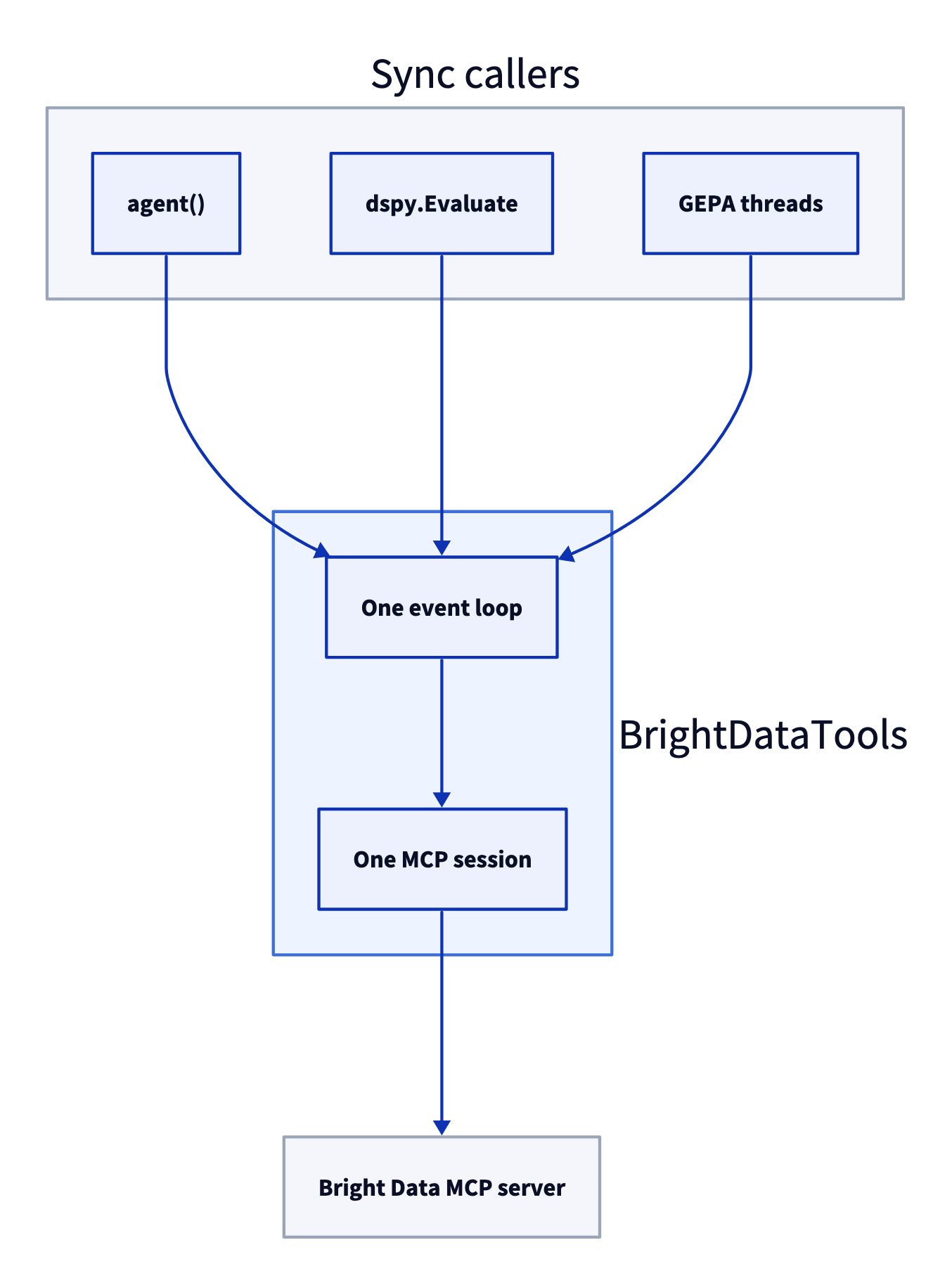
每次同步调用都会通过 run_coroutine_threadsafe 发送到该循环,因此只有打开 MCP 会话的事件循环会使用该会话。
该类位于 brightdata_tools.py 中,评估和优化脚本都会导入此模块:
import asyncio
import json
import os
import re
import threading
from urllib.parse import urlparse

import dspy
from mcp import StdioServerParameters, types
from mcp.client import Client
from mcp.client.streamable_http import create_mcp_http_client, streamable_http_client

SERVER_URL = "https://mcp.brightdata.com/mcp?tools=search_engine,scrape_as_markdown"
# The Bright Data MCP server wraps results in a security notice and two markers
WRAPPED = re.compile(r"(=====UNTRUSTED_\w+_BEGIN=====\n)(.*)(\n=====UNTRUSTED_\w+_END=====)", re.S)


async def approve_page(context, params):
    # Read-only tools, so pages with MCP setup text are returned as data
    return types.ElicitResult(action="accept", content={"return_content": True})


class BrightDataTools:
    """One MCP session on a background event loop, exposed as sync dspy.Tools."""

    def __init__(self, country="us", max_chars=20_000, retries=2,
                 blocked_domains=(), timeout=180, cache=False, remote=True):
        self.country = country
        self.max_chars = max_chars
        self.retries = retries
        self.blocked = tuple(blocked_domains)
        self.timeout = timeout
        self.cache = {}  # pages always, searches too when cache=True
        self.keep_all = cache  # reuse search results while optimizing
        self.lock = threading.Lock()
        self.stats = {"calls": 0, "sent": 0, "errors": 0}
        self.error = None  # why the MCP session failed to start or stopped
        self.remote = remote
        self.loop = asyncio.new_event_loop()
        self.ready = threading.Event()
        self.thread = threading.Thread(target=self.loop.run_until_complete,
                                       args=(self._serve(),), daemon=True)
        self.thread.start()
        self.ready.wait()
        if self.error:
            raise RuntimeError("Could not connect to the MCP server") from self.error

    async def _serve(self):
        try:
            await self._connect()
        except Exception as e:  # report it instead of waiting forever
            self.error = e
        finally:
            self.ready.set()

    async def _connect(self):
        token = os.environ["BRIGHTDATA_API_TOKEN"]
        if self.remote:  # hosted server over streamable HTTP
            async with create_mcp_http_client(headers={"Authorization": f"Bearer {token}"}) as http:
                async with Client(streamable_http_client(SERVER_URL, http_client=http),
                                  elicitation_callback=approve_page) as client:
                    await self._hold(client)
        else:  # local server, latest release
            local = StdioServerParameters(
                command="npx", args=["-y", "@brightdata/mcp@latest"],
                env={"API_TOKEN": token, "TOOLS": "search_engine,scrape_as_markdown",
                     "PATH": os.environ["PATH"]})
            async with Client(local, elicitation_callback=approve_page) as client:
                await self._hold(client)

    async def _hold(self, client):
        self.client = client
        self.mcp_tools = (await client.list_tools()).tools
        self.stop = asyncio.Event()
        self.ready.set()
        await self.stop.wait()

    def close(self):
        self.loop.call_soon_threadsafe(self.stop.set)
        self.thread.join(timeout=30)  # let the session shut down cleanly

    def _is_blocked(self, url):
        host = urlparse(url).netloc.lower()
        return any(host == d or host.endswith("." + d) for d in self.blocked)

    def call(self, name, args):
        start = int(args.pop("start", 0) or 0)  # where to resume a long page
        find = args.pop("find", "") or ""  # phrase to look for in a long page
        if name == "search_engine":
            args = {**args, "geo_location": self.country}
        if name == "scrape_as_markdown" and self._is_blocked(args.get("url", "")):
            return "This domain is excluded for this task. Use another source."
        key = (name, json.dumps(args, sort_keys=True))
        with self.lock:
            self.stats["calls"] += 1
            text = self.cache.get(key)
        if text is None:
            try:
                text = self._send(name, args)
            except Exception:
                with self.lock:
                    self.stats["errors"] += 1  # the agent sees an error, not a page
                raise
            with self.lock:
                self.stats["sent"] += 1
                if self.keep_all or name == "scrape_as_markdown":
                    self.cache[key] = text  # pages stay cached, so reading on is free
        wrapped = WRAPPED.search(text)
        head, body, tail = (text[:wrapped.start(2)], wrapped.group(2), text[wrapped.end(2):]
                            ) if wrapped else ("", text, "")
        if name == "search_engine" and self.blocked:
            data = json.loads(body)
            data["organic"] = [r for r in data.get("organic", [])
                               if not self._is_blocked(r["link"])]
            body = json.dumps(data, indent=1)
        if find:
            spans = [(max(0, m.start() - 1500), m.end() + 1500)
                     for m in re.finditer(re.escape(find), body, re.I)][:6]
            body = ("\n...\n".join(body[a:b] for a, b in spans)
                    or f"[{find!r} not found in the {len(body)}-character page]")
        end = start + self.max_chars
        if len(body) > end:
            body = (body[start:end] + f"\n[showing characters {start} to {end} of {len(body)}. "
                    f"Call {name} again with start={end} to read on, or with "
                    "find='a word or phrase' to get matching passages from the whole page]")
        elif start:
            body = body[start:] + f"\n[end of page: characters {start} to {len(body)}]"
        return head + body + tail

    def _send(self, name, args):
        if self.error or not self.thread.is_alive():
            raise RuntimeError("The MCP session is closed") from self.error
        for _ in range(self.retries + 1):
            future = asyncio.run_coroutine_threadsafe(
                self.client.call_tool(name, args), self.loop)
            try:
                result = future.result(self.timeout)
            finally:
                future.cancel()  # a timed-out call stops instead of running on
            text = "\n".join(c.text for c in result.content if hasattr(c, "text"))
            wrapped = WRAPPED.search(text)
            body = wrapped.group(2) if wrapped else text
            if not result.is_error and body.strip():
                return text
        raise RuntimeError(text[:500] or "empty result")

    def tools(self):
        out = []
        for t in self.mcp_tools:
            spec = dspy.Tool.from_mcp_tool(self.client, t)  # name, description, args
            args, types, desc = dict(spec.args), dict(spec.arg_types), spec.desc
            if t.name == "scrape_as_markdown":  # let the agent read beyond the character limit
                args["start"] = {"type": "integer", "default": 0,
                                 "description": "Character offset to read from, for long pages"}
                args["find"] = {"type": "string", "default": "",
                                "description": "Word or phrase to find; returns matching passages"}
                types["start"], types["find"] = int, str
                desc += (f" Returns {self.max_chars} characters at a time; pass find to search"
                         " the whole page for a word or phrase.")

            def run(_name=t.name, **kwargs):
                return self.call(_name, kwargs)

            out.append(dspy.Tool(run, name=spec.name, desc=desc,
                                 args=args, arg_types=types))
        return out
BrightDataTools().tools() 返回 2 个同步工具,并保留服务器上的工具名称、说明和参数。抓取工具增加了 start 和 find 两个参数,让智能体能够读取超出 max_chars 所设字符限制的文本。Bright Data MCP 服务器会用一段安全提示包装结果,标记页面文本并要求模型将其视为数据。该类只会筛选并截断被标记的文本,因此模型仍会收到完整提示。
构造函数的设置:
remote=False使用本地服务器而不是托管服务器。country会在每次搜索中设置geo_location,使每次运行都获得同一国家/地区的结果。max_chars将每个结果限制为 20,000 个字符,因为有些网站会发布非常长的页面,例如完整的 Wikipedia 文章。如果不设限制,某个模型请求会达到 491,564 个 token,超出模型的上下文窗口。设置限制后,在 2 次评估运行中,没有任何问题使用超过 58,651 个提示词 token。页面会保留在缓存中,因此使用start或find的调用不会发送新请求。retries和timeout有助于长时间评估顺利完成。返回错误的调用最多会重试 2 次,运行超过timeout秒的调用则会被取消,而不会继续在后台运行。每次最终仍失败的调用都会计入stats["errors"],evaluate.py和optimize.py会输出该计数。在信任分数之前,请先检查它,因为工具失败时,智能体会依靠记忆作答。blocked_domains会从搜索结果中移除选定网站,并阻止抓取这些网站。评估时请使用该设置,生产环境中则将其留空。cache=True也会复用搜索结果,optimize.py用于启用它。
BrightDataTools 专为 dspy.Evaluate 和 GEPA 这类同步多线程作业而构建,并且无需修改即可在 Jupyter Notebook 中使用。在 FastAPI 端点等异步 Web 服务中,请使用 await asyncio.to_thread(agent, question=question) 在工作线程中运行基于 BrightDataTools 构建的智能体,以便事件循环继续处理其他请求。
在 SimpleQA Verified 上评估智能体
GEPA 通过使用指标评估程序来改进程序,因此智能体首先需要一组答案已知的问题。SimpleQA Verified 提供了这些问题。这是一个公开且采用 MIT 许可证的集合,包含 1,000 道答案经过验证的简短事实题。
将问题下载到仓库文件夹:
curl -L -o simpleqa_verified.csv https://huggingface.co/datasets/google/simpleqa-verified/resolve/main/simpleqa_verified.csvresearch.py 包含智能体、名为 grader 的 SimpleQA 风格 LLM 评审器,以及 GEPA 使用的指标:
import csv
import random

import dspy

# Hosts that publish the benchmark answers, excluded while evaluating
EVAL_BLOCKLIST = ("huggingface.co", "github.com", "raw.githubusercontent.com",
                  "kaggle.com", "openaipublic.blob.core.windows.net")

AGENT_LM = dspy.LM("openai/gpt-5.4-mini", temperature=1.0, max_tokens=16000)
JUDGE_LM = dspy.LM("openai/gpt-5.4-mini", temperature=1.0, max_tokens=16000)


class ResearchQuestion(dspy.Signature):
    """Answer the question with facts found on the web."""

    question: str = dspy.InputField()
    answer: str = dspy.OutputField(desc="a short, direct answer")
    sources: list[str] = dspy.OutputField(desc="URLs of the pages that support the answer")


def make_agent(tools):
    return dspy.ReActV2(ResearchQuestion, tools=tools, max_iters=8)


def load_examples(path="simpleqa_verified.csv", seed=7):
    rows = list(csv.DictReader(open(path)))
    random.Random(seed).shuffle(rows)
    return [dspy.Example(question=r["problem"], gold=r["answer"]).with_inputs("question")
            for r in rows]


class Grade(dspy.Signature):
    """Grade a predicted answer against the gold answer, SimpleQA style.
    CORRECT: the prediction contains the gold answer's meaning and does not contradict it.
    Small spelling or formatting differences are fine; for numbers and dates the value must match.
    INCORRECT: the prediction states a different or contradictory answer, or hedges between several.
    NOT_ATTEMPTED: the prediction does not give an answer."""

    question: str = dspy.InputField()
    gold_answer: str = dspy.InputField()
    predicted_answer: str = dspy.InputField()
    grade: str = dspy.OutputField(desc="CORRECT, INCORRECT, or NOT_ATTEMPTED")


grader = dspy.Predict(Grade)


def tool_calls(pred):
    calls = []
    history = getattr(pred, "history", None)
    for event in (history.messages if history else []):
        for call in getattr(event.get("tool_calls"), "tool_calls", []):
            if call.name != "submit":
                calls.append((call.name, call.args))
    return calls


def metric(gold, pred, trace=None, pred_name=None, pred_trace=None):
    """Score for GEPA, plus feedback that never shows the reference answer."""
    answer = getattr(pred, "answer", "") or ""
    with dspy.context(lm=JUDGE_LM):
        grade = grader(question=gold.question, gold_answer=gold.gold,
                       predicted_answer=answer).grade.strip().upper()
    correct = grade.startswith("CORRECT")
    calls = tool_calls(pred)
    searches = [args.get("query") for name, args in calls if name == "search_engine"]
    pages = [args.get("url") for name, args in calls if name == "scrape_as_markdown"]
    feedback = (f"Grade: {'CORRECT' if correct else 'INCORRECT'}. Agent answered: {answer!r}. "
                f"Searches ({len(searches)}): {searches}. Pages opened ({len(pages)}): {pages}.")
    if not correct and not pages:
        feedback += " The agent answered without opening a page."
    return dspy.Prediction(score=float(correct), feedback=feedback)


def leaked_answers(instruction, examples):
    """Reference answers (4+ characters) that an optimized instruction repeats."""
    text = instruction.lower()
    return sorted({ex.gold for ex in examples if len(ex.gold) >= 4 and ex.gold.lower() in text})
评审器使用智能体自身的小模型给出 SimpleQA 的 3 种评分:正确、错误和未作答。该指标会返回分数和书面反馈,其中列出智能体的搜索和页面,但不包含参考答案。评估期间,EVAL_BLOCKLIST 会屏蔽发布基准答案的网站,因此智能体必须在开放网络上找到每个答案。
仓库中的 evaluate.py 会对打乱后的问题切片运行智能体,每次处理 8 道题,并将每个答案保存到 results.json。默认情况下,它会评估 60 道测试题。--no-tools 只评估模型,--local 则使用本地服务器。运行结果如下:
配置,均使用 gpt-5.4-mini |
同一组 60 道 SimpleQA Verified 问题中的答对数量 |
|---|---|
| 仅模型,无工具 | 14(1 次运行) |
使用 Bright Data 工具的智能体、本地服务器、不使用 find |
58、55、58、54(4 次运行) |
使用 Bright Data 工具的智能体、托管服务器、使用 find |
57(1 次运行) |
仅使用模型时的 46 个错误全都是具体但错误的答案,例如把一位出生于内布拉斯加州比阿特丽斯的画家的出生地回答成奥马哈。模型给出的错误答案看起来很像正确答案。
重复运行同一个智能体,可以看出单次分数中有多少属于噪声。4 次运行之间的差异部分源于模型随机采样和评审器评分。对于同一首 John Cage 作品,智能体在不同运行中给出了不同乐器;对于同一个国际象棋比分,评审器将“4½ 分”判为正确,却将“4.5”判为错误。
应将 60 道题中不超过 4 道的变化视为噪声,并根据保存的结果逐题比较程序,而不是只比较总分。DSPy 默认缓存模型调用,因此在重复运行前,请在两个 LM 上都设置 cache=False。
还要抽查评审器的评分,尤其是在评审器与智能体使用同一模型时。在对另一次运行的人工审查中,与参考答案核对后,60 个评分全部正确。
一次运行的成本。一次 60 道题的运行平均每题调用工具 2.3 次,对 Bright Data 的请求少于 200 次,智能体的 gpt-5.4-mini 调用成本为 0.29 美元。完整评估可包含在每月免费请求额度内。
测试模型知识截止日期之后的事件
SimpleQA Verified 中相对稳定的问题并非为测试模型知识截止日期之后的事实而设计。针对这类事实,仓库中的 post_cutoff_questions.csv 包含 14 道关于 2025 年和 2026 年事件的问题,答案均已根据 Wikipedia 核实。先运行 python evaluate.py --csv post_cutoff_questions.csv --start 0 --n 14,再使用 --no-tools 运行一次。每种配置各运行 1 次:
| 问题范围,每种配置运行 1 次 | 仅 gpt-5.4-mini |
使用 Bright Data 工具和托管服务器的 gpt-5.4-mini |
|---|---|---|
| 2025 年事件 | 6 道中答对 5 道 | 6 道中答对 6 道 |
| 2026 年事件 | 8 道中答对 0 道 | 8 道中答对 8 道 |
在没有工具的情况下,模型表示多个 2026 年事件尚未发生。尽管模型声称其知识截止日期为 2024 年 6 月,但它知道 6 个 2025 年事实中的 5 个。应实际测试模型知道什么,而不是相信它声明的知识截止日期;同时加入你自身用例中的问题,且其答案只能在最近发布的页面中找到。
使用 GEPA 优化智能体
GEPA 是 DSPy 的反思式提示词优化器。它会在小批量训练问题上运行程序,然后将失败的运行和指标反馈展示给更强的反思模型;在这些运行中,该模型为 gpt-5.5。GEPA 会保留在验证集上表现最佳的新指令。
GEPA 需要错误答案才能学习。如果智能体正确回答了所有抽样训练问题,GEPA 就不会提出新指令。
因此,应使用智能体答错的问题构建训练集。在测试集以外的问题上运行 python evaluate.py --start 108 --n 400 --out pool.json。随后,optimize.py 会将 12 个错误答案与 12 个正确答案组合成训练集,并以相同方式构建验证集:
import json
import random

import dspy
from brightdata_tools import BrightDataTools
from research import AGENT_LM, EVAL_BLOCKLIST, leaked_answers, make_agent, metric

dspy.configure(lm=AGENT_LM, adapter=dspy.ChatAdapter(use_native_function_calling=True))

# Half wrong, half correct answers from an evaluate.py run outside the test set
pool = json.load(open("pool.json"))
misses = [r for r in pool if not r["correct"] and not r.get("error")]
hits = [r for r in pool if r["correct"]]
random.Random(0).shuffle(hits)


def to_ex(rows):
    return [dspy.Example(question=r["question"], gold=r["gold"]).with_inputs("question")
            for r in rows]


half = min(12, len(misses) // 2)
trainset = to_ex(misses[:half] + hits[:half])
valset = to_ex(misses[half:2 * half] + hits[half:2 * half])

bd = BrightDataTools(blocked_domains=EVAL_BLOCKLIST, cache=True)
agent = make_agent(bd.tools())
gepa = dspy.GEPA(
    metric=metric,
    reflection_lm=dspy.LM("openai/gpt-5.5", temperature=1.0, max_tokens=32000),
    max_metric_calls=300,
    num_threads=8,
    track_stats=True,
    log_dir="gepa_logs",
)
optimized = gepa.compile(agent, trainset=trainset, valset=valset)
optimized.save("optimized_agent.json")

instruction = optimized.react.signature.instructions
print(instruction)
print("Training answers in the instruction:", leaked_answers(instruction, trainset + valset))
print("Tool calls:", bd.stats["calls"], "| requests sent:", bd.stats["sent"],
      "| errors:", bd.stats["errors"])
bd.close()
使用 python optimize.py 运行。BrightDataTools 中的缓存在此处非常重要,因为 GEPA 会多次询问相同的问题。在一次 GEPA 运行中,994 次工具调用里有 524 次由缓存响应,没有发出新请求。
以下 4 次 GEPA 运行分别使用了 24 道训练题、24 道验证题,以及相同的 60 道测试题:
| 训练集 | 反馈中包含预期答案 | 验证得分(共 24 题) | 复制到指令中的训练答案数 | 测试得分(共 60 题) |
|---|---|---|---|---|
| 24 道随机题 | 是 | 21 至 23 | 3 | 55、52 |
| 24 道随机题 | 否 | 24,未生成新指令 | 0 | 未测量 |
| 12 道答错题、12 道答对题 | 是 | 18 至 21 | 3 | 57、55 |
| 12 道答错题、12 道答对题 | 否 | 20 至 21 | 3 | 未测量 |
GEPA 可能会把训练答案写进指令。第一次运行生成的指令以如下内容结尾:
Known facts that may be useful for repeated questions:
- Galip Ulsoy received the Charles Russ Richards Memorial Award from ASME and Pi Tau Sigma in 2013. ...
- The Koshi/Kosi River basin size is commonly listed as about 74,500 km². ...
- For the April 25, 2015 Nepal/Gorkha earthquake, a Mw 6.6 aftershock occurred about 34 minutes after the initial Mw 7.8 event ...
每一行都回答了 1 道训练题,而 GEPA 在该次运行中提出的每条指令都有类似的内容块。隐藏预期答案也没能阻止这种情况。反思模型随后从智能体自身的正确运行中获取答案,例如 2000 年人口普查时俄亥俄州韦斯顿的家庭数量。
将错误答案用于训练前先重新运行。在根据错误答案构建的验证集上,基线智能体已经能在 24 道题中答对 18 至 20 道。因此,12 个错误答案中至少有 6 个在重新运行时变成了正确答案。只保留智能体在多次运行中都答错的问题。
在留出问题上衡量结果。在所有提出新指令的运行中,验证得分都有所提高。在 60 道测试题上,优化后的程序得分为 52 至 57,而使用 Bright Data 工具的基线智能体得分为 54 至 58。GEPA 对指令的修改没有带来可衡量的分数提升,仅第一次运行中,gpt-5.4-mini 智能体和 gpt-5.5 反思模型的模型调用成本就达到 3.31 美元。
检查指令中是否包含复制的答案。research.py 中的 leaked_answers 会检测指令中重复出现的、长度不少于 4 个字符的参考答案。在这些运行中,它找到了大多数被复制的答案,但字符串匹配无法检测短数字或改写后的答案。请阅读整条指令,并删除涉及特定训练问题的所有行。
通过错误分析找出工具修复方案
GEPA 只能重写指令,因此无法修复工具本身的问题。对错误答案进行分析可以找出这些问题。在这里,错误答案主要集中在日期和数字上。在 3 次运行和 519 道已评分问题中,智能体答错了约 15% 的日期与数字问题,而人物和地点问题的错误率为 7%。
这些运行通过智能体自身的 max_chars 设置,将每个页面限制为 20,000 个字符。在 62 个错误答案中,有 24 个涉及智能体打开了超出限制的页面。重新获取这些页面的完整内容后,其中 6 个页面的答案位于限制之后:
| 智能体打开的页面 | 答案起始字符位置(智能体的限制为 20,000) | 智能体的答案 | 正确答案 |
|---|---|---|---|
| Wikipedia,Equinox | 38,604 | equinox | equilux |
| Wikipedia,ChromeOS | 24,709 | 2011 年 10 月 | 2011 年 8 月 |
| Wikipedia,Cannibal Corpse | 25,566 | 1993 年 3 月 | 1993 年 2 月 |
| Aseprite 发行说明 | 59,987 | v1.2.22 | v1.3-rc8 |
| Baseball-Reference,Tim Wakefield | 65,663 | 2.25 | 12.27 |
| RuPaul’s Drag Race Wiki,第 1 季 | 99,250 | “I Will Survive” | “Stronger” |
在全部 6 个案例中,智能体都引用了包含正确答案的页面。引用只能说明智能体查看了哪里,不能证明页面中写了什么。
在封装类 BrightDataTools 中,start 返回接下来的 20,000 个字符,find 则针对某个单词或短语的每次匹配,返回最多 6 段、每段约 3,000 个字符的文本。截断页面末尾的注释会向智能体说明这两个参数。仅使用分页还不够。在另一项只使用 start 的测试中,智能体仅在 18 次运行中的 3 次请求了页面的下一部分。
每种配置针对每道题运行 8 次:
| 配置,相同的 6 道长页面问题 | 正确次数(共 48 次运行) | 每次运行的提示词 token 数量 | gpt-5.4-mini 成本(全部 48 次运行) |
|---|---|---|---|
| 仅字符限制 | 24 | 23,023 | 0.52 美元 |
字符限制加 start 和 find |
33 | 11,908 | 0.35 美元 |
在 48 次运行中,智能体有 28 次调用了 find。准确率提升很有潜力,但在每个版本仅运行 48 次的情况下,尚未达到统计显著性(p ≈ 0.10)。
向用户展示来源之前,请先验证来源。智能体经常引用自己从未打开过的搜索结果。在本地运行中,它实际打开的 URL 不到所引用 URL 的四分之一。要检查来源,请使用 find 和答案中的一段独特文本调用 BrightDataTools 抓取工具。
使用 MLflow 跟踪每次工具调用
跟踪记录会显示智能体进行的每次搜索及其读取的每个页面。借助它,你可以了解智能体如何生成每个答案,并快速找出导致错误答案的步骤。MLflow DSPy 集成会将每个模块、模型调用和工具调用记录为 span。安装经过测试的 MLflow 版本:
uv pip install "mlflow==3.17.1"然后在智能体运行前,将以下代码行添加到 agent.py:
import mlflow

mlflow.set_tracking_uri("sqlite:///mlflow.db")
mlflow.dspy.autolog()
MLflow 3.17 需要数据库后端,因此跟踪 URI 被设置为本地 SQLite 文件。运行 mlflow ui --backend-store-uri sqlite:///mlflow.db 以查看跟踪记录。以下 span 树来自 1 道题:
CHAIN       ReActV2.forward
LLM         Predict.forward          x6
CHAT_MODEL  LM.__call__              x6
PARSER      ChatAdapter.format       x6
TOOL        Tool.search_engine       x4
TOOL        Tool.scrape_as_markdown  x1
TOOL        Tool.submit              x1
每个 TOOL span 都会存储模型发送的参数,以及 Bright Data MCP 服务器返回的文本。在 MLflow UI 中选择第一个搜索 span,即可查看该次调用的这两项内容:
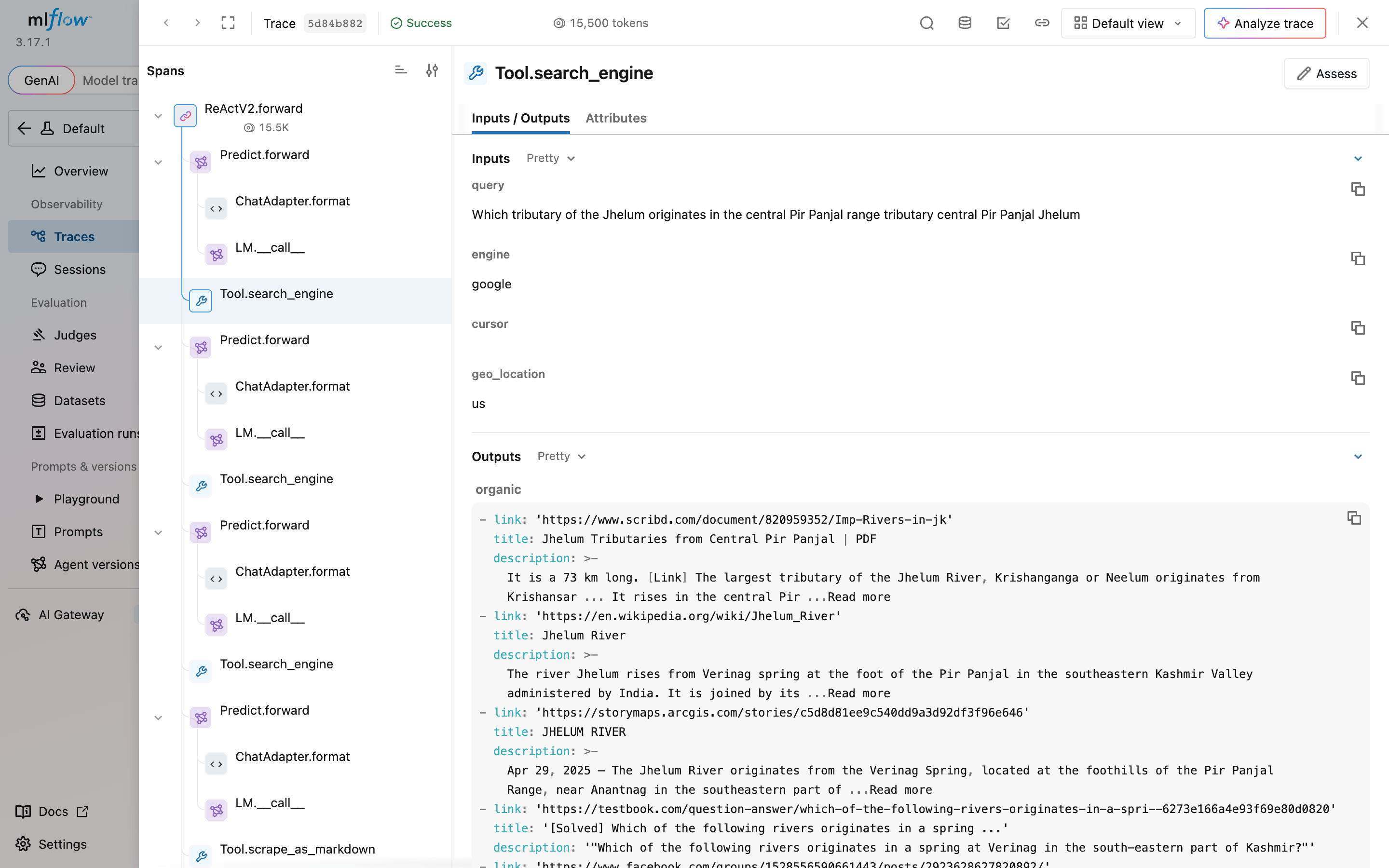
对于错误答案,此视图会显示智能体的查询是否找到了包含正确答案的页面。
总结
借助 Bright Data MCP 服务器,该 DSPy 智能体在 60 道基准问题中正确回答了 54 至 58 道,高于原来的 14 道,并且答对了全部 8 道关于其知识截止日期之后事件的问题。要评估和优化该智能体,请让 MCP 会话在自己的事件循环上运行,因为 dspy.Evaluate 和 GEPA 会从工作线程调用工具。优化前应检查错误答案,因为此处有 6 个答案位于智能体自身字符限制之后,而 find 可让智能体搜索整个页面。当错误答案具有可通过指令修复的共同原因时,GEPA 最有可能发挥作用;同时,你还应检查其输出中是否包含复制的答案。创建免费的 Bright Data 账户,针对模型无法依靠记忆回答的问题运行 agent.py,并针对你自己的问题运行 evaluate.py。
常见问题
DSPy 支持 MCP 服务器吗?
支持。借助 dspy.Tool.from_mcp_tool 和 MCP Python SDK 中的客户端,DSPy 可以将 Bright Data MCP 服务器等 MCP 服务器的工具转换为 DSPy 工具。使用 pip install "dspy[mcp]" 安装 MCP 扩展。在 DSPy 3.4.1 中,MCP 工具是异步的,因此请使用 acall 调用智能体。在工作线程上,请使用运行于后台事件循环的同步封装器。
DSPy 是 MCP 客户端吗?
DSPy 本身不是。DSPy 使用 MCP Python SDK 中的客户端,dspy.Tool.from_mcp_tool 则将该客户端的工具转换为 DSPy 工具。DSPy 负责构建和优化智能体程序,而 MCP 则将智能体连接到 Bright Data MCP 服务器等服务器。
如何为 DSPy 智能体添加网页搜索?
连接 Bright Data MCP 服务器,并将其搜索和抓取工具传递给 dspy.ReActV2;从 DSPy 3.5 开始,dspy.ReAct 使用该实现。智能体会搜索 Google、以 Markdown 格式读取页面,并返回来源 URL。调用 Bright Data 搜索引擎 API 的 Python 函数也可以用作 DSPy 工具,该 API 会以 JSON 格式返回搜索结果。
哪种网页搜索工具适用于 DSPy?
Bright Data MCP 服务器通过单一连接向 DSPy 智能体提供 Google 搜索结果和 Markdown 格式的完整页面,并由服务器处理反机器人防护。在 60 道 SimpleQA Verified 问题中,gpt-5.4-mini 借助该服务器答对了 54–58 道,而不使用它时只答对 14 道。其他搜索工具同样适用,AI 智能体搜索工具对比介绍了这些工具。
什么是 DSPy ReActV2?
dspy.ReActV2 是基于原生工具调用构建的实验性 DSPy 智能体模块。它会保留结构化历史记录,可以在每轮中进行多次工具调用,并通过 submit 工具结束。DSPy 文档指出,从 DSPy 3.5 开始,dspy.ReAct 使用该实现;ReActV2 名称则在 3.6 中被移除。
DSPy 现在仍然有用吗?
有用,尤其适用于能够使用指标进行评估的程序。DSPy 将任务与提示词分离,因此你可以切换模型,并使用指标和 GEPA 等优化器重新优化。采用默认设置时,只有程序仍会答错部分训练问题,GEPA 才会提出修改,因此应先评估程序。
DSPy 已可用于生产环境吗?
可以,前提是你固定版本并确保工具调用足够稳健。请固定 dspy 和所有 MCP 服务器的版本,限制工具输出大小,允许智能体搜索超出该限制的文本,为工具调用添加重试、超时和错误计数,并使用 MLflow 跟踪运行。ReActV2 等实验性模块可能会在次要版本之间发生变化。
DSPy 可以用于提示词优化吗?
可以。GEPA 等 DSPy 优化器会根据已评估的示例重写程序指令。GEPA 会审查已经评估的运行及其书面反馈,提出新指令,然后保留在验证集上表现最佳的指令。部署前请检查结果,因为 GEPA 有时会将训练答案复制到指令中。



技术写作者
 5 years experience
Satyam Tripathi 帮助 SaaS 和数据初创公司将复杂技术转化为可执行的内容,提升开发者采用度并增强用户理解。