
在本教程中,你将了解:
- 探索圣迭戈住房市场的数据分析场景。
- 为什么 Bright Data 的 Python SDK 能简化对结构化、开箱即用的数据集的访问。
- 如何筛选、检索和导出 Zillow 房产销售数据。
- 如何清理数据、统一单位并计算实用指标。
- 如何可视化成交价格、地理趋势、Zestimate 准确度和预估租金回报率。
让我们开始吧!
场景介绍
假设你是一名数据分析师,负责了解圣迭戈住房市场。你希望回答一些关键问题,例如:房屋的实际成交价格是多少?哪些社区的每平方米价格最高?Zillow 的估值对最终成交价格的预测有多准确?
为此,你需要一个近期、可靠且信息丰富的已售房屋数据集。对于类似任务,Bright Data 提供了一个包含超过 1.37 亿条记录的 Zillow 房产信息数据集。
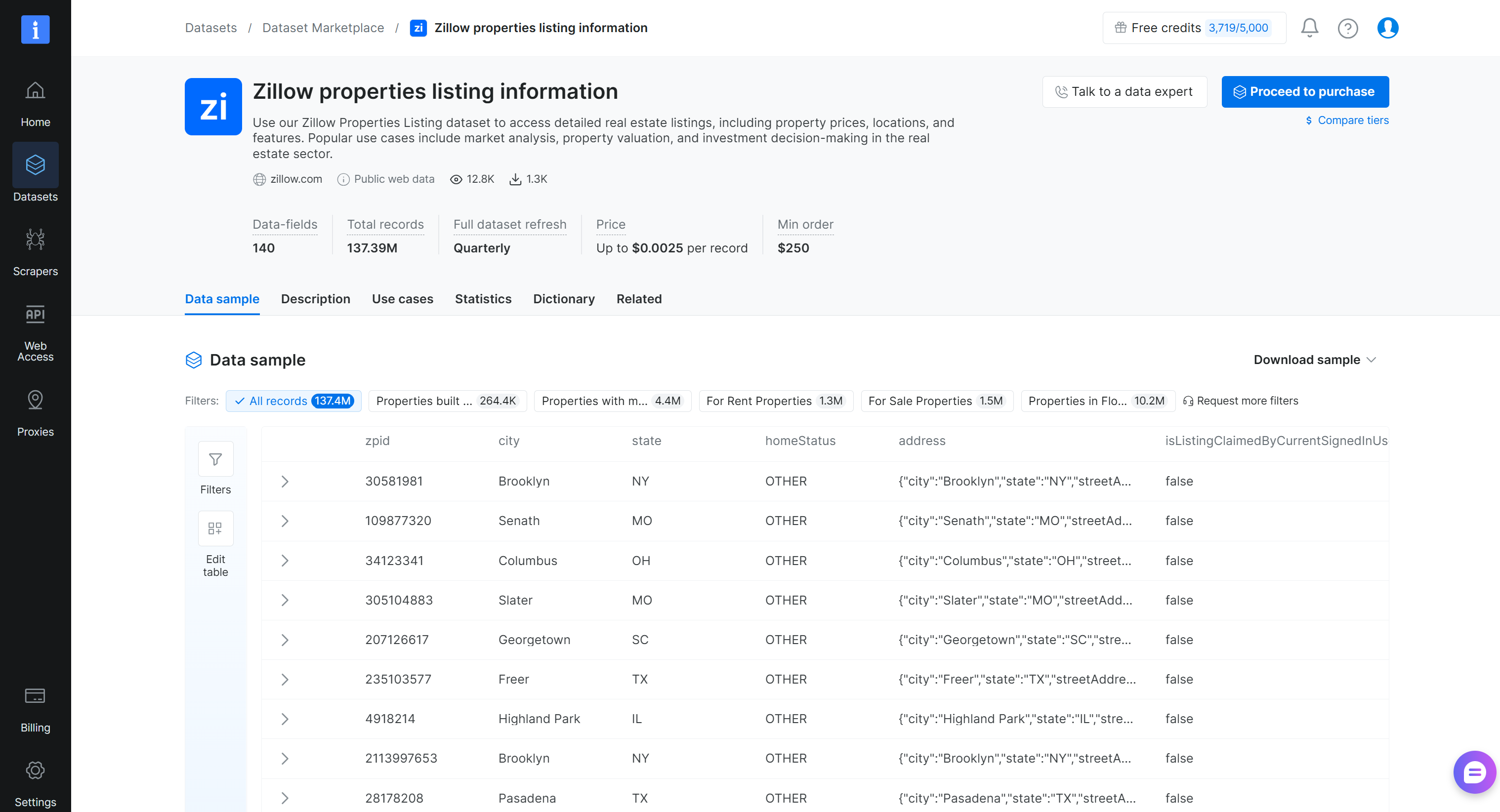
在接下来的步骤中,你将学习如何使用 Bright Data Python SDK 获取该数据集的筛选快照,其中仅包含与此场景相关的记录。然后,你会将数据加载到 pandas 中,并创建一个包含回答这些问题所需图表和分析的 Jupyter Notebook。
在此过程中,你还将了解如何清理数据、统一计量单位并计算衍生指标,以确保不同社区之间的比较公平且有意义。
为什么使用 Bright Data Python SDK?
Bright Data 是领先的数据集网站,尤其是一家出色的房地产数据集提供商。它提供大量结构化且频繁更新的数据集,其中包含数十亿条公开可用的网络数据记录。
开展数据分析和/或可视化项目时,第一步是获取所需的数据。主要有两种方法:
- 按需采集数据:构建并运行网页爬虫工作流,直接从网站提取所需信息。
- 使用现有数据集:获取经过筛选、预先采集且可直接用于分析的数据集。
Bright Data Python SDK 支持这两种方法。它提供简化且带类型的 Python 接口,用于访问 Bright Data 的网络数据采集解决方案,并提供便捷方法,可直接从 Bright Data 数据集市场获取结构化数据集。
如需更多信息,请参阅以下资源:
检索用于分析和可视化的数据
按照以下步骤开始你的数据分析和可视化项目,首先进行数据检索。
前提条件
请确保你已具备:
- 本地计算机上已安装 Python 3.10+。
- 拥有已配置 API 密钥的 Bright Data 账户。请参阅如何获取 Bright Data API 密钥。
运行以下命令,安装本指南中使用的 Python 软件包:
pip install brightdata-sdk jupyter pandas numpy matplotlib seaborn plotly这些库提供了访问 Bright Data 数据集、处理和分析数据以及在 Jupyter Notebook 中创建可视化所需的工具。
要对 Bright Data Python SDK 进行身份验证,请在 BRIGHTDATA_API_KEY 环境变量中设置 API 密钥。在 macOS 或 Linux 上运行:
export BRIGHTDATA_API_KEY="<YOUR_BRIGHT_DATA_API_KEY>"在 Windows 上,请在 PowerShell 中执行以下命令:
$env:BRIGHTDATA_API_KEY="<YOUR_BRIGHT_DATA_API_KEY>"将 <YOUR_BRIGHT_DATA_API_KEY> 替换为你实际的 Bright Data API 密钥。
为简单起见,我们假设你已经有一个本地 Python 项目,并且已设置好 Jupyter Notebook。
获取目标数据
所需数据来自 Bright Data 上的 Zillow 房源信息数据集。
在此场景中,假设你只关注过去一年内在圣迭戈售出的房产。
在 Python 项目中创建一个脚本,使用 Bright Data SDK 按所选筛选条件请求数据集快照,等待快照可用,然后导出结果记录:
import asyncio
from datetime import date, timedelta
from brightdata import BrightDataClient
from brightdata.datasets import export

async def main():
    # Get the current date
    today = date.today()
    # Compute the start of the sales window of interest (last year)
    one_year_ago = today - timedelta(days=365)

    # Define the filters that every returned home must match
    filters = {
        "operator": "and",
        "filters": [
            {
                # Keep only homes in San Diego
                "name": "city",
                "operator": "=",
                "value": "San Diego",
            },
            {
                # Keep only homes in California
                "name": "state",
                "operator": "=",
                "value": "CA",
            },
            {
                # Keep only sold listings
                "name": "homeStatus",
                "operator": "includes",
                "value": "SOLD",
            },
            {
                # Keep only sales from the last year
                "name": "dateSold",
                "operator": ">=",
                "value": one_year_ago.isoformat(),
            },
        ],
    }

    async with BrightDataClient() as client:
        # Request up to 1,000 records from the filtered dataset
        snapshot_id = await client.datasets.zillow_properties(
            filter=filters,
            records_limit=1000,
        )

        # Wait for the snapshot to finish and download the records
        data = await client.datasets.zillow_properties.download(
            snapshot_id,
            timeout=600 # Wait up to 10 mins
        )

        # Confirm how many records were downloaded
        print(f"Downloaded {len(data)} records")

        # Save the records to a CSV file
        export(data, "properties.csv")

if __name__ == "__main__":
    asyncio.run(main())
上述脚本会异步请求数据集快照,等待最长 10 分钟直至完成,下载记录、报告检索到的记录数量,并将其导出到 properties.csv,以便在 pandas 中进行分析。
该脚本使用 Bright Data SDK 获取符合指定筛选条件的 Zillow 房产记录:位于加利福尼亚州圣迭戈、且在过去 365 天内售出的房屋。SDK 会在后台调用 Bright Data Filter API,让你能够获取 Bright Data 数据集的筛选快照。
请注意,记录上限设置为 1,000 条,但你可以根据需要将其调整为任意数量。你也可以添加新的筛选条件或修改现有条件,以进一步细化数据集,仅检索与分析相关的记录。
注意:export() 辅助函数会根据文件扩展名检测输出格式,因此 .csv 会生成 CSV 文件。其他支持的数据导出格式包括 JSON、NDJSON 和 JSONL。
探索检索到的数据集
运行数据检索脚本。项目目录中将出现一个 properties.csv 文件:
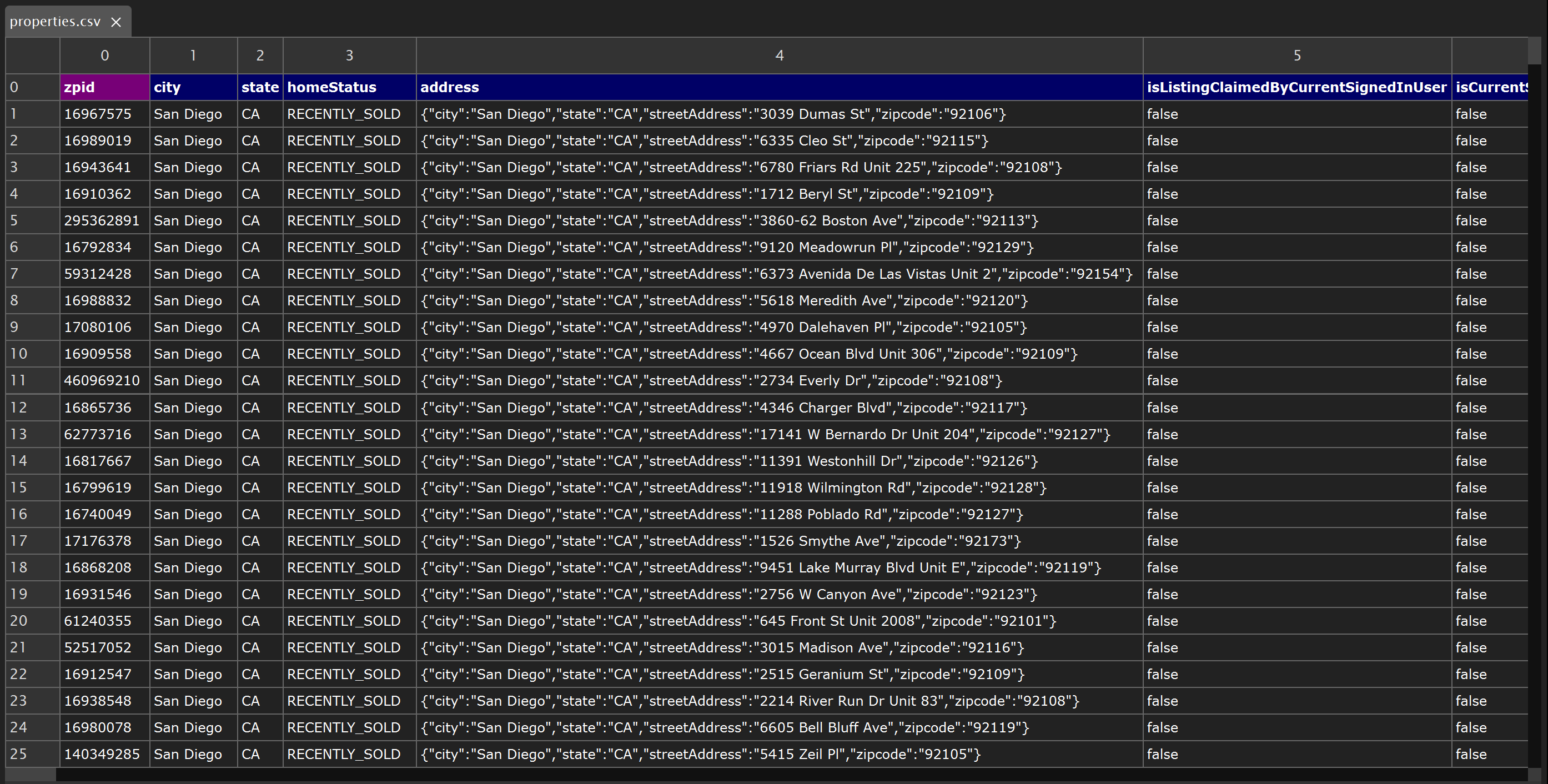
打开该文件,你会看到以结构化 CSV 格式返回的 1,000 条 Zillow 房产记录。每条记录包含大约 140 列,其中最相关的列包括:
| 列 | 说明 |
|---|---|
zipcode、latitude、longitude |
房屋位置 |
homeType |
房产类型,例如 SINGLE_FAMILY 或 CONDO |
bedrooms、bathrooms |
卧室和浴室数量 |
price |
以 USD 计价的成交价格 |
livingAreaValue、livingAreaUnits |
室内面积及其单位 |
lotAreaValue、lotAreaUnits |
地块面积,以平方英尺或英亩为单位 |
yearBuilt |
建造年份 |
dateSoldString |
成交日期(YYYY-MM-DD) |
daysOnZillow |
房源的活跃时长 |
zestimate、rentZestimate |
Zillow 的预估房产价值和月租金 |
taxAssessedValue |
用于计算房产税的价值 |
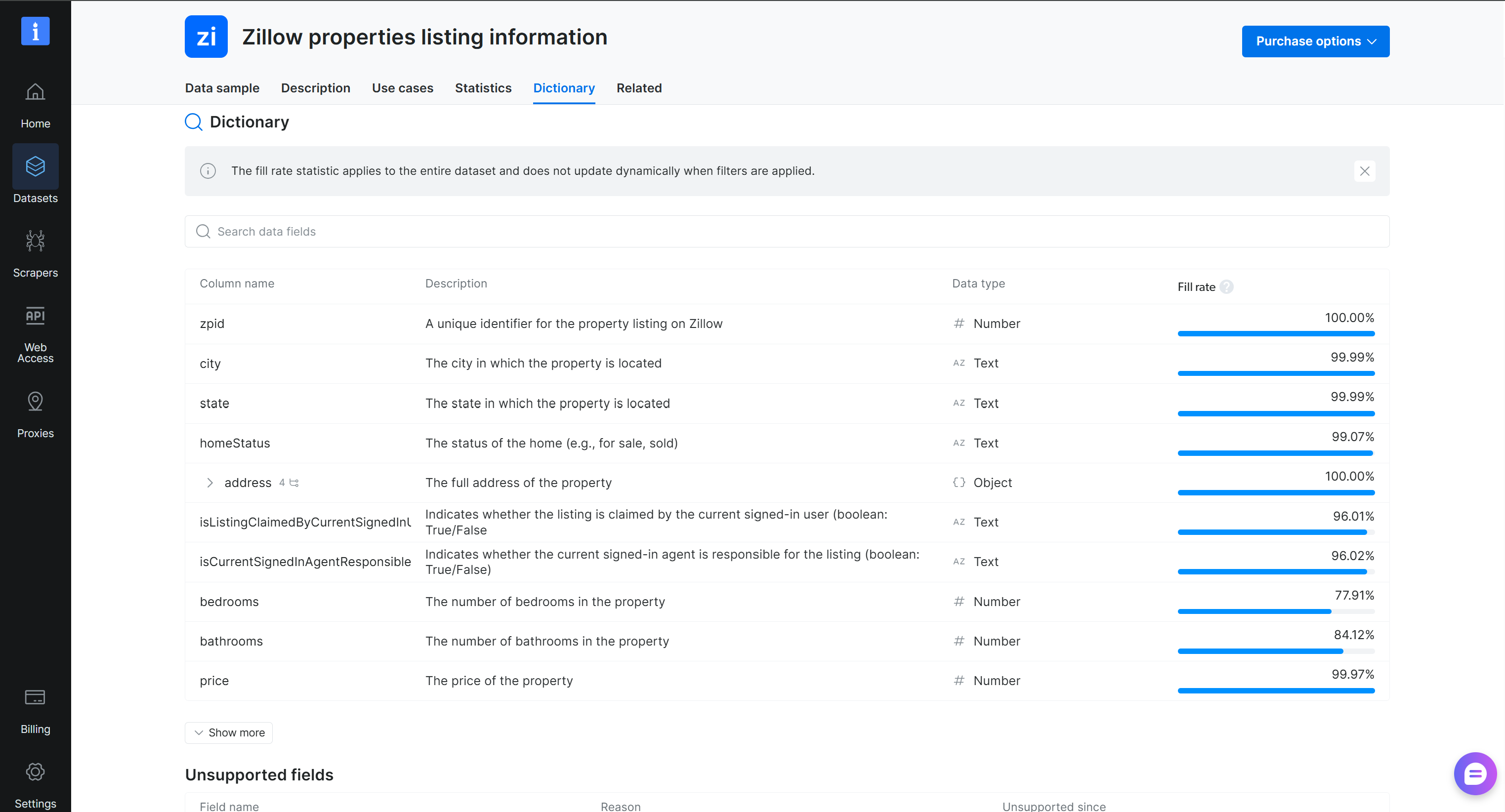
你可以在 Zillow 房源数据集的 Bright Data 控制面板页面中,通过“数据字典”部分查看所有字段:
任务完成!你现在已经获得了原始的结构化数据。
接下来,你将学习如何清理并准备这些数据,以便进行分析和可视化。然后,你会定义 10 多个场景,用于探索圣迭戈房地产市场,并回答有关房屋成交价格、社区可负担性以及 Zillow 估值准确度的关键问题。
准备用于分析和可视化的数据
现在你已经检索到数据集,请打开 Notebook 并准备用于数据分析的数据集。在一个独立的单元格中执行以下任务:
- 导入数据处理、统计分析和可视化所需的库。
- 配置数据绘图设置。
- 将
properties.csv导入 pandas DataFrame,以加载数据集。 - 通过处理缺失值、修正数据类型以及将字段转换为一致格式,清理并标准化数据。
- 创建额外变量,以支持更有效的分析、比较和可视化。
使用以下代码完成这些步骤:
import numpy as np
import pandas as pd
import matplotlib.pyplot as plt
import seaborn as sns
import plotly.express as px
from matplotlib.ticker import FuncFormatter
from IPython.display import display

# Show axis prices as full numbers, for example 1,000,000
usd_fmt = FuncFormatter(lambda x, _: f"{x:,.0f}")

# Use a clean grid style for all charts
sns.set_theme(style="whitegrid")

# Conversion factor from square feet to square meters
SQFT_TO_M2 = 0.092903
# Conversion factor from acres to square feet
ACRE_TO_SQFT = 43560
# Ignore ZIP codes with fewer sales than this
MIN_SALES = 3

# Format a DataFrame's columns as text, then display it as a table
def show_table(frame, formats, title=""):
    # Work on a copy so the original data is unchanged
    out = frame.copy()
    # Apply each format to its column, showing missing values as a dash
    for col, fmt in formats.items():
        out[col] = out[col].map(lambda v, f=fmt: f.format(v) if pd.notna(v) else "-")
    # Print a heading above the table when a title is given
    if title:
        print(title)
    # Show the formatted table
    display(out)

# Load the CSV, keeping ZIP codes as text
df = pd.read_csv("properties.csv", dtype={"zipcode": str})

# List the columns that should be numbers
numeric_cols = ["price", "bedrooms", "bathrooms", "livingAreaValue", "lotAreaValue",
                "yearBuilt", "daysOnZillow", "zestimate", "rentZestimate",
                "taxAssessedValue", "latitude", "longitude"]
# Convert those columns to numbers, turning invalid values into NaN
df[numeric_cols] = df[numeric_cols].apply(pd.to_numeric, errors="coerce")

# Pad ZIP codes to 5 digits
df["zipcode"] = df["zipcode"].str.zfill(5)
# Convert the sale date text into a datetime
df["dateSold"] = pd.to_datetime(df["dateSoldString"])

# Find the rows where the living area is in square feet
is_sqft = df["livingAreaUnits"].eq("Square Feet")
# Convert square feet to m², and leave NaN for other units
df["living_area_m2"] = np.where(is_sqft, df["livingAreaValue"] * SQFT_TO_M2, np.nan)

# Convert lot sizes to square feet, whether they were in acres or already in square feet
lot_sqft = np.where(df["lotAreaUnits"].eq("Acres"),
                    df["lotAreaValue"] * ACRE_TO_SQFT,
                    df["lotAreaValue"])
# Convert the lot size to square meters
df["lot_m2"] = lot_sqft * SQFT_TO_M2

# Drop rows without a valid sold price
df = df[df["price"] > 0].copy()
# Calculate the sold price per square meter
df["price_per_m2"] = df["price"] / df["living_area_m2"]
# Calculate the gap between sold price and Zestimate as a percentage
df["zestimate_error_pct"] = ((df["price"] - df["zestimate"])
                             / df["zestimate"].where(df["zestimate"] > 0) * 100)
# Calculate annual rent as a percentage of the sold price
df["rent_yield_pct"] = df["rentZestimate"] * 12 / df["price"] * 100
# Group prices into bands, labeled with full numbers in USD
df["price_band"] = pd.cut(df["price"], bins=[0, 500_000, 1_000_000, 1_500_000, np.inf],
                          labels=["<500,000", "500,000-1,000,000",
                                  "1,000,000-1,500,000", ">1,500,000"])
# Group homes by construction era
df["age_band"] = pd.cut(df["yearBuilt"], bins=[0, 1949, 1979, 1999, np.inf],
                        labels=["<1950", "1950-1979", "1980-1999", "2000+"])

# Summarize how many homes and ZIP codes are in the cleaned dataset
print(f"{len(df)} sold homes across {df['zipcode'].nunique()} ZIP codes")

# Preview the key columns with prices and areas formatted
show_table(
    # Select the key columns for the preview
    df[["zpid", "streetAddress", "zipcode", "homeType", "bedrooms", "bathrooms",
        "price", "living_area_m2", "dateSold"]].head(),
    # Format prices as full numbers and areas with one decimal
    formats={"price": "{:,.0f}", "living_area_m2": "{:,.1f} m²"},
    title="Sample of sold homes",
)
执行后,你将获得以下结果:
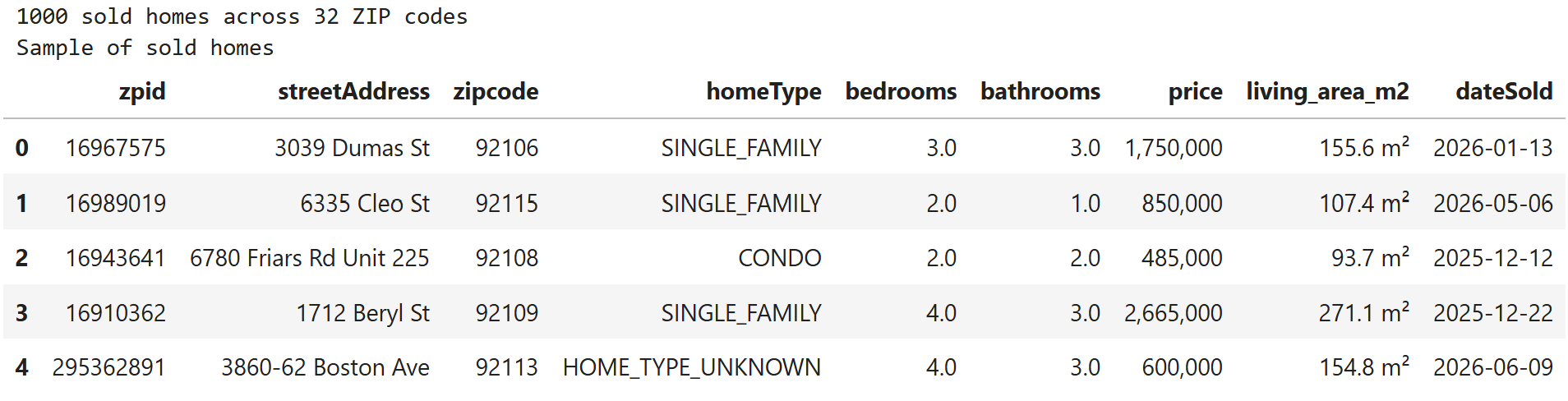
值得注意的是,上述单元格会完成以下工作:
- 统一计量单位:将居住面积和地块面积转换为平方米,使所有基于面积的指标使用相同单位。
- 处理缺失值:仅当 Zestimate 大于零时才计算 Zestimate 误差,从而避免除以零。
- 添加衍生字段:将每平方米价格、租金回报率、价格区间和房龄区间添加为列,以简化数据可视化。
太棒了!你现在可以继续进行数据分析和可视化。
分析和可视化
在这里,你将看到 10 多种检查和可视化数据集的实用方法,从中发现圣迭戈住房市场的规律和洞察。每个部分都包括简要概述、单元格代码、输出结果以及对发现的解读。
成交价格分布
说明:探索大多数成交价格所在的范围,并标记中位数,以便观察市场分布的偏斜程度。
单元格:
plt.figure(figsize=(10, 6))

# Draw a histogram of prices with a smoothed density curve
sns.histplot(df["price"], bins=30, kde=True, color="steelblue")

# Calculate the median sold price
median = df["price"].median()

# Draw a dashed red line at the median, labeled with the full number
plt.axvline(median, color="red", linestyle="--", label=f"Median: {median:,.0f} USD")
# Show x-axis prices as full numbers
plt.gca().xaxis.set_major_formatter(usd_fmt)

plt.title("Distribution of Sold Prices in San Diego")
plt.xlabel("Sold price (USD)")
# Remove automatic passing on x axys
plt.xlim(left=0)
plt.ylabel("Number of homes")
plt.legend()
plt.show()输出:
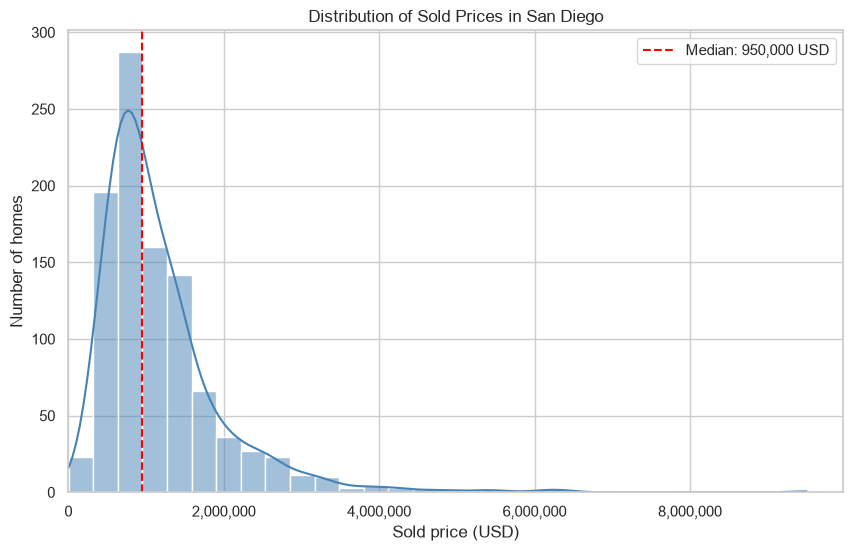
解读:大多数成交价格集中在约 500,000 至 1,500,000 USD 之间,峰值接近 750,000 USD,而中位数更高,为 950,000 USD。长尾一直延伸到接近 9,500,000 USD。该分布呈右偏,导致均值高于中位数。
按房屋类型划分的价格中位数
说明:比较不同房产类型的成交价格中位数和均值,了解哪些房屋类型主导市场。
单元格:
# Group sales by property type and compute summary statistics
by_type = (df.groupby("homeType")
             # Count the homes, and take the median and mean price for each type
             .agg(homes=("zpid", "count"),
                  median_price=("price", "median"),
                  mean_price=("price", "mean"))
             # Sort the types from highest to lowest median price
             .sort_values("median_price", ascending=False))

show_table(by_type.reset_index(),
           formats={"median_price": "{:,.0f}", "mean_price": "{:,.0f}"},
           title="Sold price by home type (USD)")

plt.figure(figsize=(10, 6))
sns.barplot(data=by_type.reset_index(), x="homeType", y="median_price", color="steelblue")
plt.gca().yaxis.set_major_formatter(usd_fmt)
plt.xticks(rotation=30)
plt.title("Median Sold Price by Home Type")
plt.xlabel("Home type")
plt.ylabel("Median price (USD)")
plt.show()输出:
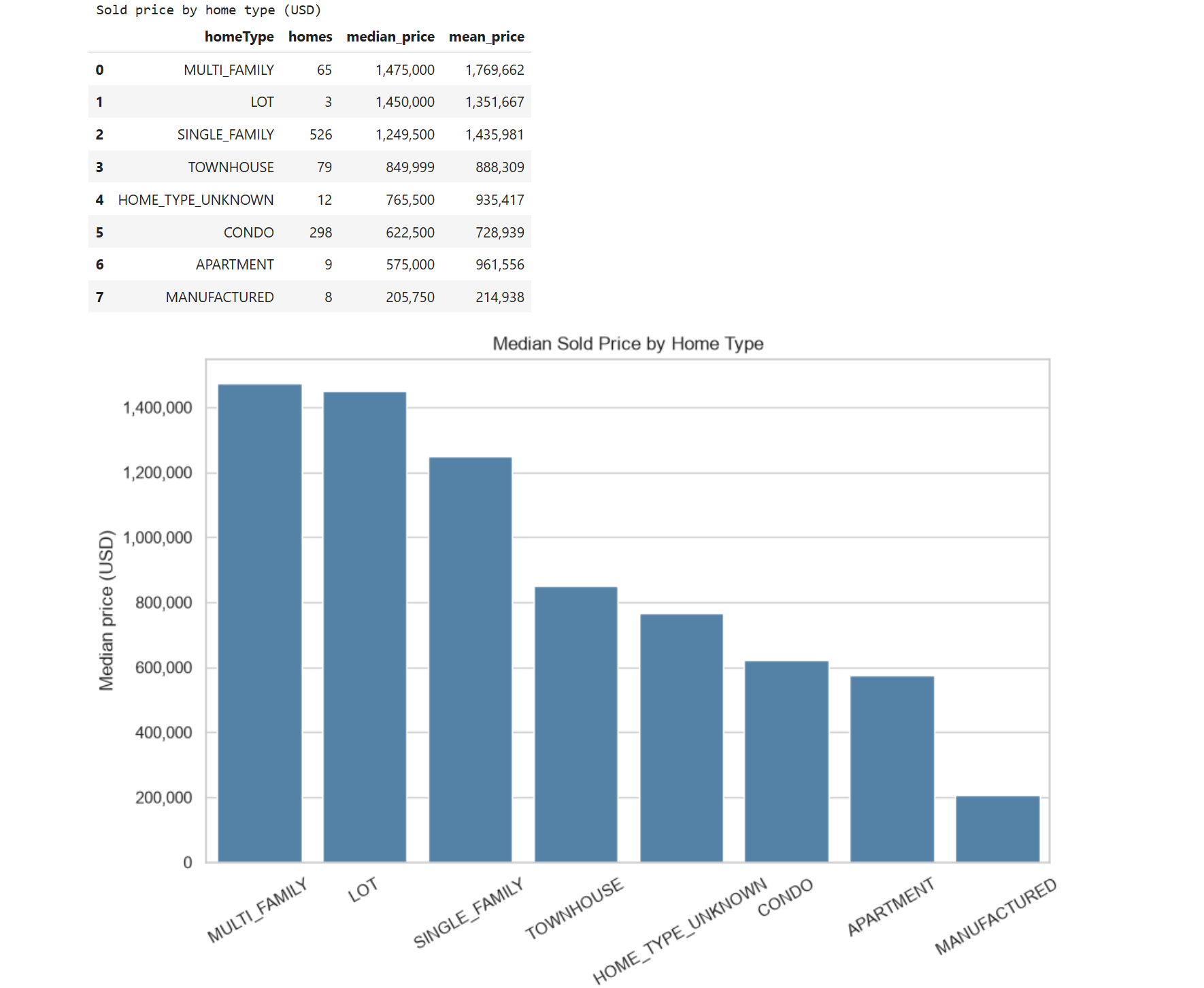
解读:独栋住宅是最可靠的基准,526 笔成交的中位数为 1,249,500 USD。多户住宅和地块的中位数看起来更高,但成交数量要少得多,分别只有 65 笔和 3 笔;预制房最便宜,中位数为 205,750 USD,而公寓为 622,500 USD。
按成交价格中位数排名最高的邮政编码
说明:按成交价格中位数对最昂贵的 15 个邮政编码进行排名。排除成交数量极少的邮政编码,以避免产生误导性的中位数。
单元格:
# Group sales by ZIP code and compute the sales count and median price
zip_stats = (df.groupby("zipcode")
               .agg(sales=("zpid", "count"), median_price=("price", "median"))
               # Drop ZIP codes with too few sales
               .query("sales >= @MIN_SALES")
               # Sort from most to least expensive
               .sort_values("median_price", ascending=False)
               # Keep only the top 15
               .head(15)
               # Turn the ZIP code index back into a column
               .reset_index())

show_table(zip_stats,
           formats={"median_price": "{:,.0f}"},
           title=f"Top 15 ZIP codes by median sold price (min. {MIN_SALES} sales)")

plt.figure(figsize=(10, 7))
sns.barplot(data=zip_stats, x="median_price", y="zipcode", color="steelblue")
plt.gca().xaxis.set_major_formatter(usd_fmt)
plt.title(f"Top 15 ZIP Codes by Median Sold Price (min. {MIN_SALES} sales)")
plt.xlabel("Median price (USD)")
plt.ylabel("ZIP code")
plt.show()输出:
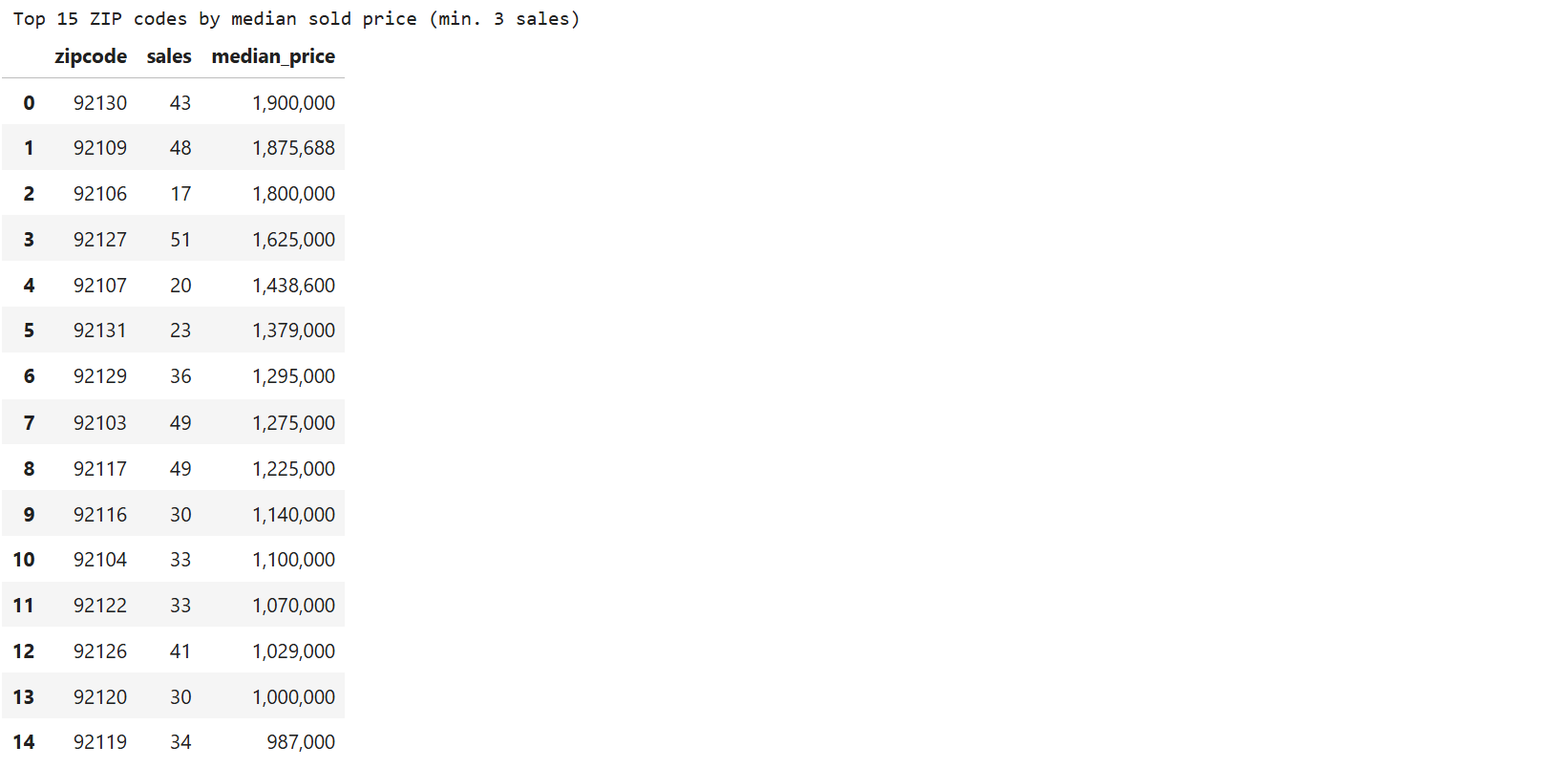
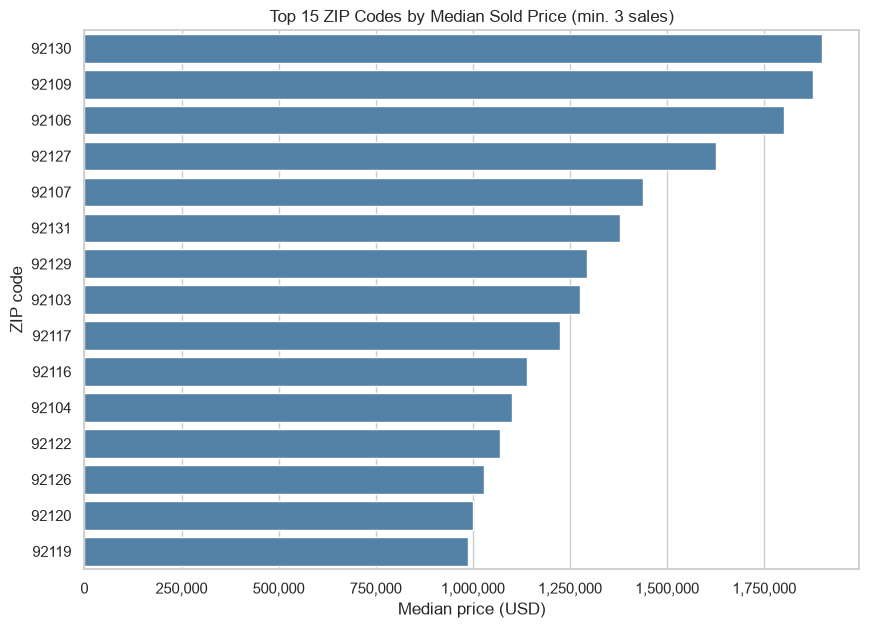
解读:92130、92109 和 92106 位居前列,中位数均至少为 1,800,000 USD。92118(科罗纳多)的中位数最高,超过 3,300,000 USD,但成交数量太少,无法参与排名。92106 仅有 17 笔成交,因此其排名可能会发生变化。
房屋成交位置地图
说明:在地图上绘制每笔成交,并按成交价格着色,以查看最昂贵的房屋位于何处。
单元格:
# Copy the original data
map_df = df.copy()

for col in ["latitude", "longitude", "price"]:
    map_df[col] = pd.to_numeric(map_df[col], errors="coerce")

# Keep rows with valid coordinates and sale prices
map_df = map_df.dropna(subset=["latitude", "longitude", "price"])

fig = px.scatter_map(
    map_df,
    lat="latitude",
    lon="longitude",
    color="price",
    hover_name="streetAddress",
    hover_data={
        "zipcode": True,
        "homeType": True,
        "bedrooms": True,
        "price": ":,.0f",
        "latitude": False,
        "longitude": False,
    },
    labels={
        "price": "Sold price (USD)",
    },
    color_continuous_scale="Viridis",

    center={"lat": 32.8157, "lon": -117.1611},
    zoom=8.8,
    height=650,
    map_style="open-street-map",
    title="Where Homes Sold in San Diego (color = sold price in USD)",
)

fig.show(renderer="notebook")

# Define geographic cutoffs
longitude_cutoff = -117.2
latitude_cutoff = 32.8

# Divide properties into western and eastern groups
west = geo_df[geo_df["longitude"] < longitude_cutoff]
east = geo_df[geo_df["longitude"] >= longitude_cutoff]

# Divide properties into northern and southern groups
north = geo_df[geo_df["latitude"] >= latitude_cutoff]
south = geo_df[geo_df["latitude"] < latitude_cutoff]

# Display median prices and sample sizes
print("WESTERN VS. EASTERN PROPERTIES")
print("-" * 40)
print(f"West of longitude {longitude_cutoff}:")
print(f"  Median sold price: ${west['price'].median():,.0f}")
print(f"  Number of properties: {len(west):,}")

print(f"\nEast of or at longitude {longitude_cutoff}:")
print(f"  Median sold price: ${east['price'].median():,.0f}")
print(f"  Number of properties: {len(east):,}")

print("\nNORTHERN VS. SOUTHERN PROPERTIES")
print("-" * 40)
print(f"North of or at latitude {latitude_cutoff}:")
print(f"  Median sold price: ${north['price'].median():,.0f}")
print(f"  Number of properties: {len(north):,}")

print(f"\nSouth of latitude {latitude_cutoff}:")
print(f"  Median sold price: ${south['price'].median():,.0f}")
print(f" Number of properties: {len(south):,}")输出:
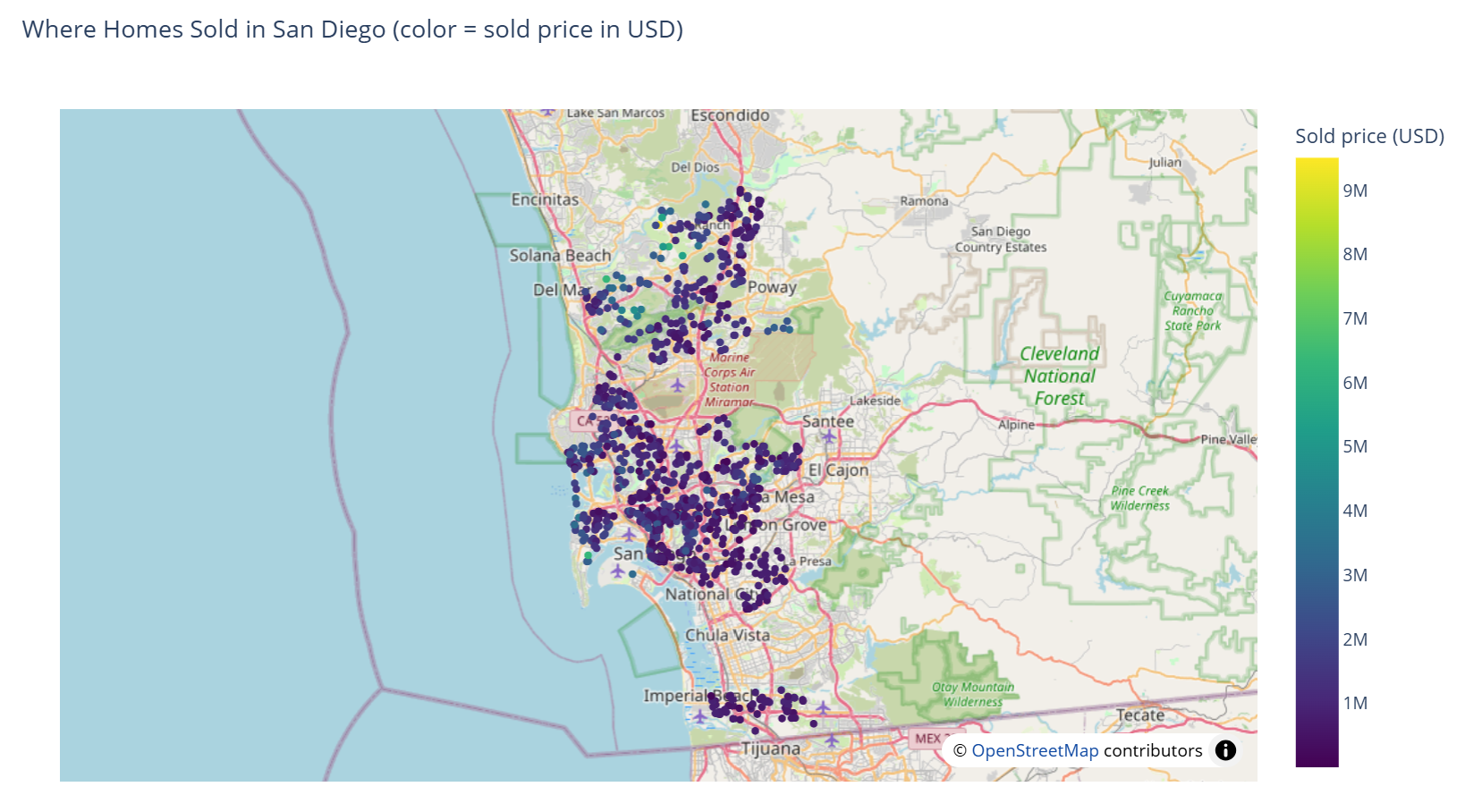
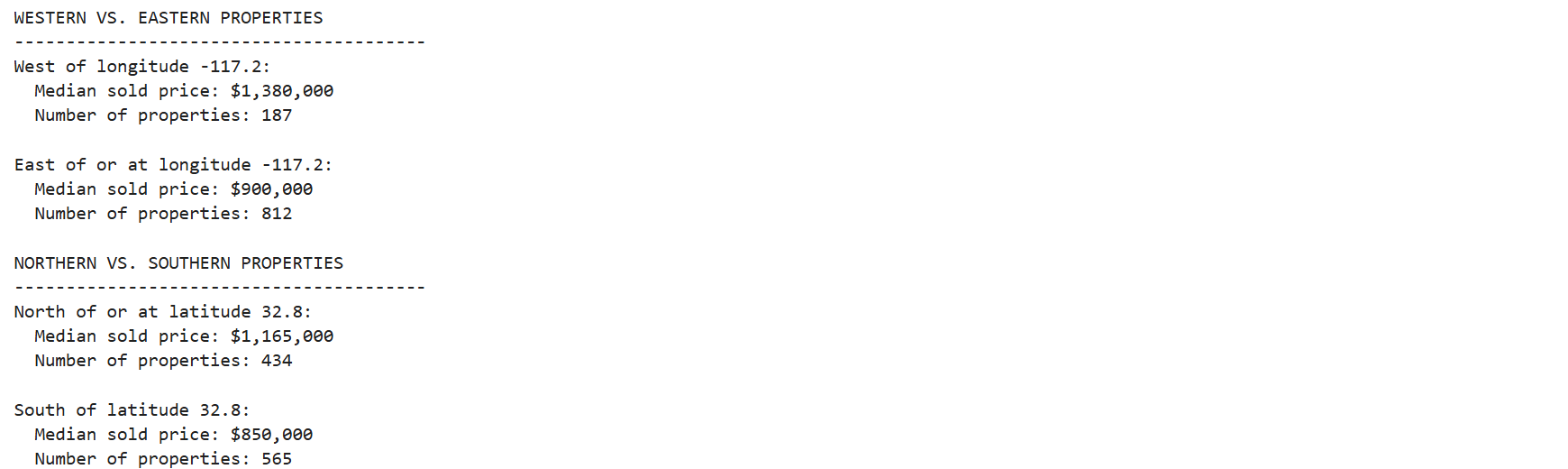
解读:经度 -117.2 以西房屋的成交价格中位数约为 1,380,000 USD,而内陆地区为 900,000 USD。北部成交房屋的中位数为 1,165,000 USD,远高于南部的 850,000 USD。
按邮政编码划分的每平方米价格
说明:比较成交数量最多的 10 个邮政编码中每平方米价格的分布。
单元格:
# Find the 10 ZIP codes with the most sales
top_zips = df["zipcode"].value_counts().head(10).index
# Keep sales in those ZIP codes that have a valid price per m²
zip_m2 = df[df["zipcode"].isin(top_zips)].dropna(subset=["price_per_m2"])
# Order the ZIP codes by their median price per m², highest first
order = (zip_m2.groupby("zipcode")["price_per_m2"]
               # Take the median price per m² for each ZIP code
               .median()
               # Sort from highest to lowest
               .sort_values(ascending=False)
               # Keep the ZIP codes in that order
               .index)

plt.figure(figsize=(12, 6))
sns.boxplot(data=zip_m2, x="zipcode", y="price_per_m2", order=order,
            hue="zipcode", legend=False, palette="Set2", showfliers=False)
plt.gca().yaxis.set_major_formatter(usd_fmt)
plt.title("Sold Price per m² in the 10 Most Active ZIP Codes")
plt.xlabel("ZIP code")
plt.ylabel("Price per m² (USD)")
plt.show()输出:
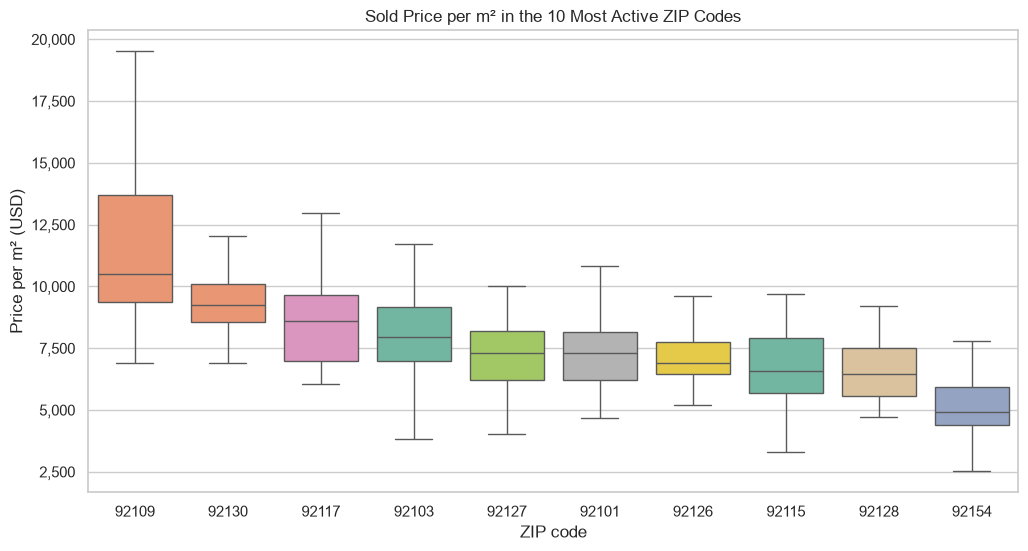
解读:92109 的每平方米价格中位数最高,约为 10,500 USD,分布范围也最广。92154 最便宜,约为 4,900 USD。
按邮政编码划分的独栋住宅每平方米价格与居住面积关系
说明:根据邮政编码,检验面积较大的独栋住宅是否具有更低的每平方米成交价格。
单元格:
# Keep only single-family homes with both a price per m² and a living area
d = df[
    (df["homeType"] == "SINGLE_FAMILY")
].dropna(subset=["price_per_m2", "living_area_m2"]).copy()

# Keep the 10 most active ZIP codes as their own groups and put the rest in "Other"
d["zip_group"] = np.where(d["zipcode"].isin(top_zips), d["zipcode"], "Other")

zip_order = list(top_zips) + ["Other"]

fig = px.scatter(
    d,
    x="living_area_m2",
    y="price_per_m2",
    facet_col="zip_group",
    facet_col_wrap=4,
    category_orders={"zip_group": zip_order},
    hover_data={
        "zipcode": True,
        "price": ":,.0f",
        "living_area_m2": ":,.1f",
        "zip_group": False,
    },
    labels={
        "living_area_m2": "Living area (m²)",
        "price_per_m2": "Price per m² (USD)",
        "price": "Sold price (USD)",
    },
    height=1200,
    title="Price per m² vs. Living Area for Single-Family Homes by ZIP Code",
)

fig.for_each_annotation(
    lambda a: a.update(text=a.text.split("=")[-1])
)

fig.update_xaxes(
    matches=None,
    showticklabels=True,
    showline=True,
    tickformat=",.0f",
    title_text="Living area (m²)",
)

fig.update_yaxes(
    tickformat=",.0f",
    title_text="Price per m² (USD)",
)

fig.show(renderer="notebook")输出:
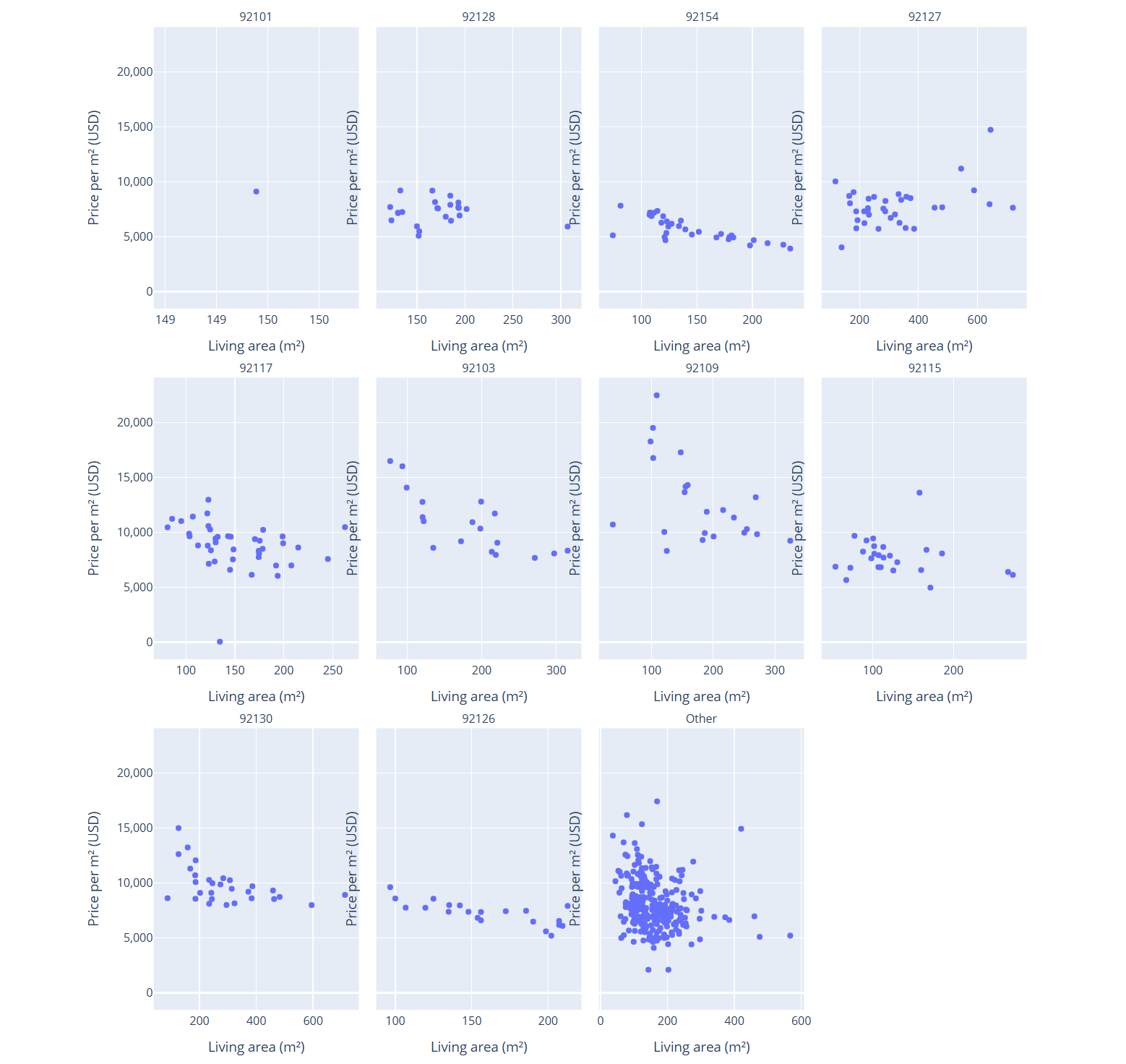
解读:部分邮政编码(例如 92154、92126、92103)显示,面积更大的房屋每平方米价格更低。92127 是个例外,呈上升趋势。总体来看,相关性似乎接近于零,因此社区位置比房屋面积更重要。
房屋特征相关性矩阵
说明:检查价格与主要物理特征及房源特征之间的 Pearson 相关性。
单元格:
corr_cols = {
    # Sold price in USD
    "price": "Price",
    # Number of bedrooms
    "bedrooms": "Bedrooms",
    # Number of bathrooms
    "bathrooms": "Bathrooms",
    "living_area_m2": "Living area",
    "lot_m2": "Lot size",
    # Construction year
    "yearBuilt": "Year built",
    # Zillow's estimated value
    "zestimate": "Zestimate",
    # Assessed value for taxes
    "taxAssessedValue": "Tax assessed value",
}
# Compute pairwise Pearson correlations between the renamed columns
corr = df[list(corr_cols)].rename(columns=corr_cols).corr()

plt.figure(figsize=(10, 8))
sns.heatmap(corr, annot=True, fmt=".2f", cmap="coolwarm", vmin=-1, vmax=1, linewidths=0.5)
plt.title("Correlation Matrix of Sold Home Features (Pearson)")
plt.show()输出:
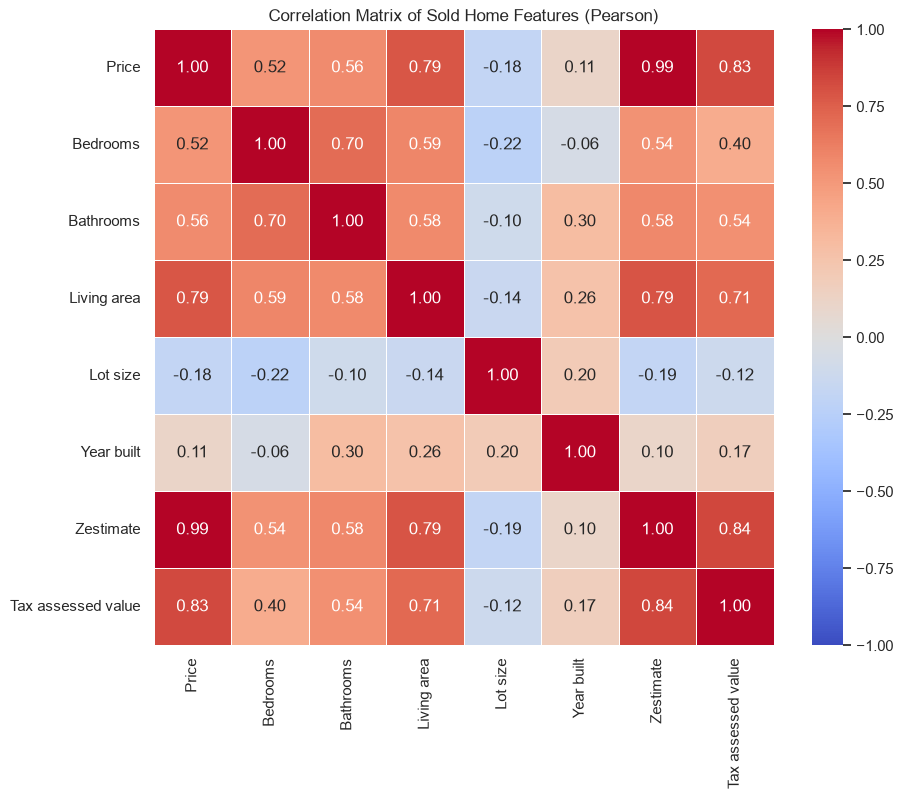
解读:Zestimate(0.99)几乎相当于价格的副本。居住面积(0.79)、浴室数量(0.56)和卧室数量(0.52)是最有用的价格信号,而建造年份对价格几乎没有影响(0.11)。
最活跃邮政编码中的价格区间构成
说明:展示 10 个成交最活跃邮政编码中各价格区间的成交占比有何不同。
单元格:
# Keep sales from the 10 most active ZIP codes
top_df = df[df["zipcode"].isin(top_zips)]
# Compute the percentage of each price band within each ZIP code
mix = pd.crosstab(top_df["zipcode"], top_df["price_band"], normalize="index") * 100

ax = mix.plot(kind="barh", stacked=True, figsize=(10, 6),
              colormap="RdYlGn_r", width=0.8)
ax.set_xlabel("Share of sales (%)")
ax.set_ylabel("ZIP code")
ax.set_title("Price Band Mix in the 10 Most Active ZIP Codes")
ax.legend(title="Price band (USD)", bbox_to_anchor=(1.02, 1), loc="upper left")
plt.tight_layout()
plt.show()输出:
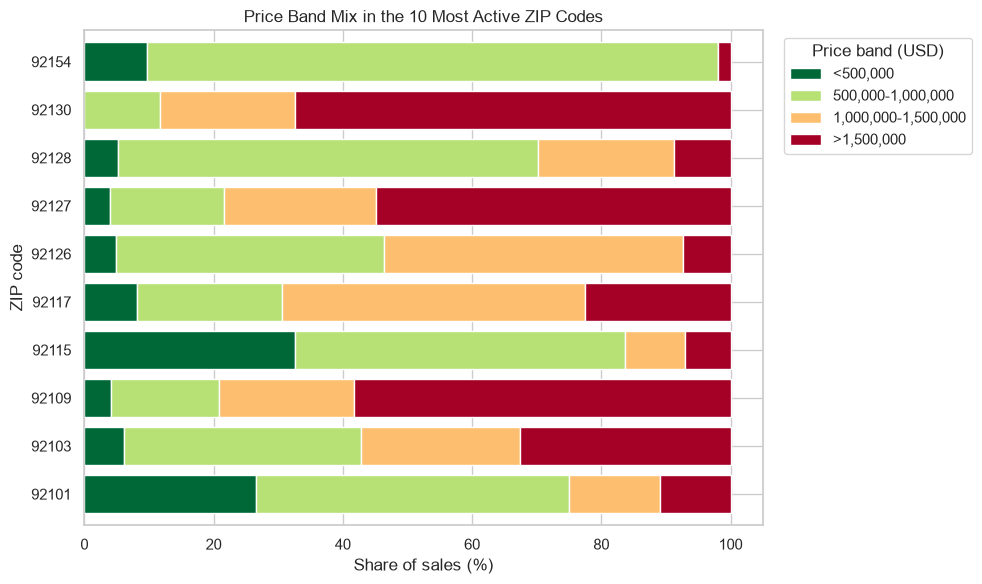
解读:邮政编码 92154 最偏向中等价位,约 88% 的成交价格介于 500,000 至 1,000,000 USD。邮政编码 92130、92109 和 92127 的成交价格大多高于 1,500,000 USD。可负担成交在 92115 最为常见,约三分之一低于 500,000 USD。
按价格区间划分的 Zillow 挂牌天数
说明:通过查看不同价格区间的 Zillow 挂牌天数,判断价格更高的房屋是否需要更长时间才能售出。
单元格:
# Keep homes with both days on market and a price band
d = df.dropna(subset=["daysOnZillow", "price_band"])
# Compute Spearman correlation, which is Pearson correlation on ranks
rho = d["price"].rank().corr(d["daysOnZillow"].rank())

plt.figure(figsize=(10, 6))
sns.boxplot(data=d, x="price_band", y="daysOnZillow", hue="price_band",
            legend=False, palette="Oranges")
plt.title(f"Days on Zillow by Price Band (Spearman ρ with price = {rho:.2f})")
plt.xlabel("Price band (USD)")
plt.ylabel("Days on Zillow")
plt.show()输出:
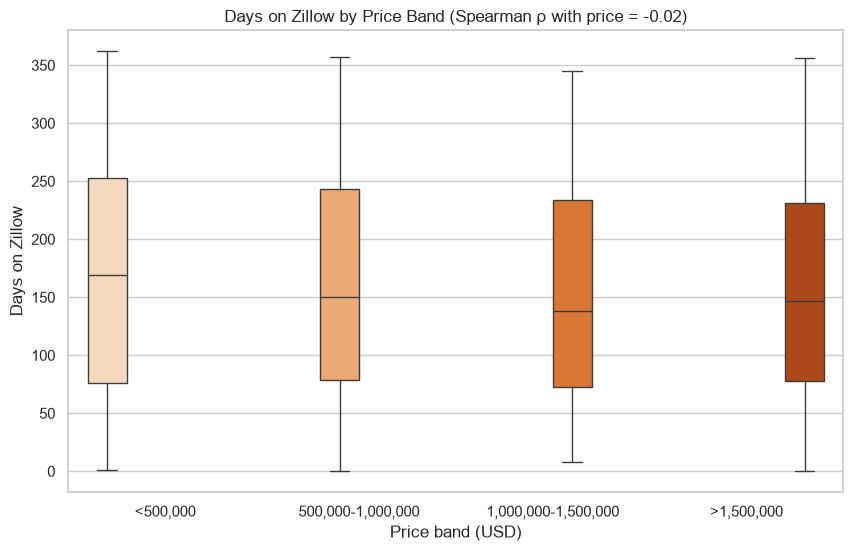
解读:Zillow 挂牌天数几乎不会随价格变化(Spearman ρ = -0.02)。每个价格区间的挂牌时长中位数均保持在约 140 至 170 天之间,整体范围很广,从接近零天到超过 350 天不等。因此,仅靠价格无法解释房屋的出售速度。
Zestimate 的准确度如何?
说明:测量每笔成交价格与 Zillow Zestimate 之间的差距,以了解估值的准确度。
单元格:
# Keep homes where the error could be computed
d = df.dropna(subset=["zestimate_error_pct"])
median_abs_error = d["zestimate_error_pct"].abs().median()

plt.figure(figsize=(10, 6))
sns.histplot(d["zestimate_error_pct"], bins=40, kde=True, color="purple")
# Mark zero error, where the estimate matches the sale price
plt.axvline(0, color="black", linestyle="--")
# Focus on errors between -20% and +20%
plt.xlim(-20, 20)
plt.title(f"Sold Price vs. Zestimate (median absolute error: {median_abs_error:.1f}%)")
plt.xlabel("(Sold price - Zestimate) / Zestimate (%)")
plt.ylabel("Number of homes")
plt.show()输出:
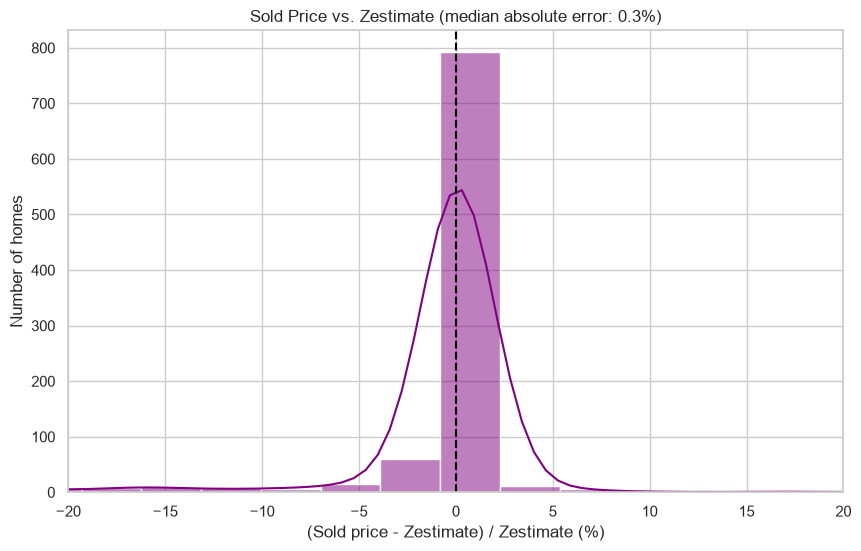
解读:绝对误差中位数仅为 0.3%,因此 Zestimate 对大多数房屋都很准确。少数成交价格与估值相差 20% 或更多。
按邮政编码划分的预估毛租金回报率
说明:针对每个邮政编码,估算年租金占成交价格的比例,以比较租金回报。
单元格:
# Group sales by ZIP code and compute the sales count and median yield
yield_stats = (df.groupby("zipcode")
                 .agg(sales=("zpid", "count"), median_yield=("rent_yield_pct", "median"))
                 # Drop ZIP codes with too few sales
                 .query("sales >= @MIN_SALES")
                 # Sort from highest to lowest yield
                 .sort_values("median_yield", ascending=False)
                 # Keep only the top 15
                 .head(15)
                 # Turn the ZIP code index back into a column
                 .reset_index())

show_table(yield_stats,
           formats={"median_yield": "{:.1f}%"},
           title="Top 15 ZIP codes by estimated gross rental yield")

plt.figure(figsize=(10, 7))
sns.barplot(data=yield_stats, x="median_yield", y="zipcode", color="seagreen")
plt.title("Estimated Gross Rental Yield by ZIP Code (Top 15)")
plt.xlabel("Gross yield (%) = rent Zestimate × 12 / sold price")
plt.ylabel("ZIP code")
plt.show()输出:
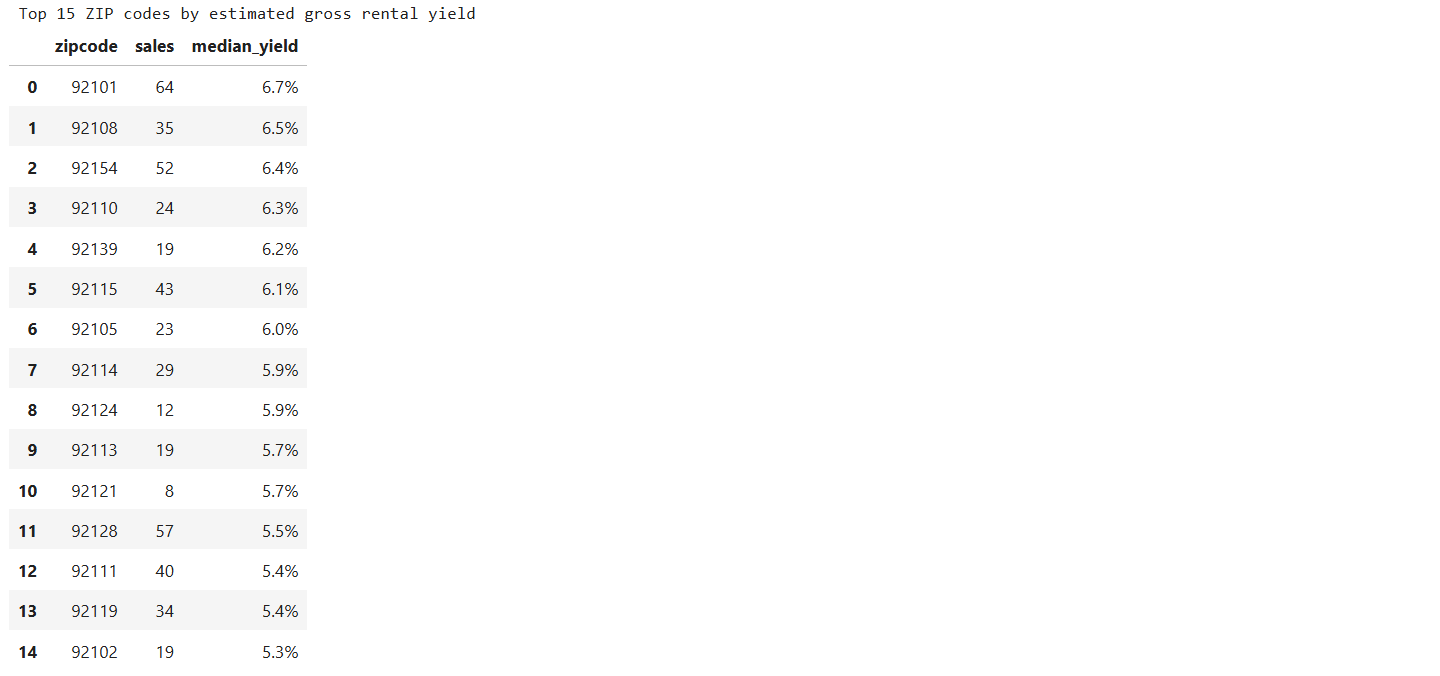
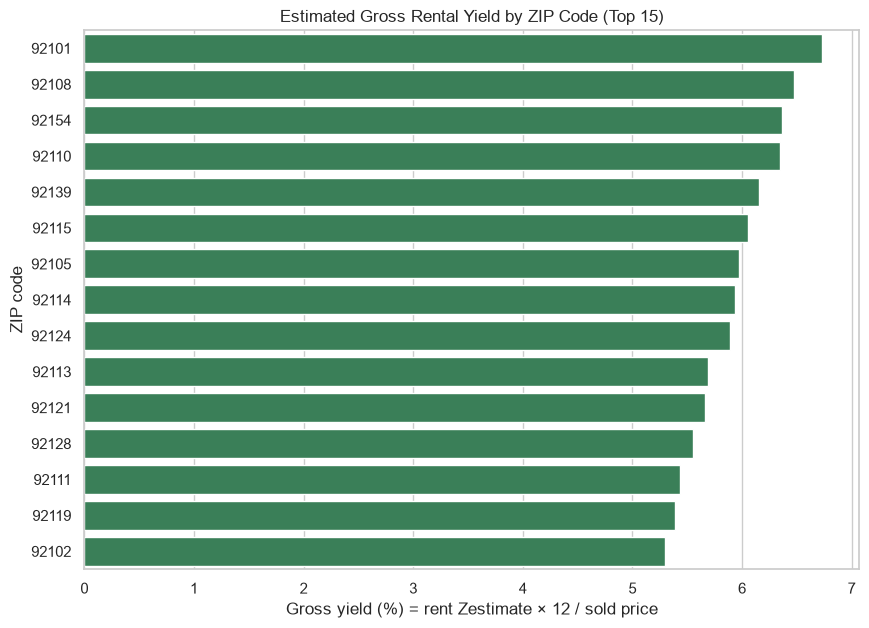
解读:排名前 15 的邮政编码毛租金回报率介于 5.3% 至 6.7% 之间,区间较窄。92101 以 6.7% 位居首位,其次是 92108(6.5%)和 92154(6.4%)。由于租金数据是 Zillow 的估值,因此应将这些数据视为方向性指标,而非精确回报。
延伸阅读
如果你对使用图表或 AI 进行类似的网络数据分析和可视化方法感兴趣,请查看以下指南:
在此示例基础上,你还可以训练回归模型来预测成交价格、比较两个城市的住房市场,或分析单套房产的历史价格趋势。
总结
在本文中,你学习了如何使用 Bright Data Python SDK 检索符合自身需求的结构化、可直接分析的数据集。具体而言,你了解了如何获取圣迭戈已售房屋的 Zillow 数据、清理和准备数据,并创建 10 多种可视化,涵盖成交价格、位置、房产面积、估值和租金回报率。
Bright Data Python SDK 提供对 Bright Data 产品的编程访问,包括其丰富的数据集市场。SDK 简化了数据采集流程,让你可以专注于分析,而不是数据收集和准备工作。
你可以将结果获取为 CSV、JSON、JSONL 或其他受支持的格式,然后直接加载到 Jupyter Notebook 中进行分析和可视化,或将其传递给 AI 工具进行进一步分析。
创建 Bright Data 账户,访问数据分析项目所需的公开网络数据!



技术写作
 5.5 years experience
Antonello是一名软件工程师,但他更喜欢称自己为技术传教士。通过写作传播知识是他的使命。