在这篇博客中,你将学习:
- 为什么 Kubeflow Pipelines 应该包含专门的网络数据采集组件。
- 该方法在一个具体的 TikTok 情感分析流水线中的应用。
- 如何通过特定的抓取解决方案连接 TikTok 评论数据源来实现该流水线。
让我们开始吧!
为什么 Kubeflow Pipelines 能从结构化的网页抓取数据中获益
现代机器学习与 AI 工作流高度依赖 高质量数据。相反,传统流水线通常摄取静态数据集或预处理文件。然而,这些来源很快就会过时,导致模型在陈旧信息上训练。
这正是结构化网页抓取数据的价值所在!通过从网络中采集实时、具备上下文的数据,流水线可以持续对齐最新趋势、用户行为和新兴内容。
Kubeflow Pipelines 的设计目标是模块化、可复现与可扩展的 ML 工作流,因此将网络数据采集组件集成进去会带来巨大收益。这类组件提供最新、结构化的数据流,可在下游自动摄取、过滤与处理。
在你的流水线中加入一个 网络数据采集组件 无疑能提升模型准确性。因此,添加一个专用的数据采集组件——甚至针对不同数据源添加多个组件——在策略上非常合理。它使你的流水线能够持续适应、再训练,并近实时地产出洞察,为任何 AI 驱动项目打下坚实基础。
介绍用于 TikTok 情感分析的 Kubeflow 流水线
为更好理解网络数据采集组件如何增强 Kubeflow 流水线,我们来看一个真实案例。假设你想构建一个数据分析工作流:输入一组 TikTok 帖子,并对其内容进行情感分析。
你可以设计一个包含两个组件的流水线:
- TikTok 评论数据组件:通过网页抓取从 TikTok 帖子中获取结构化评论数据。
- 数据分析组件:为这些评论补充 情感洞察(
positive、negative或neutral)。
问题在于,抓取 TikTok(以及许多其他热门平台)一直以困难著称。这是因为存在 反爬措施,例如验证码(CAPTCHA)、JavaScript 挑战、IP 封锁以及速率限制。扩大规模只会增加复杂度,因为限流与封禁很容易中断数据采集。
为避免这些问题,使用一流的 网络数据服务(如 Bright Data) 来驱动网络数据采集组件是更合理的选择。Bright Data 依托可高度扩展的基础设施,在 195 个国家提供 1.5 亿代理 IP,成功率达 99.95%,正常运行时间达 99.99%,可实现大规模、可靠的抓取。
具体来说,我们将使用 TikTok Scraper,这是一款旨在简化从 TikTok 帖子中采集结构化数据的网页抓取 API。它是众多可用于从热门站点获取数据的 Web Scraping APIs 之一。同样地,你也可以使用 Filter Dataset API 从 Bright Data 数据集 中拉取过滤后的数据,为你的 ML/AI 流水线提供开箱即用的数据。
如何构建带有动态网页抓取数据组件的 Kubeflow 流水线
在本引导章节中,你将看到如何构建前面介绍的用于 TikTok 情感分析的 Kubeflow 流水线。
按照以下步骤操作!
前置条件
要学习本教程,你需要:
- 在你的机器上已安装并运行 Docker。
- 本地安装 Python 3.10+。
- 一个 Bright Data 账户,并正确配置你的 API key(现在无需担心如何配置,后文会在专门小节中指导)。
对 Kubeflow Pipelines 的工作方式 有基本了解,也会帮助你理解下面的说明。
建议运行以下示例的操作系统为 Linux、macOS 或 WSL(Windows Subsystem for Linux)。
步骤 #1:项目初始化
首先打开终端,为 Kubeflow Pipelines 项目创建一个新目录:
mkdir kfp-bright-data-pipeline进入项目目录,并在其中创建一个 Python 虚拟环境:
cd kfp-bright-data-pipeline
python -m venv .venv
接着,在你偏好的 Python IDE 中打开该项目文件夹。我们推荐 安装了 Python 扩展的 Visual Studio Code 或 PyCharm Community Edition。
在项目根目录创建一个名为 tiktok_sentiment_analysis_kfp_pipeline.py 的新文件。结构应如下所示:
kfp-bright-data-pipeline/
├── .venv/
└── tiktok_sentiment_analysis_kfp_pipeline.py # <-----------
在 IDE 的终端中激活虚拟环境。Linux 或 macOS 上运行:
source venv/bin/activate同样地,在 Windows 上执行:
venv/Scripts/activate激活虚拟环境后,安装所需依赖:
pip install kfp唯一必需的库是 kfp,它可用于构建与编译可移植、可扩展的机器学习流水线。
最后,打开 tiktok_sentiment_analysis_kfp_pipeline.py 并导入必要模块:
from kfp import dsl, compiler
from kfp.dsl import Input, Output, Dataset
完成!现在你已经拥有一个可以用于构建 Kubeflow 流水线的 Python 开发环境。
步骤 #2:开始使用 Bright Data
流水线中的第一个组件将使用 Bright Data 的 Web Scraping APIs 获取实时网络数据。在实现它之前,你需要正确配置 Bright Data 账户。
由于我们将使用 Web Scraping APIs,建议你花几分钟 查看官方文档。简而言之,这些 API 会提供来自热门网站的结构化数据流,便于在 ML/AI 工作流(或任何其他 支持的使用场景)中直接消费。
如果你还没有账户,请 创建一个。否则,登录 并打开用户控制台。然后进入 “Web Scrapers” 区域: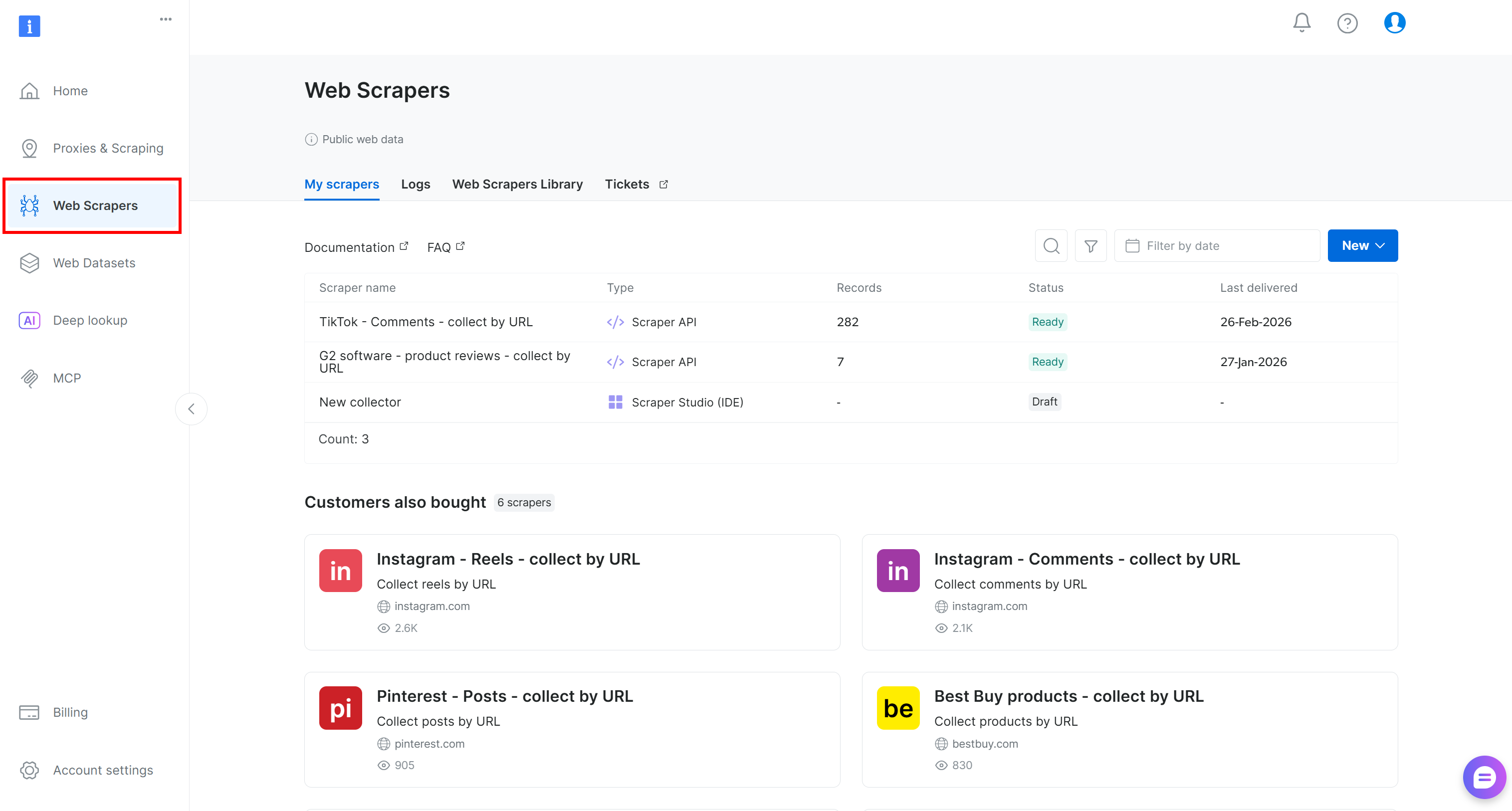
转到 “Web Scrapers Library” 标签页。你将看到 120+ 个面向互联网热门平台的现成采集器。
在本教程中,搜索 “tiktok.com”,因为我们的目标是获取 TikTok 帖子的实时评论数据并对其进行情感分析。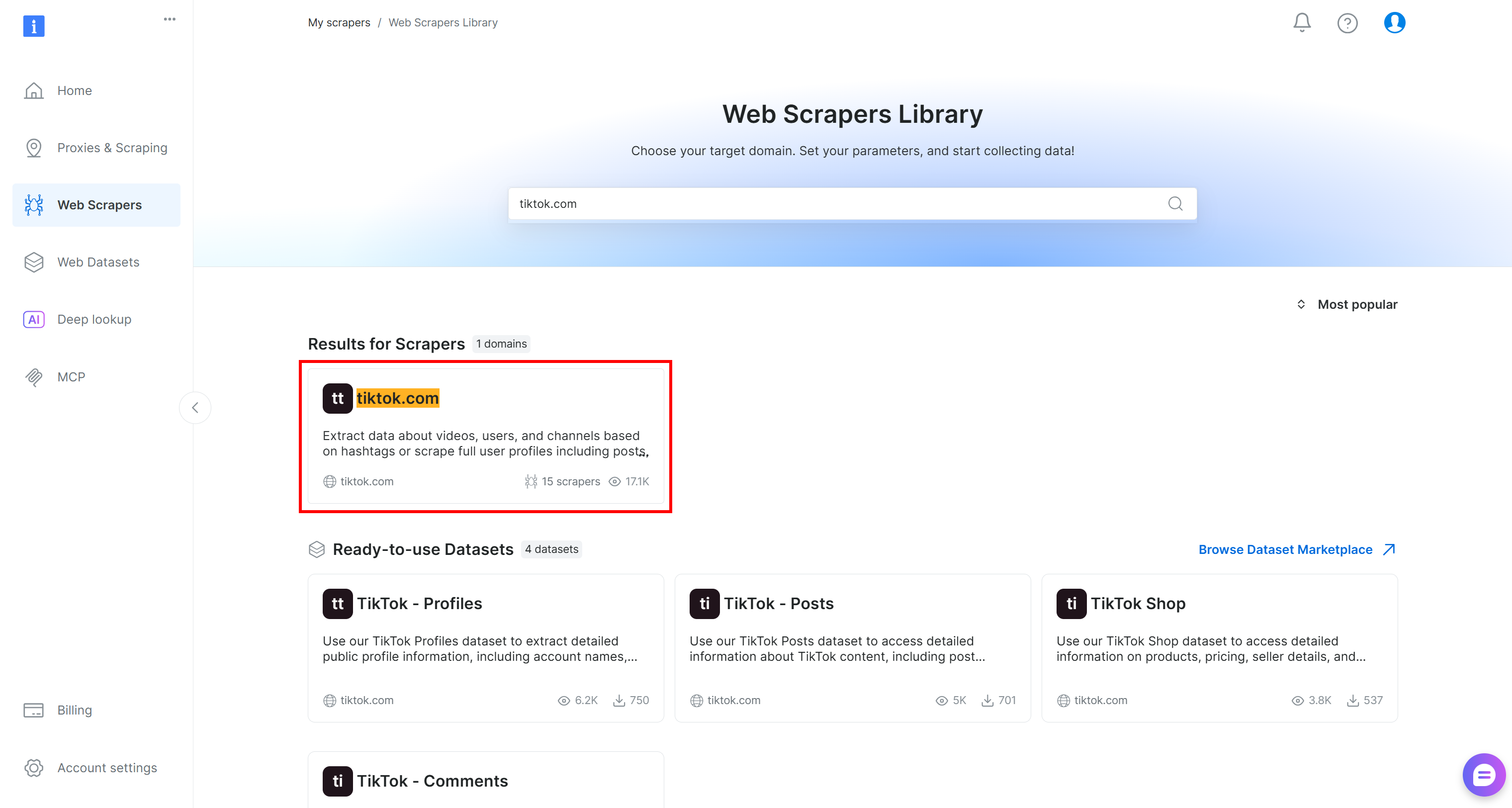
进入 TikTok scraper 页面 后,查看可用的抓取端点。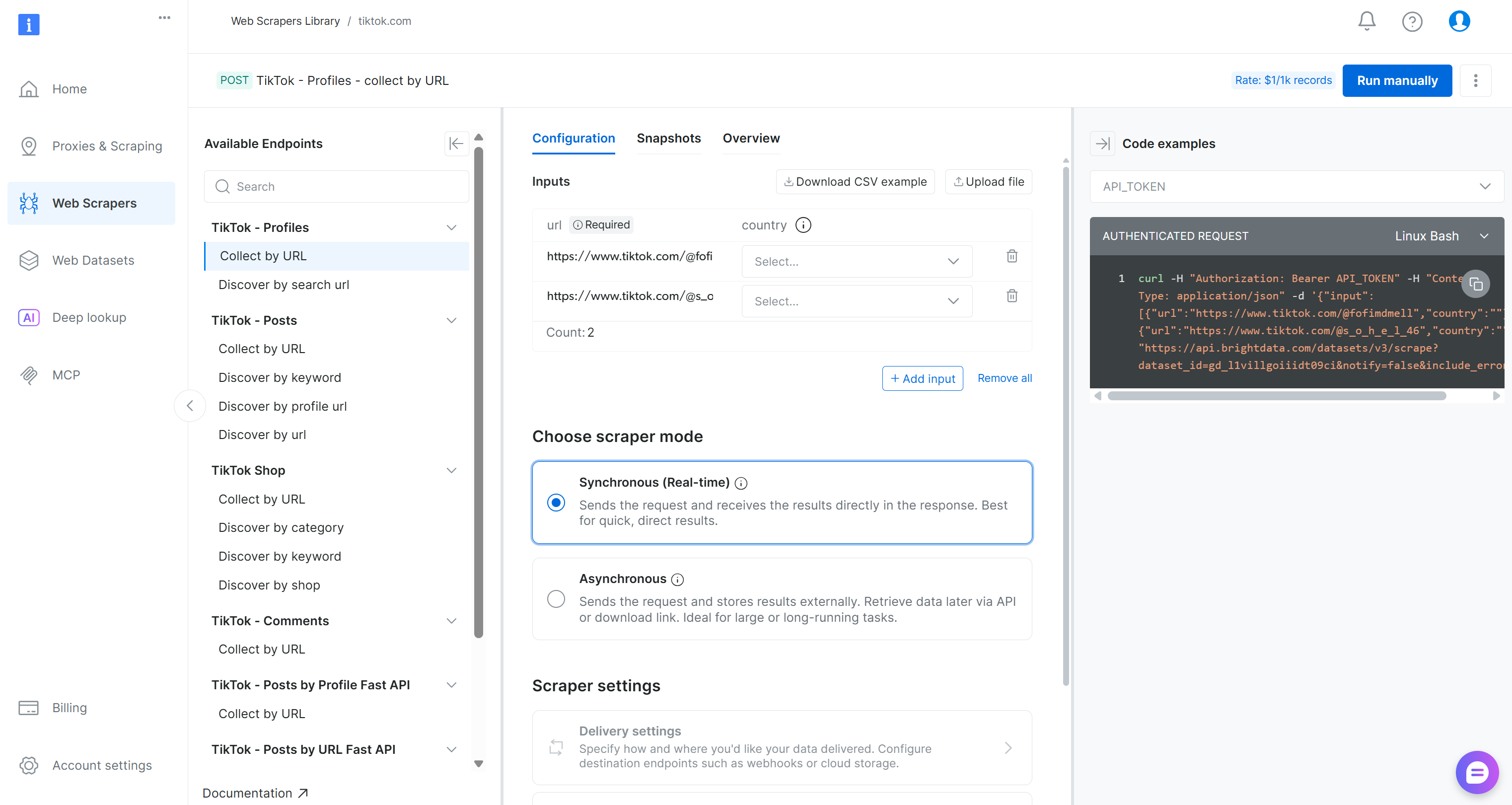
在这里,你可以配置输入参数、检查请求/响应格式、查看示例 API 调用等。
对于本流水线,在 “TikTok – Comments” 下拉菜单中找到 “Collect by URL” 采集器: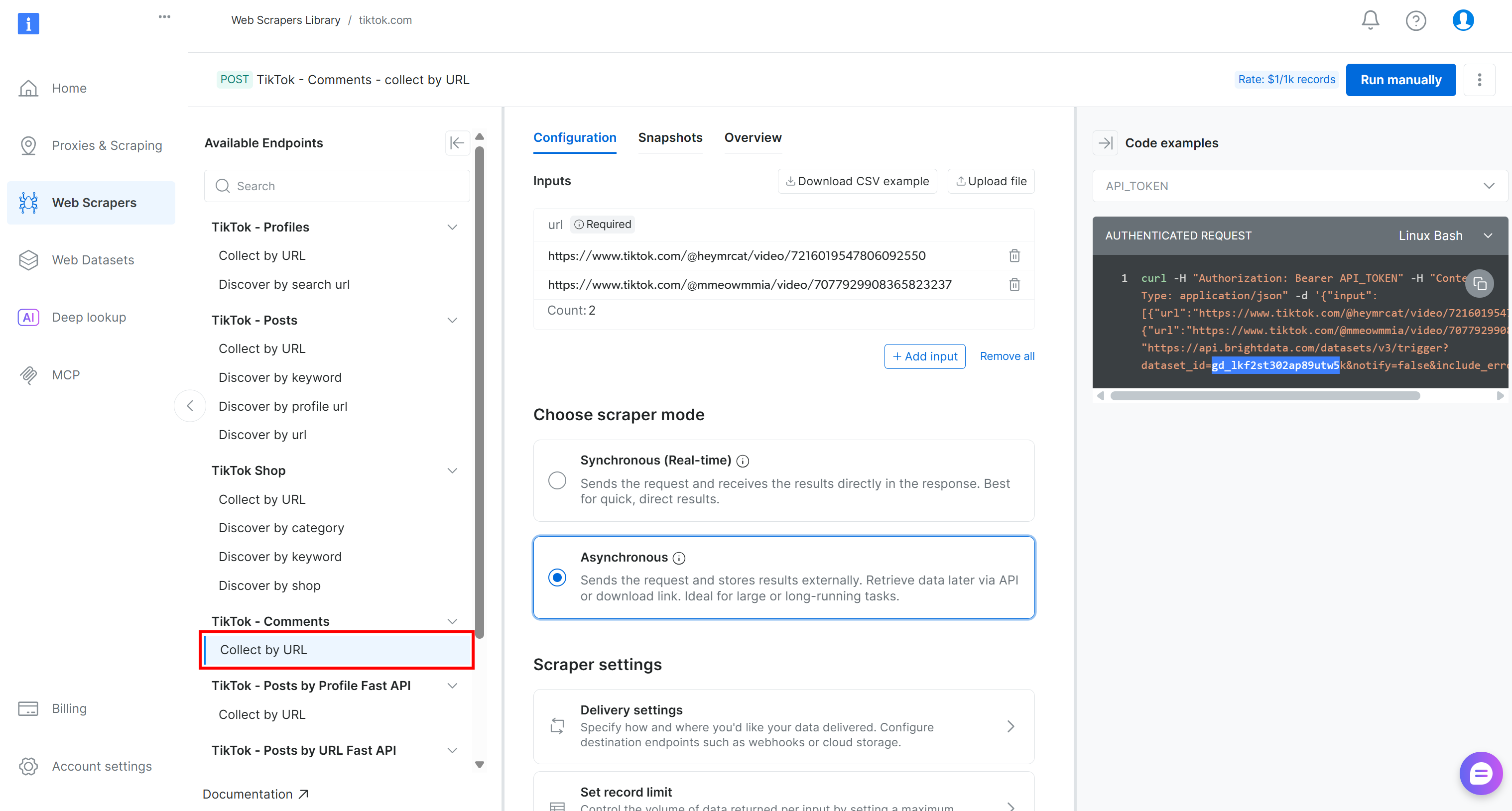
这就是你将在 Kubeflow 流水线的数据采集组件中使用的、由 Bright Data 驱动的端点。
记下它的 dataset ID:
gd_lkf2st302ap89utw5k你将需要它来触发用于采集 TikTok 评论数据的特定 Web Scraping API。
另外,如你在右侧代码片段中所见,对 Web Scraping APIs 的 Bright Data API 调用使用 API_TOKEN 进行认证。该值应替换为你的 Bright Data API key,这是 认证 API 请求 的推荐方式。
按文档说明获取你的 API key 并妥善保管。下一步会用到它!
步骤 #3:定义网络数据采集组件
通过与 Bright Data Web Scraping API(用于 TikTok 抓取)集成,实现用于网络数据采集的 Kubeflow 流水线组件:
@dsl.component(
    base_image="python:3.10",
    packages_to_install=["requests"]
)
def collect_tiktok_comments(post_urls: list, output_dataset: Output[Dataset]):
    import requests, time, json, os

    BRIGHT_DATA_API_KEY = "<YOUR_BRIGHT_DATA_API_KEY>" # Replace with your Bright Data API key
    # The ID of the "TikTok – Comments → Collect by URL" Bright Data web scraping API
    TIKTOK_DATASET_ID = "gd_lkf2st302ap89utw5k"

    # The HTTP headers common to all requests to Bright Data
    headers = {"Authorization": f"Bearer {BRIGHT_DATA_API_KEY}", "Content-Type": "application/json"}

    # Trigger the Bright Data Web Scraping API on the input TikTok posts
    trigger = requests.post(
        f"https://api.brightdata.com/datasets/v3/trigger?dataset_id={TIKTOK_DATASET_ID}",
        headers=headers,
        json={"input": [{"url": u} for u in post_urls]},
    )
    trigger.raise_for_status()
    # Retrieve the data snaptshot ID
    snapshot_id = trigger.json()["snapshot_id"]

    # Poll the snapshot endpoint to check whether the snapshot
    # containing the data of interest has been produced
    scraped_data = []
    status = "running"
    while status in ["running", "building", "starting"]:
        progress = requests.get(f"https://api.brightdata.com/datasets/v3/snapshot/{snapshot_id}?format=json", headers=headers)
        progress.raise_for_status()

        # Access the JSON response data
        response_data = progress.json()
        # If the response does not include a status, it means it contains the scraped data
        if isinstance(response_data, dict) and "status" in response_data:
            # Extract the current snapshot status
            status = progress.json()["status"]
            # Waiting for 5 seconds for the next check
            time.sleep(5)
        else:
            scraped_data = response_data
            break

    # Store the scraped dataset
    with open(output_dataset.path, "w", encoding="utf-8") as f:
json.dump(scraped_data, f, ensure_ascii=False, indent=2)注意:请务必将 <YOUR_BRIGHT_DATA_API_KEY> 占位符替换为你前面获取的 Bright Data API key。在生产级流水线中,不要在组件里硬编码密钥。应改为安全地管理密钥,例如按文档所述 使用 Kubernetes Secret。
在 Kubeflow Pipelines 中,组件是一个自包含单元(通过 dsl.component 注解定义),用于执行特定任务。本例中,该组件从 Bright Data 获取网络数据。每个组件都会被打包进一个 Docker 容器。
在该组件中,基础镜像为 Python 3.10 环境,然后加入 requests 库,用于向 Bright Data 的 API 端点发起 HTTP 请求。部署时构建组件时,会拉取 Python 3.10 镜像并自动安装 requests。
Bright Data 的 Web Scraping APIs 同时支持 同步 与 异步数据交付。同步方式适用于快速取数;异步方式更适合大规模数据集。对于生产级流水线,通常推荐使用异步方式。
在异步方式下,请求数据时可能无法立即返回。Bright Data 会生成所请求数据的快照(snapshot),可能需要几秒或更久。因此需要轮询机制:重复检查快照是否可用,然后再获取数据。
基于此,该网络数据组件的代码工作流程如下:
- 发送数据请求:组件向 Bright Data 发起 API 调用,开始生成所请求数据的快照。
- 轮询快照端点:组件反复调用快照端点检查状态。如果响应包含
status字段且值为 “running”,则说明快照仍在准备中;如果status字段不存在,则表示快照已就绪且响应中包含抓取数据。 - 获取数据:快照就绪后,组件从 API 响应中提取数据,并提供给流水线下游组件使用。
太棒了!用于网络数据采集的 Kubeflow 流水线组件已经完成。
步骤 #4:构建情感分析组件
抓取到的 TikTok 数据将以 JSON 数组形式返回,结构如下: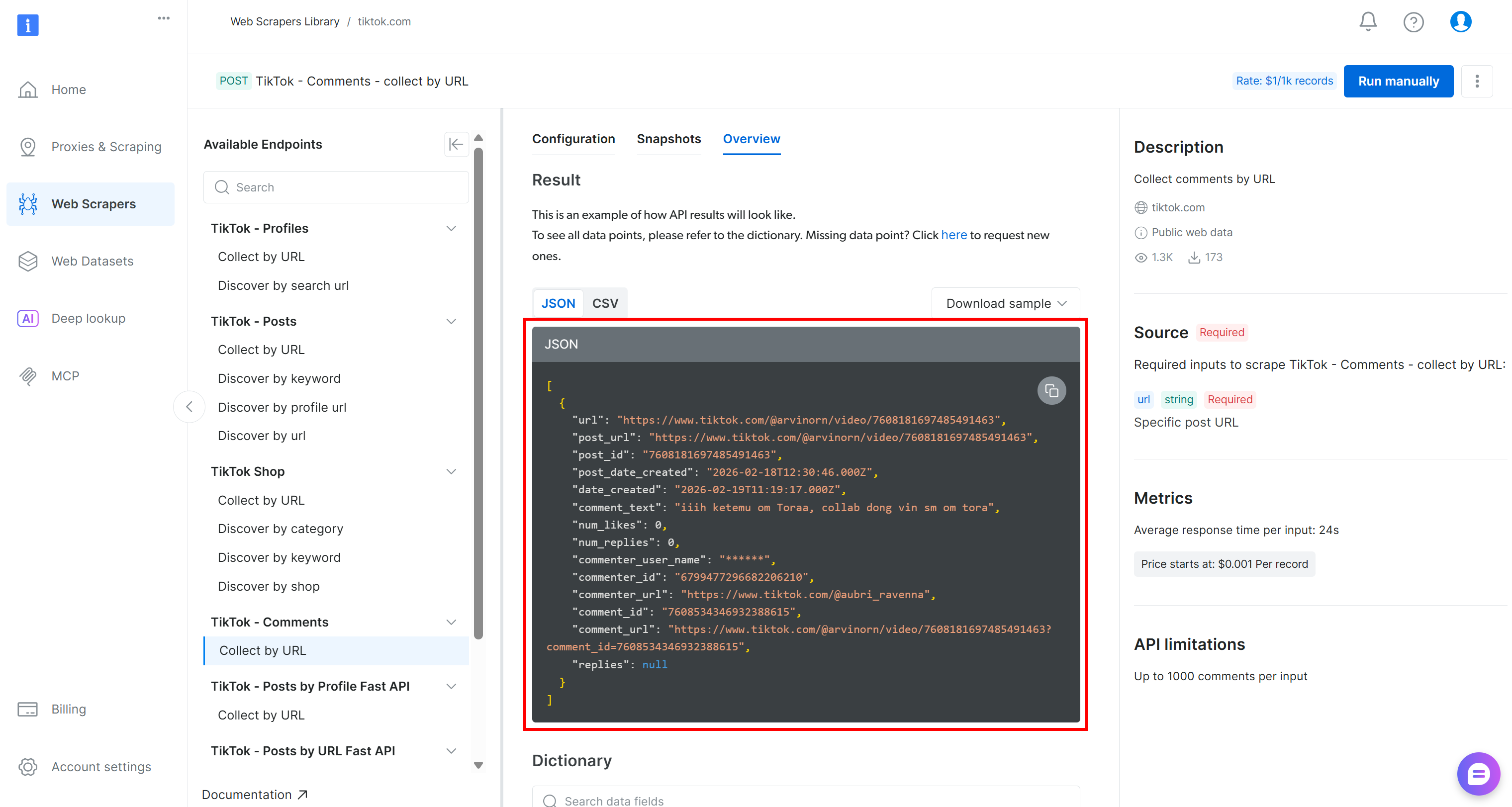
要对这些数据做情感分析,你可以将 comment_text 字段传给情感分析工具,例如 VADER Sentiment Analysis。VADER 是基于词典与规则的方法,专为捕捉社交媒体语境中的情绪表达而设计。当然,你也可以使用其他情感分析方法,包括基于 AI 的模型。
VADER 被包含在 NLTK 中,这是最流行的 Python 自然语言处理工具包之一。典型工作流为:
- 从上一个组件读取输入 JSON 数组(抓取到的 TikTok 评论)。
- 使用
pandas简化数据过滤与选择。 - 通过
nltk将文本传入 VADER Sentiment Analyzer。 - 将分析结果保存下来供下游组件使用。
综合以上,情感分析组件可实现为:
@dsl.component(
    base_image="python:3.10",
    packages_to_install=["pandas", "nltk"]
)
def sentiment_analysis(input_dataset: Input[Dataset], sentiment_output: Output[Dataset]):
    import pandas as pd
    from nltk.sentiment import SentimentIntensityAnalyzer
    import nltk

    # Download the VADER sentiment lexicon (used by NLTK for sentiment scoring)
    nltk.download("vader_lexicon")

    # Load the input dataset containing TikTok comments
    df = pd.read_json(input_dataset.path)

    # Initialize the sentiment analyzer
    sia = SentimentIntensityAnalyzer()

    # Apply sentiment analysis to each comment and classify as positive, negative, or neutral
    df["sentiment"] = df["comment_text"].apply(lambda t: (
        "positive" if sia.polarity_scores(str(t))["compound"] >= 0.05 else
        "negative" if sia.polarity_scores(str(t))["compound"] <= -0.05 else "neutral"
    ))

    # Save the results to the output dataset for downstream components
    df.to_json(sentiment_output.path, orient="records")
很好!流水线的两个主要组件(网络数据采集与情感分析)现在都已完整实现。
步骤 #5:完成 Kubeflow 流水线
现在两个组件都准备好了,你可以用带有 dsl.pipeline 注解的函数,将它们组合成一个 Kubeflow 流水线:
@dsl.pipeline(name="TikTok Sentiment Pipeline")
def tiktok_sentiment_pipeline():
    # List of TikTok post URLs to scrape comments from
    tiktok_post_urls = [
        "https://www.tiktok.com/@nike/video/7600211777267272991",
        "https://www.tiktok.com/@nike/video/7556252854294482189"
    ]

    # Collect TikTok comments using the Bright Data web scraping component
    collect_task = collect_tiktok_comments(post_urls=tiktok_post_urls)

    # Perform sentiment analysis on the collected comments
    sentiment_task = sentiment_analysis(
        input_dataset=collect_task.outputs["output_dataset"]
)该流水线会先对同一账号(@nike)的两个目标视频运行 TikTok 评论采集组件。具体来说,这两个 TikTok 视频之所以被选中,是因为它们展示了新鞋款。对其进行情感分析对于业务至关重要,有助于理解受众对新品发布的看法。
通过 Bright Data Web Scraping API 生成的数据集会被传递给下游的情感分析组件。情感分析步骤会处理抓取到的评论,并生成一个包含情感标签(positive、negative 或 neutral)的新数据集。该输出可被更多下游组件使用,例如报表或可视化。
非常好!Kubeflow 流水线现在已完整定义。
步骤 #6:编译流水线
最后一步是将流水线编译成 Kubeflow YAML 流水线文件:
if __name__ == "__main__":
    compiler.Compiler().compile(
        pipeline_func=tiktok_sentiment_pipeline,
        package_path="tiktok_sentiment_analysis_kfp_pipeline.yaml"
    )
当你运行 tiktok_sentiment_analysis_kfp_pipeline.py 脚本时,这段代码会生成名为 tiktok_sentiment_analysis_kfp_pipeline.yaml 的文件。该 YAML 文件包含 Kubeflow 部署所需的完整流水线规范。任务完成!
步骤 #7:最终代码
下面是你在 tiktok_sentiment_analysis_kfp_pipeline.py 文件中应得到的完整 Kubeflow 流水线:
# tiktok_sentiment_analysis_kfp_pipeline.py
# pip install kfp

from kfp import dsl, compiler
from kfp.dsl import Input, Output, Dataset


@dsl.component(
    base_image="python:3.10",
    packages_to_install=["requests"]
)
def collect_tiktok_comments(post_urls: list, output_dataset: Output[Dataset]):
    import requests, time, json, os

    BRIGHT_DATA_API_KEY = "<YOUR_BRIGHT_DATA_API_KEY>" # Replace with your Bright Data API key
    # The ID of the "TikTok – Comments → Collect by URL" Bright Data web scraping API
    TIKTOK_DATASET_ID = "gd_lkf2st302ap89utw5k"

    # The HTTP headers common to all requests to Bright Data
    headers = {"Authorization": f"Bearer {BRIGHT_DATA_API_KEY}", "Content-Type": "application/json"}

    # Trigger the Bright Data Web Scraping API on the input TikTok posts
    trigger = requests.post(
        f"https://api.brightdata.com/datasets/v3/trigger?dataset_id={TIKTOK_DATASET_ID}",
        headers=headers,
        json={"input": [{"url": u} for u in post_urls]},
    )
    trigger.raise_for_status()
    # Retrieve the data snaptshot ID
    snapshot_id = trigger.json()["snapshot_id"]

    # Poll the snapshot endpoint to check whether the snapshot
    # containing the data of interest has been produced
    scraped_data = []
    status = "running"
    while status in ["running", "building", "starting"]:
        progress = requests.get(f"https://api.brightdata.com/datasets/v3/snapshot/{snapshot_id}?format=json", headers=headers)
        progress.raise_for_status()

        # Access the JSON response data
        response_data = progress.json()
        # If the response does not include a status, it means it contains the scraped data
        if isinstance(response_data, dict) and "status" in response_data:
            # Extract the current snapshot status
            status = progress.json()["status"]
            # Waiting for 5 seconds for the next check
            time.sleep(5)
        else:
            scraped_data = response_data
            break

    # Store the scraped dataset
    with open(output_dataset.path, "w", encoding="utf-8") as f:
        json.dump(scraped_data, f, ensure_ascii=False, indent=2)


@dsl.component(
    base_image="python:3.10",
    packages_to_install=["pandas", "nltk"]
)
def sentiment_analysis(input_dataset: Input[Dataset], sentiment_output: Output[Dataset]):
    import pandas as pd
    from nltk.sentiment import SentimentIntensityAnalyzer
    import nltk

    # Download the VADER sentiment lexicon (used by NLTK for sentiment scoring)
    nltk.download("vader_lexicon")

    # Load the input dataset containing TikTok comments
    df = pd.read_json(input_dataset.path)

    # Initialize the sentiment analyzer
    sia = SentimentIntensityAnalyzer()

    # Apply sentiment analysis to each comment and classify as positive, negative, or neutral
    df["sentiment"] = df["comment_text"].apply(lambda t: (
        "positive" if sia.polarity_scores(str(t))["compound"] >= 0.05 else
        "negative" if sia.polarity_scores(str(t))["compound"] <= -0.05 else "neutral"
    ))

    # Save the results to the output dataset for downstream components
    df.to_json(sentiment_output.path, orient="records")


@dsl.pipeline(name="TikTok Sentiment Pipeline")
def tiktok_sentiment_pipeline():
    # List of TikTok post URLs to scrape comments from
    tiktok_post_urls = [
        "https://www.tiktok.com/@nike/video/7600211777267272991",
        "https://www.tiktok.com/@nike/video/7556252854294482189"
    ]

    # Collect TikTok comments using the Bright Data web scraping component
    collect_task = collect_tiktok_comments(post_urls=tiktok_post_urls)

    # Perform sentiment analysis on the collected comments
    sentiment_task = sentiment_analysis(
        input_dataset=collect_task.outputs["output_dataset"]
    )


if __name__ == "__main__":
    compiler.Compiler().compile(
        pipeline_func=tiktok_sentiment_pipeline,
        package_path="tiktok_sentiment_analysis_kfp_pipeline.yaml"
    )
用以下命令运行上述脚本:
python3 tiktok_sentiment_analysis_kfp_pipeline.py运行后应生成名为 tiktok_sentiment_analysis_kfp_pipeline.yaml 的文件,如下所示: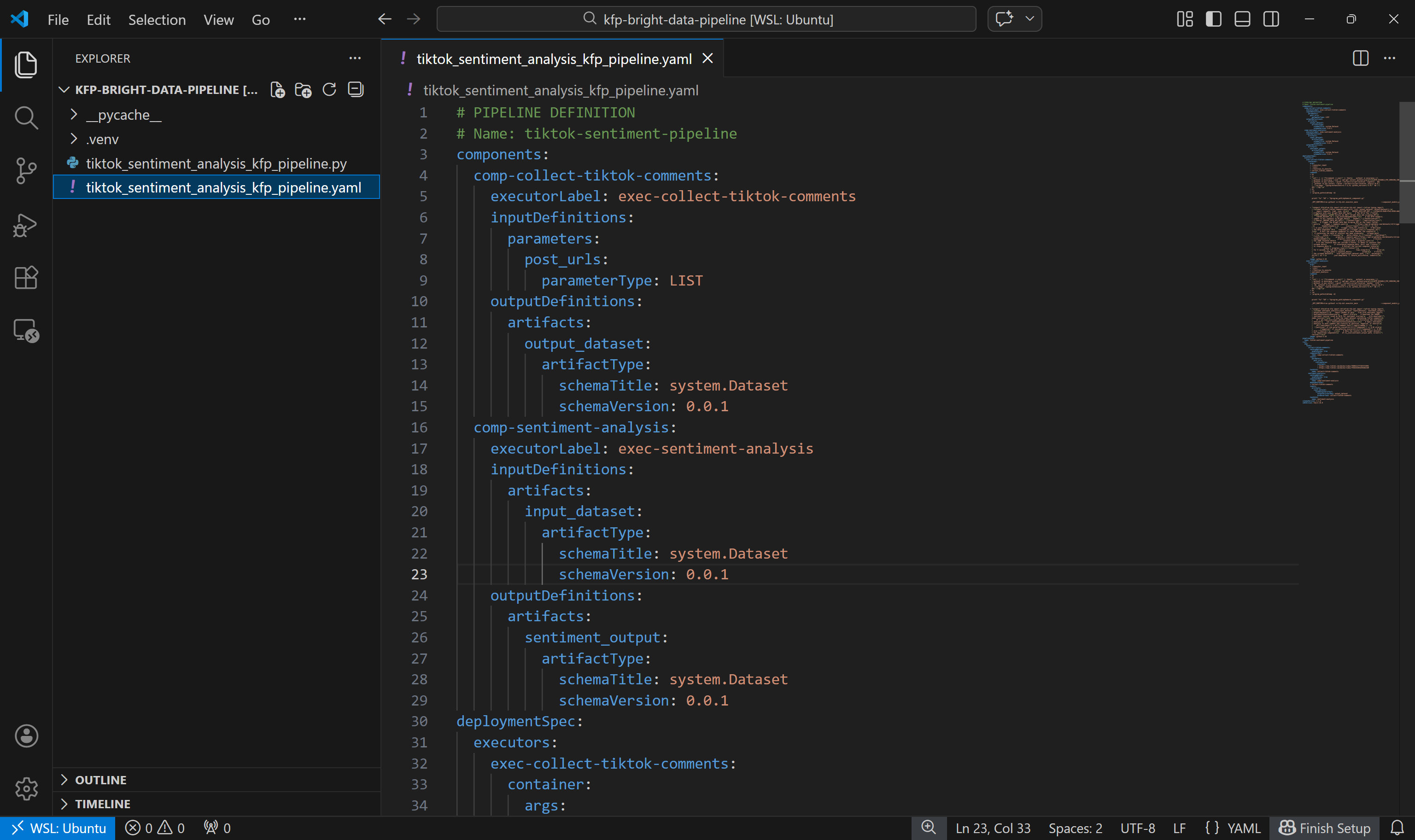
现在你可以将其部署到 Kubeflow 进行测试,或使用 Docker 在本地运行。本指南将重点介绍第二种方式。
步骤 #8:在本地测试 Kubeflow 流水线
要在本地运行 Kubeflow 流水线,你可以使用 DockerRunner 类。这要求你的机器已安装并运行 Docker。
DockerRunner 会在独立的 Docker 容器中执行每个流水线任务。换句话说,它模拟了流水线在真实 Kubeflow 环境中的运行方式。
在虚拟环境激活状态下,先安装所需的 docker 库:
pip install docker 接着,在项目目录中添加一个 run_pipeline_local.py 文件:
kfp-bright-data-pipeline/
├── .venv/
├── run_pipeline_local.py # <-----------
├── tiktok_sentiment_analysis_kfp_pipeline.py
└── tiktok_sentiment_analysis_kfp_pipeline.yaml
内容如下:
# run_pipeline_local.py
# pip install docker

from kfp import local
from tiktok_sentiment_analysis_kfp_pipeline import tiktok_sentiment_pipeline

# initialize the local Docker runner
local.init(runner=local.DockerRunner())

# Run the pipeline as a Python function call
pipeline_task = tiktok_sentiment_pipeline()
该脚本从 tiktok_sentiment_analysis_kfp_pipeline.py 导入 tiktok_sentiment_pipeline(),并通过本地 Docker runner 运行它,使每个组件在自己的容器中执行。
测试流水线前,请确认 Docker 正在运行。然后执行:
python3 run_pipeline_local.py执行日志应显示类似下方的成功信息:
流水线输出将保存在 ./local_outputs 目录中。现在就来查看结果吧!
步骤 #9:查看流水线结果
运行流水线后,打开 ./local_outputs 文件夹。在其中,你会找到当前运行对应的子文件夹,包含所有生成的产物(artifacts)。
首先查看由 collect-tiktok-comments 组件生成的输出数据集: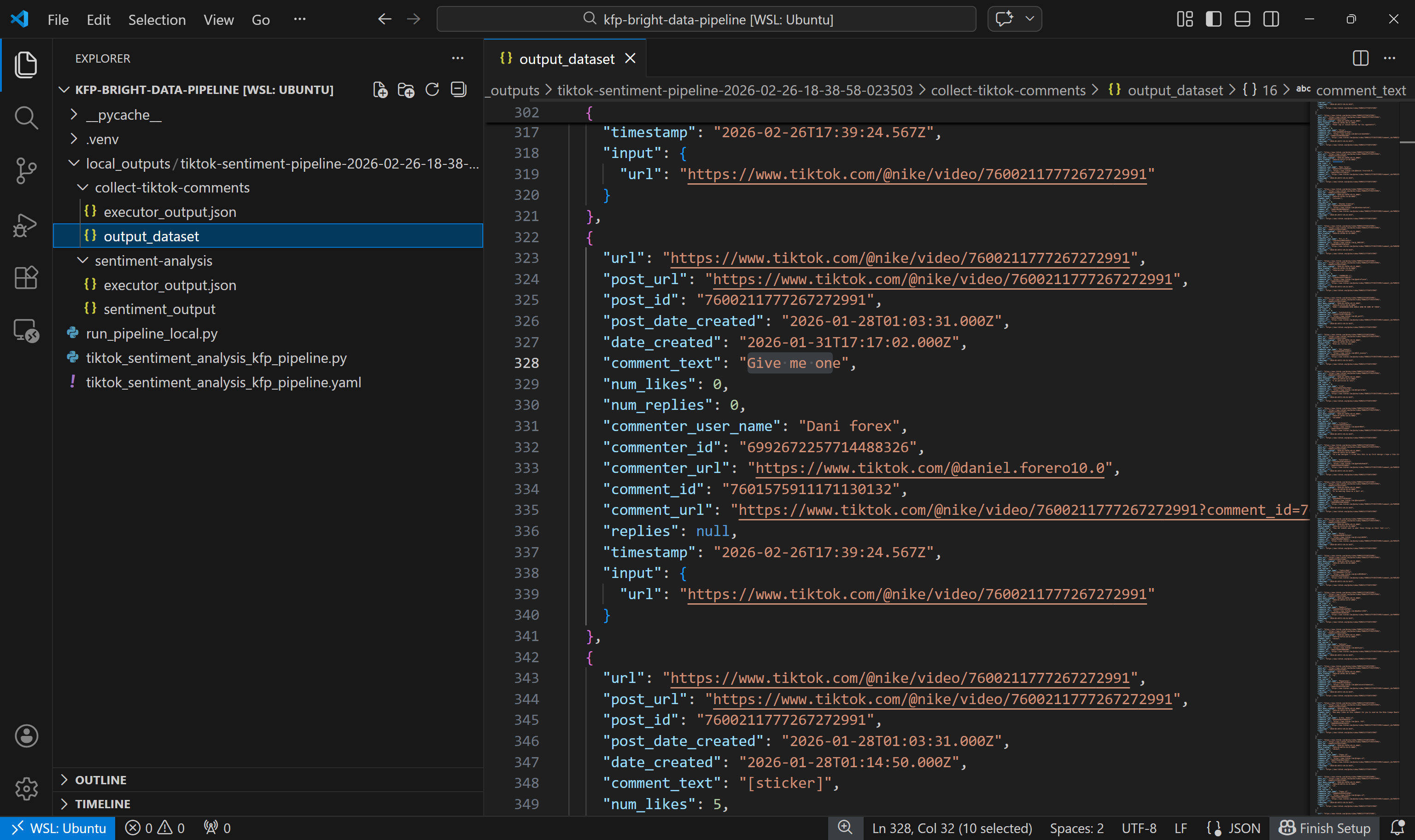
如预期所示,该数据集包含通过 Bright Data 的 TikTok Scraper 从两个指定帖子返回的评论。
接着,查看情感分析输出数据集: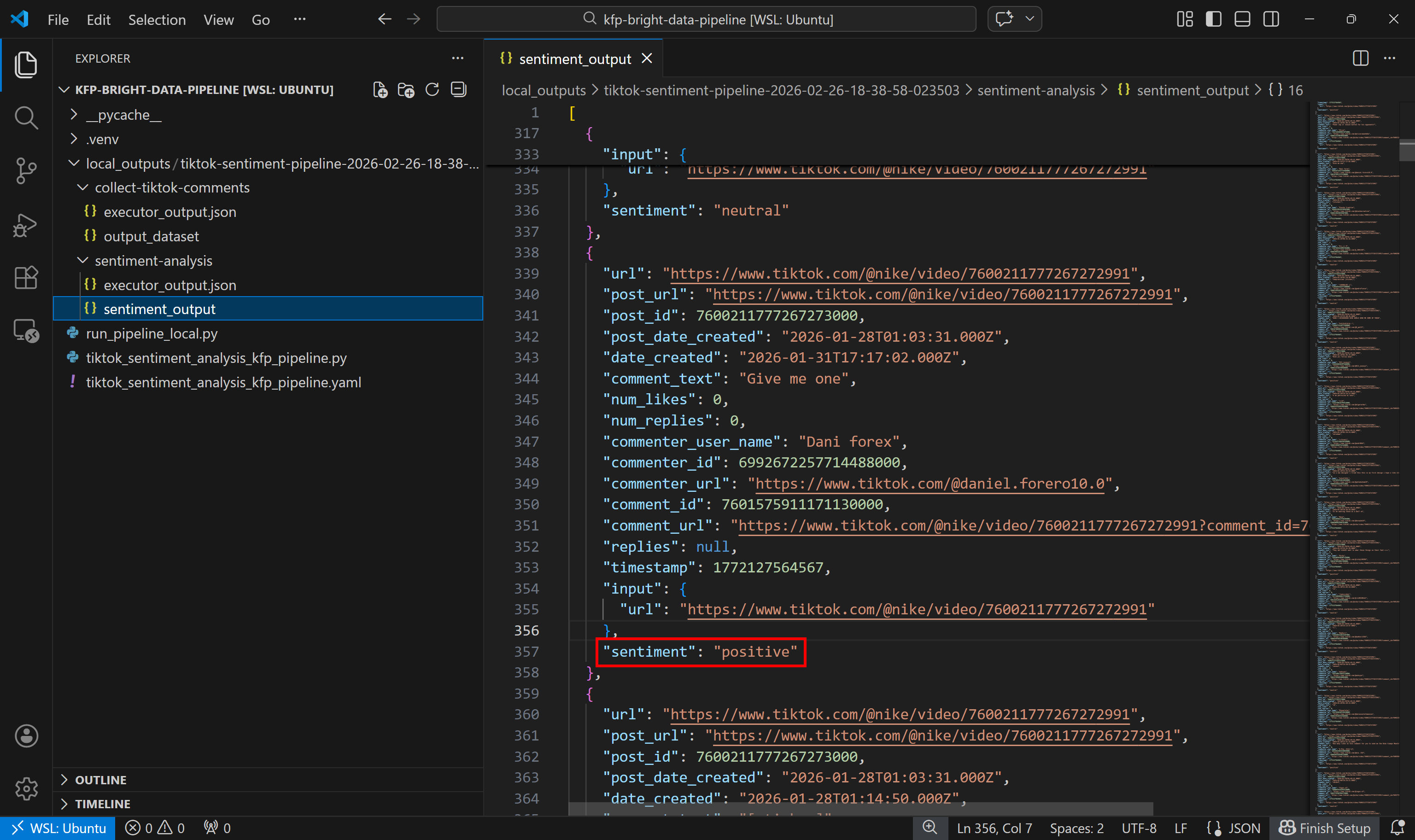
可以看到,每条评论都被情感分析组件标注为了 positive、negative 或 neutral。
大功告成!你已经了解了如何构建一个 Kubeflow 流水线:使用 Bright Data 获取最新网页数据,并对其进行分析。
结论
在本教程中,你理解了为什么 Kubeflow 流水线会受益于通过网页抓取获取的新鲜数据。尤其是,你看到了在流水线中设置一个专门组件来采集来自网络的最新、具备上下文、结构化的数据的重要性。
Bright Data 通过丰富的 Web Scraping APIs 为此提供支持,它们可作为你的流水线的结构化数据源。正如本文演示的那样,借助 Bright Data 的抓取 API,在 Kubeflow 流水线中构建网络数据采集组件非常直接!
立即创建一个免费的 Bright Data 账户,开始探索我们的网络数据解决方案!



技术写作
 5.5 years experience
Antonello是一名软件工程师,但他更喜欢称自己为技术传教士。通过写作传播知识是他的使命。