


指纹浏览器
款云端托管的浏览器,自动轮换浏览器指纹、住宅 IP 和请求头,模拟真实用户行为,绕过最先进的反机器人系统。让您的 Puppeteer、Playwright 或 Selenium 脚本实现无限规模运行。

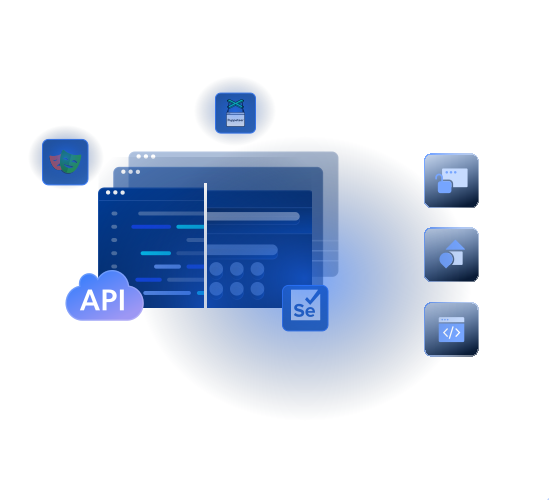
- 自动扩缩基础设施
- 通过 Chrome DevTools 实时监控
- 全球地理位置与 ASN 定向
- 从 JavaScript 密集型站点提取数据


全球 超50000 位客户信赖

















基于云的动态抓取
指纹浏览器专为基于浏览器的数据采集工作流而设计,支持完整页面渲染、模拟用户交互,并具备高级解锁能力。

轻松集成
通过 Puppeteer、Selenium 或 Playwright 连接,只需改动一个 endpoint。

内置调试
使用 Chrome DevTools 实时排障并监控你的抓取会话。

完全托管的浏览器
云端托管浏览器,内置代理轮换,针对大规模抓取优化。
                              const pw = require('playwright');

const SBR_CDP = 'wss://brd-customer-CUSTOMER_ID-zone-ZONE_NAME:[email protected]:9222';

async function main() {
    console.log('Connecting to Browser API...');
    const browser = await pw.chromium.connectOverCDP(SBR_CDP);
    try {
        const page = await browser.newPage();
        console.log('Connected! Navigating to https://example.com...');
        await page.goto('https://example.com');
        console.log('Navigated! Scraping page content...');
        const html = await page.content();
        console.log(html);
    } finally {
        await browser.close();
    }
}

main().catch(err => {
    console.error(err.stack || err);
    process.exit(1);
});
                              import asyncio
from playwright.async_api import async_playwright

SBR_WS_CDP = 'wss://brd-customer-CUSTOMER_ID-zone-ZONE_NAME:[email protected]:9222'

async def run(pw):
    print('Connecting to Browser API...')
    browser = await pw.chromium.connect_over_cdp(SBR_WS_CDP)
    try:
        page = await browser.new_page()
        print('Connected! Navigating to https://example.com...')
        await page.goto('https://example.com')
        print('Navigated! Scraping page content...')
        html = await page.content()
        print(html)
    finally:
        await browser.close()

async def main():
    async with async_playwright() as playwright:
        await run(playwright)

if __name__ == '__main__':
    asyncio.run(main())
                              const puppeteer = require('puppeteer-core');

const SBR_WS_ENDPOINT = 'wss://brd-customer-CUSTOMER_ID-zone-ZONE_NAME:[email protected]:9222';

async function main() {
    console.log('Connecting to Browser API...');
    const browser = await puppeteer.connect({
        browserWSEndpoint: SBR_WS_ENDPOINT,
    });
    try {
        const page = await browser.newPage();
        console.log('Connected! Navigating to https://example.com...');
        await page.goto('https://example.com');
        console.log('Navigated! Scraping page content...');
        const html = await page.content();
        console.log(html)
    } finally {
        await browser.close();
    }
}

main().catch(err => {
    console.error(err.stack || err);
    process.exit(1);
});
                              const { Builder, Browser } = require('selenium-webdriver');

const SBR_WEBDRIVER = 'https://brd-customer-CUSTOMER_ID-zone-ZONE_NAME:[email protected]:9515';

async function main() {
    console.log('Connecting to Browser API...');
    const driver = await new Builder()
        .forBrowser(Browser.CHROME)
        .usingServer(SBR_WEBDRIVER)
        .build();
    try {
        console.log('Connected! Navigating to https://example.com...');
        await driver.get('https://example.com');
        console.log('Navigated! Scraping page content...');
        const html = await driver.getPageSource();
        console.log(html);
    } finally {
        driver.quit();
    }
}

main().catch(err => {
    console.error(err.stack || err);
    process.exit(1);
});
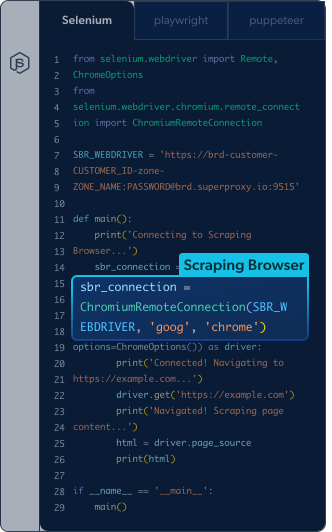
                              from selenium.webdriver import Remote, ChromeOptions
from selenium.webdriver.chromium.remote_connection import ChromiumRemoteConnection

SBR_WEBDRIVER = 'https://brd-customer-CUSTOMER_ID-zone-ZONE_NAME:[email protected]:9515'

def main():
    print('Connecting to Browser API...')
    sbr_connection = ChromiumRemoteConnection(SBR_WEBDRIVER, 'goog', 'chrome')
    with Remote(sbr_connection, options=ChromeOptions()) as driver:
        print('Connected! Navigating to https://example.com...')
        driver.get('https://example.com')
        print('Navigated! Scraping page content...')
        html = driver.page_source
        print(html)

if __name__ == '__main__':
    main()
启用自主解锁能力

浏览器指纹识别
模拟真实用户的浏览器,打造类人的使用体验

验证码求解
分析并求解验证码及挑战-响应测试

管理特定 User Agent
自动模拟不同类型的浏览器与设备

设置引用来源 Headers
模拟来自热门或可信网站的访问流量

处理 Cookies
避免由 Cookie 相关因素导致的潜在封锁

自动重试与 IP 轮换
在后台持续重试请求,并轮换 IP

全球地理覆盖
访问任意国家、城市、州/省或 ASN 的本地化内容

JavaScript 渲染
从依赖动态元素的网站中提取数据

数据完整性校验
确保数据的准确性、一致性与可靠性
指纹浏览器定价


- 专属客户经理
- 定制套餐
- 高级服务水平协议
- 优先支持
- 个性化的使用流程引导
- 单点登录 (SSO)
- 定制化
- 审核日志

通过AWS Marketplace付款
通过AWS Marketplace简化支付流程,提升采购和账单处理效率。使用现有的AWS承诺并享受AWS优惠。
浏览器 API 的优势

降低基础设施开销
通过一个 API 即可完成浏览器环境搭建并自动扩缩,提供无限并发会话与工作负载,用于持续抓取

提升成功率
无需再构建解锁补丁;通过内置网络解锁器与超大规模住宅 IP 池,为访问任意公开网页数据提供长期保障

提升开发者生产力
只需一行代码即可在混合云中运行现有脚本,让开发者“聚焦关键”,从繁琐的抓取运维中解放出来
由屡获殊荣的代理网络提供支持
超40000万 monthly 个代理 IP、业内领先技术,以及定向到任意国家/地区、城市、邮编、运营商和 ASN 的能力,使我们的优质 代理服务 成为开发者的首选。

浏览器基础设施自动扩缩
将你的交互式、多步骤抓取脚本连接到混合浏览器环境中,只需一行代码即可提供无限并发会话

兼容 Chrome DevTools
使用 Chrome DevTools 调试器,无缝监控并排查 Browser API 的性能问题
7x24 小时支持
获得全天候专家支持,快速解决问题并确保高质量数据交付。实时查看网络状态,实现完全透明
Bright Data 为全球顶级品牌提供支持
Bright Data 让自主 AI 代理能够在简单易集成、稳定可靠的环境中自动导航网站、查找信息并执行操作
 Bright Data 的浏览器基础设施帮助我们将 AI 代理扩展到更复杂的任务,让我们能够专注于为客户提供真正的价值,而不必再在浏览器基础设施上纠缠不清。
 Devi ParikhYutori,联合创始人
第八部分 —— 常见问题
什么是指纹浏览器?
指纹浏览器是一种可以控制和随机化网站用于识别自动化流量的独特标识符(User-Agent、Canvas、WebGL、TLS、字体、时区等)的浏览器。Bright Data 指纹浏览器在云端自动完成这些操作。
它与 Multilogin、AdsPower、比特浏览器、Kameleo 有什么区别?
这些都是需要本地安装和管理的桌面应用。Bright Data 指纹浏览器是完全托管的云服务,内置住宅代理、验证码解决和无限并发会话,全部通过 Puppeteer/Playwright/Selenium 控制。
支持 Puppeteer、Playwright 和 Selenium 吗?
完全支持。Browser API 可无缝集成标准浏览器自动化工具,包括 Puppeteer、Playwright 和 Selenium。
能在多个请求之间保持相同的 IP 吗?
Browser API 通过自定义 CDP 函数支持跨多个浏览器会话保持相同的 IP 地址。这允许您通过将多个请求关联到相同的会话 ID 来复用同一个代理节点。
是否支持账号登录?
Bright Data 致力于仅采集公开数据。为遵守这一承诺,Browser API 默认禁用密码输入功能以防止任何账号登录尝试。如需例外授权,需先完成 KYC 流程。
这是无头浏览器还是有头浏览器?
Bright Data 指纹浏览器是运行在云端基础设施上的真实 GUI("有头")浏览器,比无头 Chrome 更难被反爬系统识别。
价格如何计算?
仅根据通过浏览器传输的流量(GB)计费。不收取实例时间、并发会话或浏览器运行时长的费用。