
如果你进行网页爬虫已有一段时间,可能遇到过被地理围栏或 IP 封禁阻挡的网站。代理服务器可帮助你应对这些情况,隐藏你的真实身份,并授予对受限资源的访问权限。
Rust 代理服务器可以轻松实现以下操作:
- 避免 IP 封禁: 一个新的代理 IP 可让你绕过封禁大锤并恢复爬虫。
- 绕过地理封锁: 如果你对另一个国家/地区的内容感兴趣,本地代理会授予你临时的在线公民身份,使受限内容可访问。
- 拥抱匿名性: 代理服务器会隐藏你的真实 IP 地址,保护你的隐私免受窥探。
而这只是冰山一角!Rust 强大的库和健壮的语法让设置和管理代理变得轻而易举。在本文中,你将全面了解代理服务器,以及如何在 Rust 中使用代理服务器进行网页爬虫。
在 Rust 中使用代理服务器
在你可以在 Rust 中使用代理服务器之前,需要先设置一个。在本教程中,你将在本地计算机上的 Nginx 服务器中设置一个代理,并使用它从 Rust 二进制文件向爬虫沙盒(例如 https://toscrape.com/)发送爬虫请求。
首先在你的本地系统上 安装 Nginx。对于 Linux,你可以使用 Homebrew 通过以下命令安装它:
sudo apt install nginx然后使用以下命令启动服务器:
nginx接下来,你需要配置服务器,使其充当某些位置的代理。例如,你可以将其配置为位置 / 的代理,并向它处理的每个请求添加一个标头(即 X-Proxy-Server)。为此,你需要编辑 nginx.conf 文件。
文件位置会根据你的主机操作系统而有所不同。请参考 Nginx 文档 获取帮助。在 Linux 上,你可以在 /etc/nginx/nginx.conf 找到 nginx.conf。打开它,并将以下代码块添加到文件中的 http.server 对象:
http {
    server {

        # Add the following block
        location / {
            resolver 8.8.8.8;
            proxy_pass http://$http_host$request_uri;
            proxy_set_header 'X-Proxy-Server' 'Nginx';
        }

    }
}
这会配置代理将所有传入请求转发到原始 URL,同时向请求添加一个标头。如果你可以访问目标服务器上的日志,就可以检查此标头,以验证请求是通过代理传入的,还是直接来自客户端。
现在,运行以下命令重启 Nginx 服务器:
nginx -s reload此服务器现在已准备好用作爬虫的正向代理。
在 Rust 中创建网页爬虫项目
要设置新的爬虫项目,请使用 Cargo 通过运行以下命令创建一个新的 Rust 二进制文件:
cargo new rust-scraper项目创建后,你需要添加三个 crate。首先,你添加 reqwest 和 scraper。你使用 reqwest 向目标资源发送请求,并使用 scraper 从 reqwest 接收到的 HTML 中提取所需数据。然后添加第三个 crate, tokio,以通过 reqwest 处理异步网络调用。
要安装这些,请在项目目录中运行以下命令:
cargo add scraper reqwest tokio --features "reqwest/blocking tokio/full"接下来,打开 src/main.rs 文件并添加以下代码:
use reqwest;
use std::error::Error;

#[tokio::main]
async fn main()  -> Result<(), Box<dyn Error>>{
    let url = "http://books.toscrape.com/";

    let client = reqwest::Client::new();

    let response = client
        .get(url)
        .send()
        .await?;

    let html_content = response.text().await?;

    extract_products(&html_content);

    Ok(())
}

fn extract_products(html_content: &str) {

    let document = scraper::Html::parse_document(&html_content);

    let html_product_selector = scraper::Selector::parse("article.product_pod").unwrap();
    let html_products = document.select(&html_product_selector);

    let mut products: Vec<Product> = Vec::new();

    for html_product in html_products {
        let url = html_product
            .select(&scraper::Selector::parse("a").unwrap())
            .next()
            .and_then(|a| a.value().attr("href"))
            .map(str::to_owned);
        let image = html_product
            .select(&scraper::Selector::parse("img").unwrap())
            .next()
            .and_then(|img| img.value().attr("src"))
            .map(str::to_owned);
        let name = html_product
            .select(&scraper::Selector::parse("h3").unwrap())
            .next()
            .map(|title| title.text().collect::<String>());
        let price = html_product
            .select(&scraper::Selector::parse(".price_color").unwrap())
            .next()
            .map(|price| price.text().collect::<String>());

        let product = Product {
            url,
            image,
            name,
            price,
        };
        products.push(product);
    }

    println!("{:?}", products);
}

#[derive(Debug)]
struct Product {
    url: Option<String>,
    image: Option<String>,
    name: Option<String>,
    price: Option<String>,
}
此代码使用 reqwest crate 创建客户端,并获取 URL https://books.toscrape.com 处的网页。然后,它在名为 extract_products 的函数中处理页面的 HTML,以从页面中提取产品列表。提取逻辑使用 scraper crate 实现,无论你是否使用代理都保持不变。
现在,是时候尝试运行此二进制文件,看看它是否正确提取产品列表。为此,请运行以下命令:
cargo run你应该会在终端中看到如下所示的输出:
Finished dev [unoptimized + debuginfo] target(s) in 0.80s
     Running `target/debug/rust_scraper`
[Product { url: Some("catalogue/a-light-in-the-attic_1000/index.html"), image: Some("media/cache/2c/da/2cdad67c44b002e7ead0cc35693c0e8b.jpg"), name: Some("A Light in the ..."), price: Some("£51.77") }, Product { url: Some("catalogue/tipping-the-velvet_999/index.html"), image: Some("media/cache/26/0c/260c6ae16bce31c8f8c95daddd9f4a1c.jpg"), name: Some("Tipping the Velvet"), price: Some("£53.74") }, Product { url: Some("catalogue/soumission_998/index.html"), image: Some("media/cache/3e/ef/3eef99c9d9adef34639f510662022830.jpg"), name: Some("Soumission"), price: Some("£50.10") }, Product { url: Some("catalogue/sharp-objects_997/index.html"), image: Some("media/cache/32/51/3251cf3a3412f53f339e42cac2134093.jpg"), name: Some("Sharp Objects"), price: Some("£47.82") }, Product { url: Some("catalogue/sapiens-a-brief-history-of-humankind_996/index.html"), image: Some("media/cache/be/a5/bea5697f2534a2f86a3ef27b5a8c12a6.jpg"), name: Some("Sapiens: A Brief History ..."), price: Some("£54.23") }, Product { url: Some("catalogue/the-requiem-red_995/index.html"), image: Some("media/cache/68/33/68339b4c9bc034267e1da611ab3b34f8.jpg"), name: Some("The Requiem Red"), price: Some("£22.65") }, Product { url: Some("catalogue/the-dirty-little-secrets-of-getting-your-dream-job_994/index.html"), image: Some("media/cache/92/27/92274a95b7c251fea59a2b8a78275ab4.jpg"), name: Some("The Dirty Little Secrets ..."), price: Some("£33.34") }, Product { url: Some("catalogue/the-coming-woman-a-novel-based-on-the-life-of-the-infamous-feminist-victoria-woodhull_993/index.html"), image: Some("media/cache/3d/54/3d54940e57e662c4dd1f3ff00c78cc64.jpg"), name: Some("The Coming Woman: A ..."), price: Some("£17.93") }, Product { url: Some("catalogue/the-boys-in-the-boat-nine-americans-and-their-epic-quest-for-gold-at-the-1936-berlin-olympics_992/index.html"), image: Some("media/cache/66/88/66883b91f6804b2323c8369331cb7dd1.jpg"), name: Some("The Boys in the ..."), price: Some("£22.60") }, Product { url: Some("catalogue/the-black-maria_991/index.html"), image: Some("media/cache/58/46/5846057e28022268153beff6d352b06c.jpg"), name: Some("The Black Maria"), price: Some("£52.15") }, Product { url: Some("catalogue/starving-hearts-triangular-trade-trilogy-1_990/index.html"), image: Some("media/cache/be/f4/bef44da28c98f905a3ebec0b87be8530.jpg"), name: Some("Starving Hearts (Triangular Trade ..."), price: Some("£13.99") }, Product { url: Some("catalogue/shakespeares-sonnets_989/index.html"), image: Some("media/cache/10/48/1048f63d3b5061cd2f424d20b3f9b666.jpg"), name: Some("Shakespeare's Sonnets"), price: Some("£20.66") }, Product { url: Some("catalogue/set-me-free_988/index.html"), image: Some("media/cache/5b/88/5b88c52633f53cacf162c15f4f823153.jpg"), name: Some("Set Me Free"), price: Some("£17.46") }, Product { url: Some("catalogue/scott-pilgrims-precious-little-life-scott-pilgrim-1_987/index.html"), image: Some("media/cache/94/b1/94b1b8b244bce9677c2f29ccc890d4d2.jpg"), name: Some("Scott Pilgrim's Precious Little ..."), price: Some("£52.29") }, Product { url: Some("catalogue/rip-it-up-and-start-again_986/index.html"), image: Some("media/cache/81/c4/81c4a973364e17d01f217e1188253d5e.jpg"), name: Some("Rip it Up and ..."), price: Some("£35.02") }, Product { url: Some("catalogue/our-band-could-be-your-life-scenes-from-the-american-indie-underground-1981-1991_985/index.html"), image: Some("media/cache/54/60/54607fe8945897cdcced0044103b10b6.jpg"), name: Some("Our Band Could Be ..."), price: Some("£57.25") }, Product { url: Some("catalogue/olio_984/index.html"), image: Some("media/cache/55/33/553310a7162dfbc2c6d19a84da0df9e1.jpg"), name: Some("Olio"), price: Some("£23.88") }, Product { url: Some("catalogue/mesaerion-the-best-science-fiction-stories-1800-1849_983/index.html"), image: Some("media/cache/09/a3/09a3aef48557576e1a85ba7efea8ecb7.jpg"), name: Some("Mesaerion: The Best Science ..."), price: Some("£37.59") }, Product { url: Some("catalogue/libertarianism-for-beginners_982/index.html"), image: Some("media/cache/0b/bc/0bbcd0a6f4bcd81ccb1049a52736406e.jpg"), name: Some("Libertarianism for Beginners"), price: Some("£51.33") }, Product { url: Some("catalogue/its-only-the-himalayas_981/index.html"), image: Some("media/cache/27/a5/27a53d0bb95bdd88288eaf66c9230d7e.jpg"), name: Some("It's Only the Himalayas"), price: Some("£45.17") }]
这意味着抓取逻辑工作正常。现在,你已准备好将 Nginx 代理添加到这个爬虫工具中。
使用你的代理
你会注意到,抓取请求是通过 main() 函数中的完整 reqwest 客户端发送的(而不是使用一次性的 get 调用)。这意味着你可以在创建客户端时轻松配置代理。
要配置客户端,请更新以下代码行:
async fn main()  -> Result<(), Box<dyn Error>>{
    let url = "https://books.toscrape.com/";

    # Replace this line
    let client = reqwest::Client::new();

    # With this one
    let client = reqwest::Client::builder()
    .proxy(reqwest::Proxy::https("http://localhost:8080")?)
    .build()?;

    //...

    Ok(())
}
使用
reqwest配置代理时,务必要理解,某些代理提供商(包括 Bright Data)同时支持http和https配置,但可能需要一些额外配置。如果你在使用https时遇到问题,请尝试切换到http来运行应用。
现在,尝试再次使用 cargo run 命令运行二进制文件。你应该会收到与之前类似的响应。不过,请务必查看你的 Nginx 服务器日志,以确认是否有请求通过它进行了代理转发。
根据你的操作系统说明定位你的 Nginx 服务器日志。对于 Mac 上基于 Homebrew 的安装,访问日志和错误日志文件位于 /opt/homebrew/var/log/nginx 文件夹中。打开 access.log 文件,你应该会在文件底部看到这样一行:
127.0.0.1 - - [07/Jan/2024:05:19:54 +0530] "GET https://books.toscrape.com/ HTTP/1.1" 200 18 "-" "-"这表明请求是通过 Nginx 服务器代理转发的。现在,你可以在远程主机上设置该服务器,以便利用它绕过地理限制或 IP 封锁。
动态代理
在处理网页抓取项目时,你可能需要在一组代理之间轮换。这使你能够将抓取工作负载分散到多个 IP 之间,并避免因来自单一来源或位置的高流量而被检测到。
要实现动态代理,你需要将以下函数添加到你的 main.rs 文件:
#[derive(Debug)]
struct Proxy {
    ip: String,
    port: String,
}

fn get_proxies() -> Vec<Proxy> {
    let mut proxies = Vec::new();

    proxies.push(Proxy {
        ip: "http://localhost".to_string(),
        port: "8082".to_string(),
    });

    // Add more proxies.push statements here to create a bigger set of proxies

    proxies
}
这有助于你轻松定义代理集合。然后你需要像这样更新 main 函数,以使用随机代理:
#[tokio::main]
async fn main()  -> Result<(), Box<dyn Error>> {
    let url = "https://books.toscrape.com/";

    // Add these two lines
    let proxies = get_proxies();
    let random_proxy = proxies.choose(&mut rand::thread_rng()).unwrap();

    let client = reqwest::Client::builder()
    // Update the following line to match this
    .proxy(reqwest::Proxy::http(format!("{0}:{1}", random_proxy.ip, random_proxy.port))?)
    .build()?;

    // Rest remains the same
    let response = client
        .get(url)
        .send()
        .await?;

    let html_content = response.text().await?;

    extract_products(&html_content);

    Ok(())
}
现在,你需要安装 rand crate,才能从代理数组中随机选择一个代理。你可以通过运行以下命令来完成:
cargo add rand然后在你的 main.rs 文件顶部添加以下行,以导入 rand crate:
use rand::seq::SliceRandom;现在,尝试再次运行二进制文件,看看它是否可以使用 cargo run 命令正常工作。它应该会打印出与之前相同的输出,表明随机代理列表已正确设置。
Bright Data 代理服务器
如你所见,手动设置代理可能需要大量工作。此外,你还需要在远程服务器上托管代理服务器,才能充分利用新 IP 地址和位置带来的所有好处。如果你想避免所有这些麻烦,可以考虑使用 Bright Data 代理服务器 之一。
虽然存在无数代理提供商,但 Bright Data 以其庞大的规模和灵活性而闻名。使用 Bright Data,你可以获得一个覆盖 195 个国家/地区的庞大网络,其中包含每月 400M+ 的住宅、移动、数据中心和 ISP 代理。凭借大量住宅代理,你可以针对特定国家/地区、城市,甚至移动运营商进行高度精准的抓取。
此外,Bright Data 住宅代理可与真实用户流量无缝融合,而数据中心和移动选项则提供极快速度和可靠连接。Bright Data 自动轮换可让你的抓取保持灵活,最大限度降低被检测和封禁大锤击中的风险。
要亲自试用,请前往 https://brightdata.com/ 并点击右上角的 开始免费试用。注册后,你将被带到 控制面板 页面:
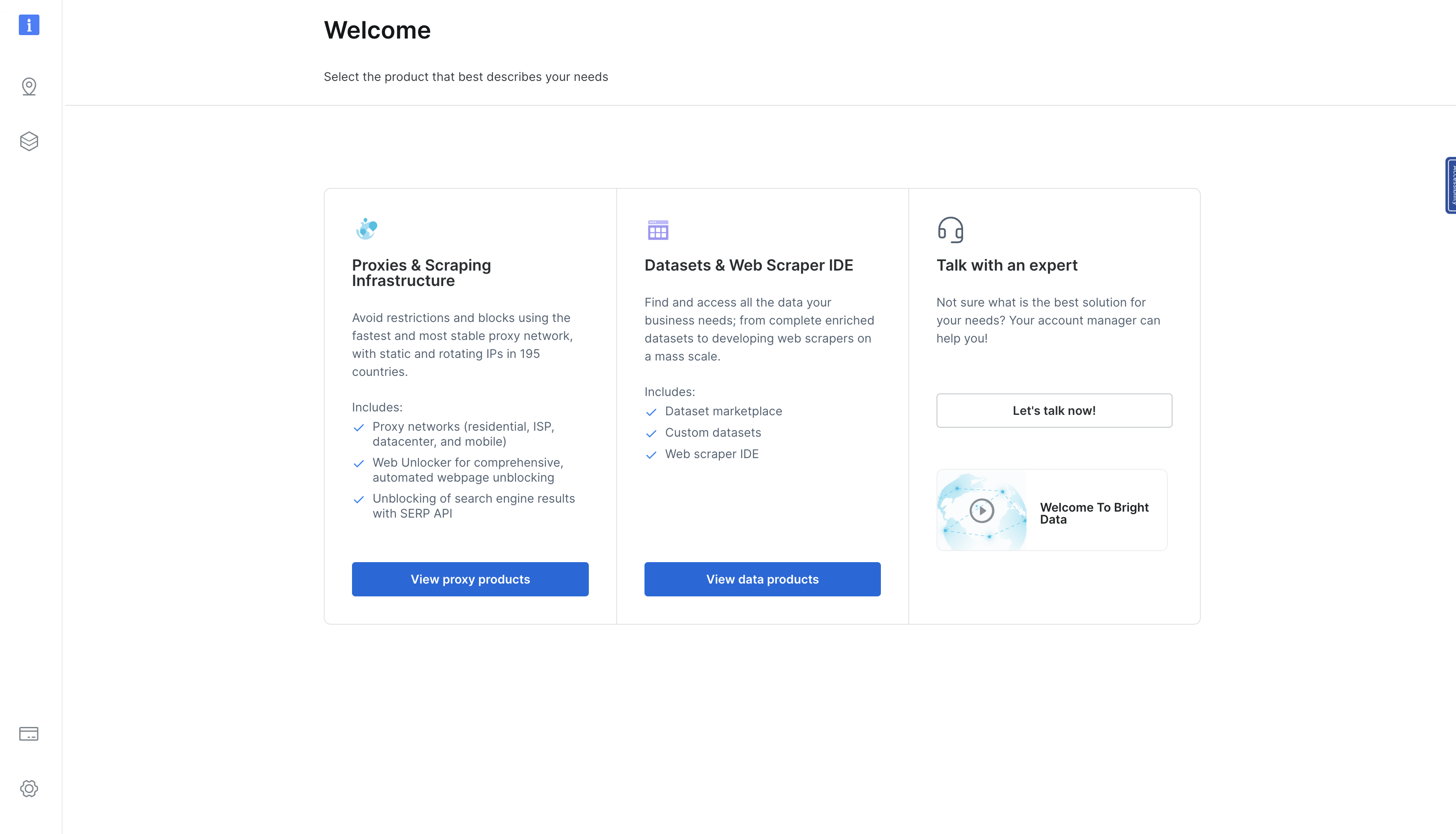
在此页面上,点击 查看代理产品 以导航到 代理和爬虫基础设施 页面:
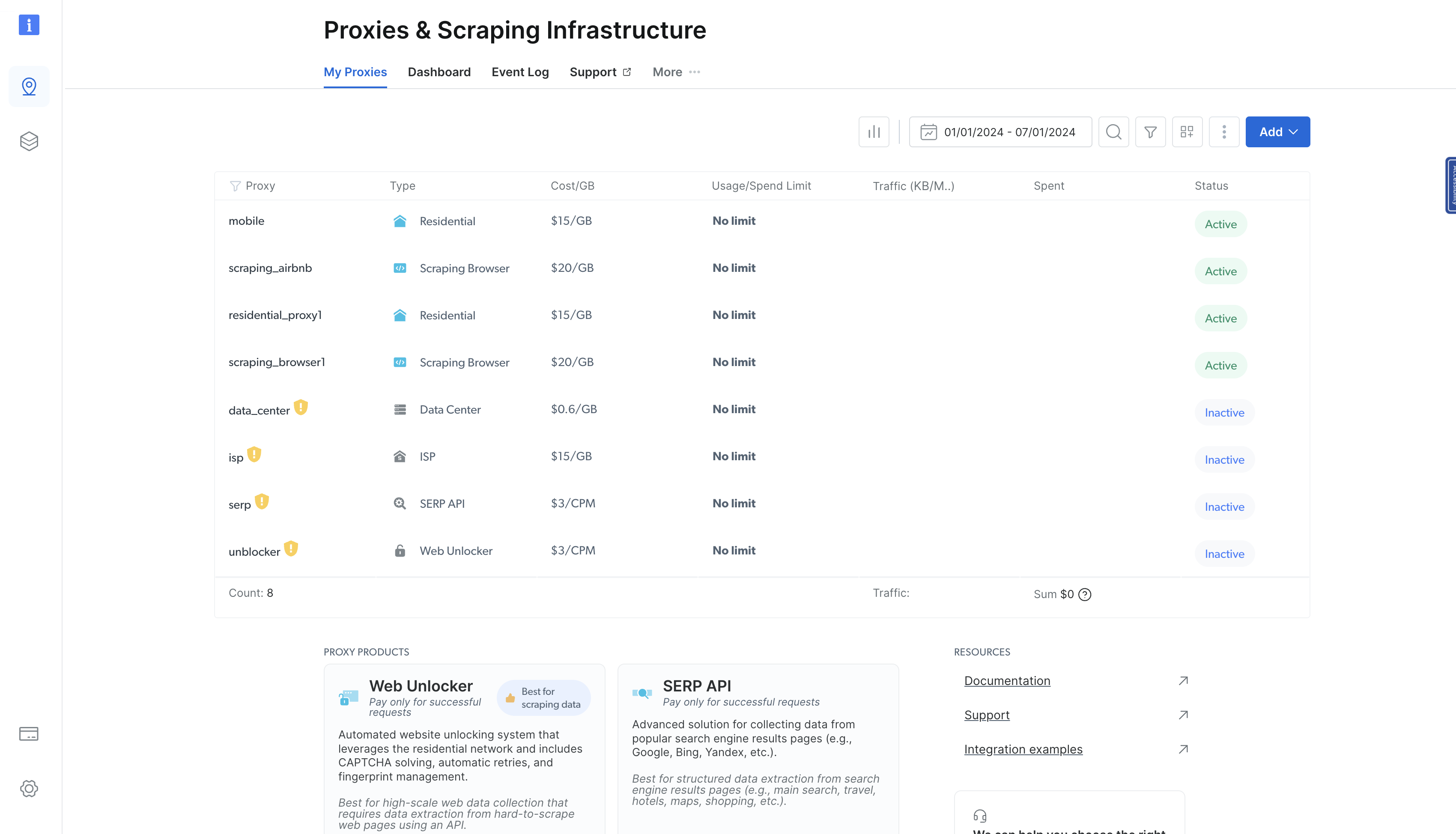
此页面列出了你之前已配置的所有代理。要添加代理,请点击右上角的蓝色 添加 按钮,并选择 住宅代理:
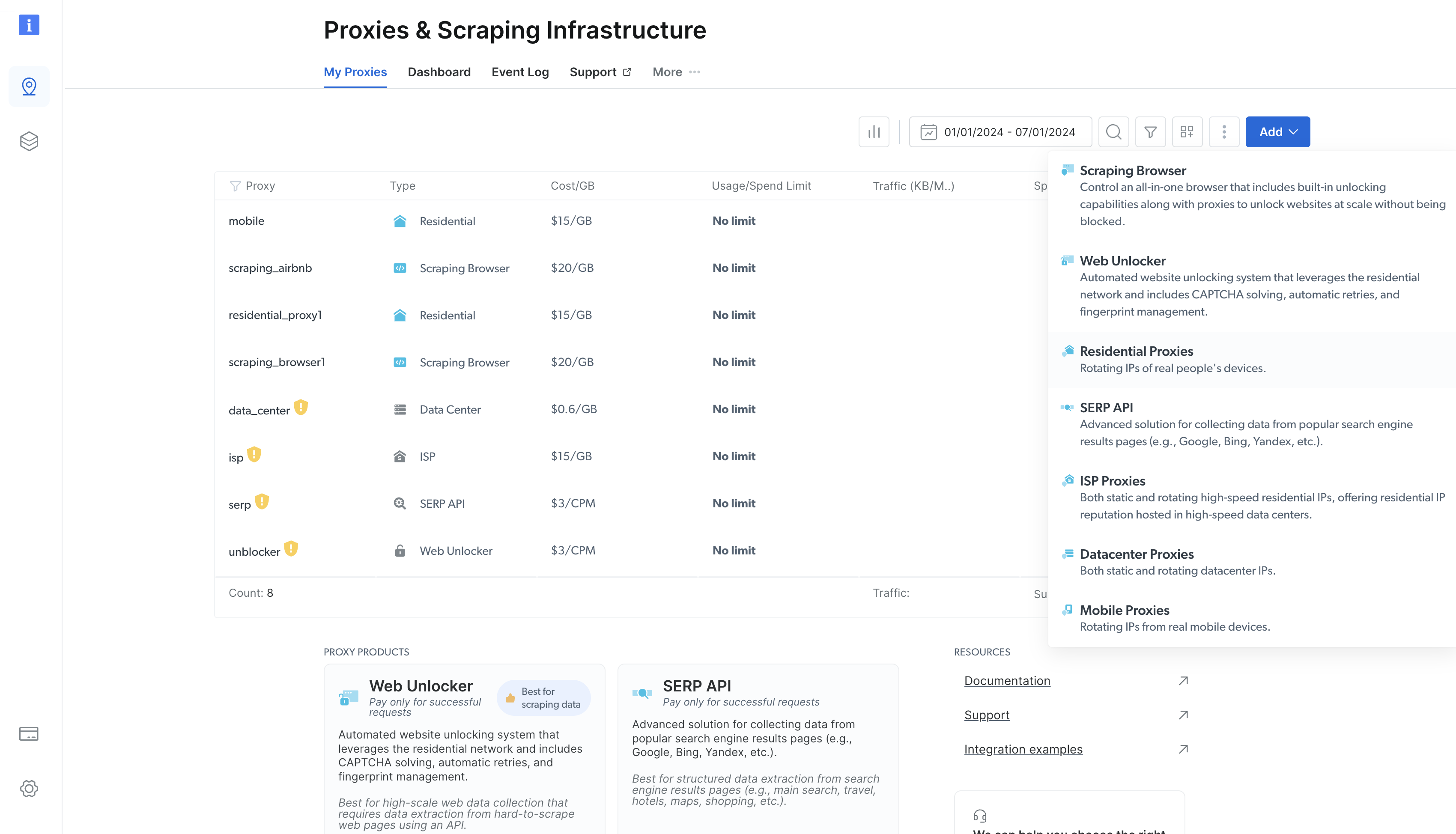
随后会弹出一个表单,你可以在其中配置新的住宅代理。保留默认选项,滚动到页面底部,然后点击 添加。
住宅代理创建后,你将被导航到一个显示新创建代理详细信息的页面。点击 访问参数 选项卡以查看代理的主机、用户名和密码:
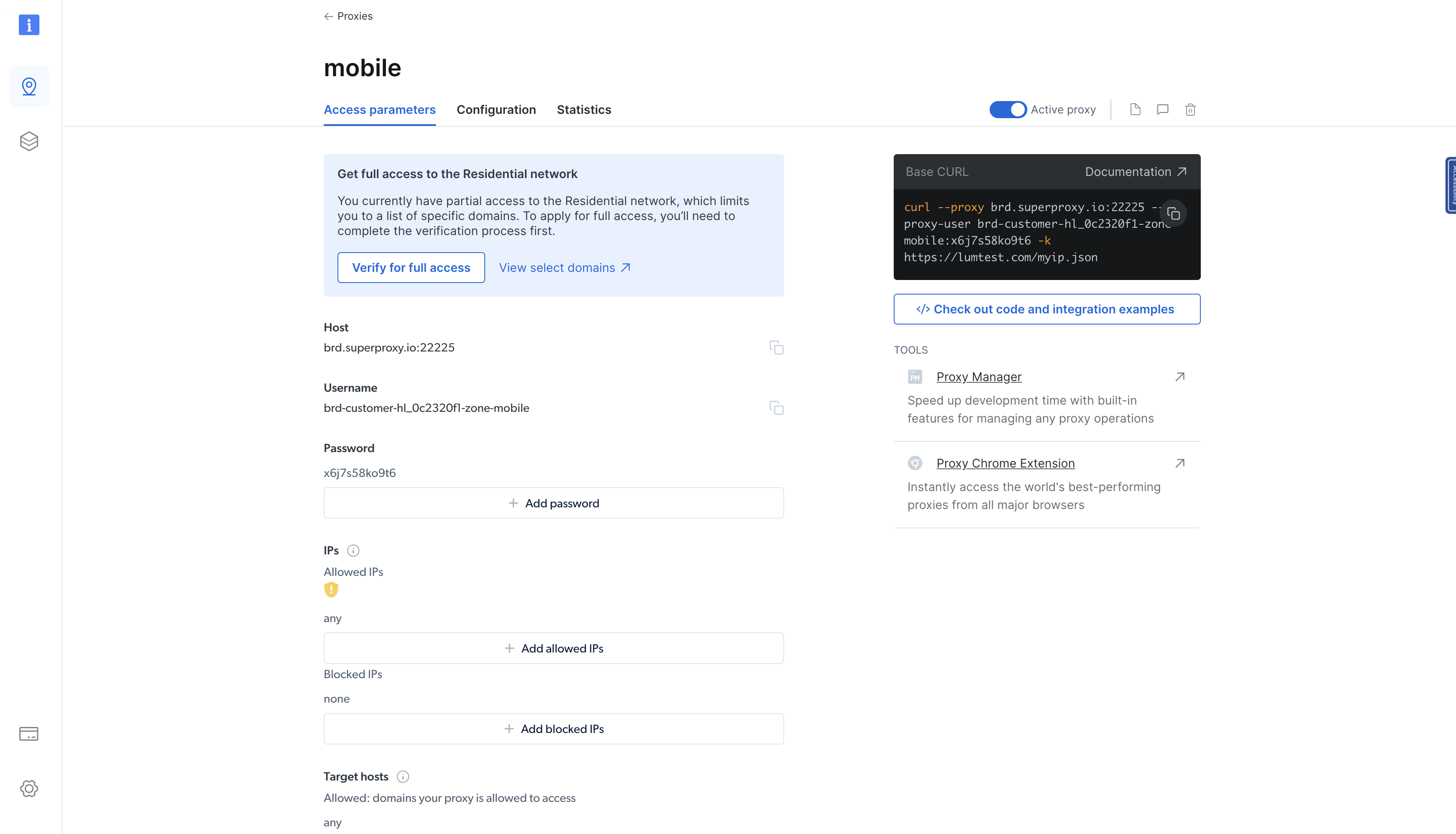
你可以使用这些参数将代理集成到你的 Rust 二进制文件中。为此,请像这样更新 src/main.rs 文件中的 main() 函数:
#[tokio::main]
async fn main()  -> Result<(), Box<dyn Error>> {
    let url = "https://books.toscrape.com/";

    // Update the following block with the details from the Bright Data proxy details page
    let client = reqwest::Client::builder()
    .proxy(reqwest::Proxy::http("<BD proxy hostname & port>")?
    .basic_auth("<your BD username>", "<your BD password>"))
    .build()?;

    // Rest remains the same
    let response = client
        .get(url)
        .send()
        .await?;

    let html_content = response.text().await?;

    extract_products(&html_content);

    Ok(())
}
然后尝试再次运行二进制文件。它应该会像之前一样正确返回响应。这里唯一的关键区别是,请求正通过 Bright Data 进行代理转发,从而隐藏你的身份和真实位置。
你可以通过向显示客户端 IP 地址的 API 发送请求来确认这一点,使用以下代码片段:
use reqwest;
use std::error::Error;

#[tokio::main]
async fn main()  -> Result<(), Box<dyn Error>> {
   let url = "http://lumtest.com/myip.json";

   // Update the following block with the details from the Bright Data proxy details page
   let client = reqwest::Client::builder()
   .proxy(reqwest::Proxy::http("<BD proxy hostname & port>")?
   .basic_auth("<your BD username>", "<your BD password>"))
   .build()?;

   // Rest remains the same
   let response = client
       .get(url)
       .send()
       .await?;

   let html_content = response.text().await?;

   println!("{:?}", html_content);
   Ok(())
}
当你使用 cargo run 命令运行代码时,应该会看到如下所示的输出:
"{"ip":"209.169.64.172","country":"US","asn":{"asnum":6300,"org_name":"CCI-TEXAS"},"geo":{"city":"Conroe","region":"TX","region_name":"Texas","postal_code":"77304","latitude":30.3228,"longitude":-95.5298,"tz":"America/Chicago","lum_city":"conroe","lum_region":"tx"}}"这将反映你用于查询页面的代理服务器的 IP 和位置详细信息。
结论
在本文中,你学习了如何在 Rust 中使用代理。请记住,代理就像数字面具,让你越过在线限制,并窥视网站限制背后的内容。它们还允许你在浏览网络时保持匿名。
然而,自行设置代理是一个复杂的过程。通常建议你选择成熟的代理提供商,例如 Bright Data,它提供一个每月 400M+ 易用代理池。