在本文中,你将学到:
- 如何使用 Google ADK 和 Vertex AI RAG 引擎构建可用于生产环境的 RAG 系统
- 如何实现语义检索和关键词检索相结合的混合搜索
- 如何通过正确的“grounding”(落地到事实依据)和引用来减少幻觉
- 如何处理包括文本、图片和表格在内的多模态内容
- 如何通过集成 Bright Data 的实时 Web 数据增强你的 RAG(可选)
现在开始!
现代知识管理的挑战
技术文档通常存放在 wiki 中,产品规格文档在 PDF 里,客户数据在数据库中,而机构化知识则散落在邮件里。员工为了查找信息要花费大量时间,而且经常找到的是过期或不完整的内容。仅在通用数据上训练的大语言模型无法访问你的专有知识库,它们在回答公司内部特定问题时往往会出错。
RAG 智能体通过在生成回答前先从你的知识库中检索相关上下文来解决这一问题。这样可以让 AI 建立在事实信息之上,减少幻觉,并通过透明的引用方便用户核查。
我们要构建什么:智能 RAG 智能体系统
我们将构建一个可用于生产环境的 RAG 智能体:它可以从多种来源接收文档,将文档切分为可检索的片段,将其转换为向量表示,通过混合搜索检索相关上下文,并生成带有正确引用且尽量避免错误的回答。
系统将负责:
- 从 Cloud Storage、Drive 和本地文件接收文档
- 带重叠的智能分块并保留元数据
- 将语义相似度和关键词匹配结合起来的混合检索
- 包含图片和表格在内的多模态内容
- 用于核查回答的引用生成
- 错误的检测与预防
前置条件
先准备你的开发环境:
- Python 3.10 或更高版本 – Google ADK 兼容性要求。
- Google Cloud 项目 – 在 Google Cloud Console 中创建启用了结算的项目。
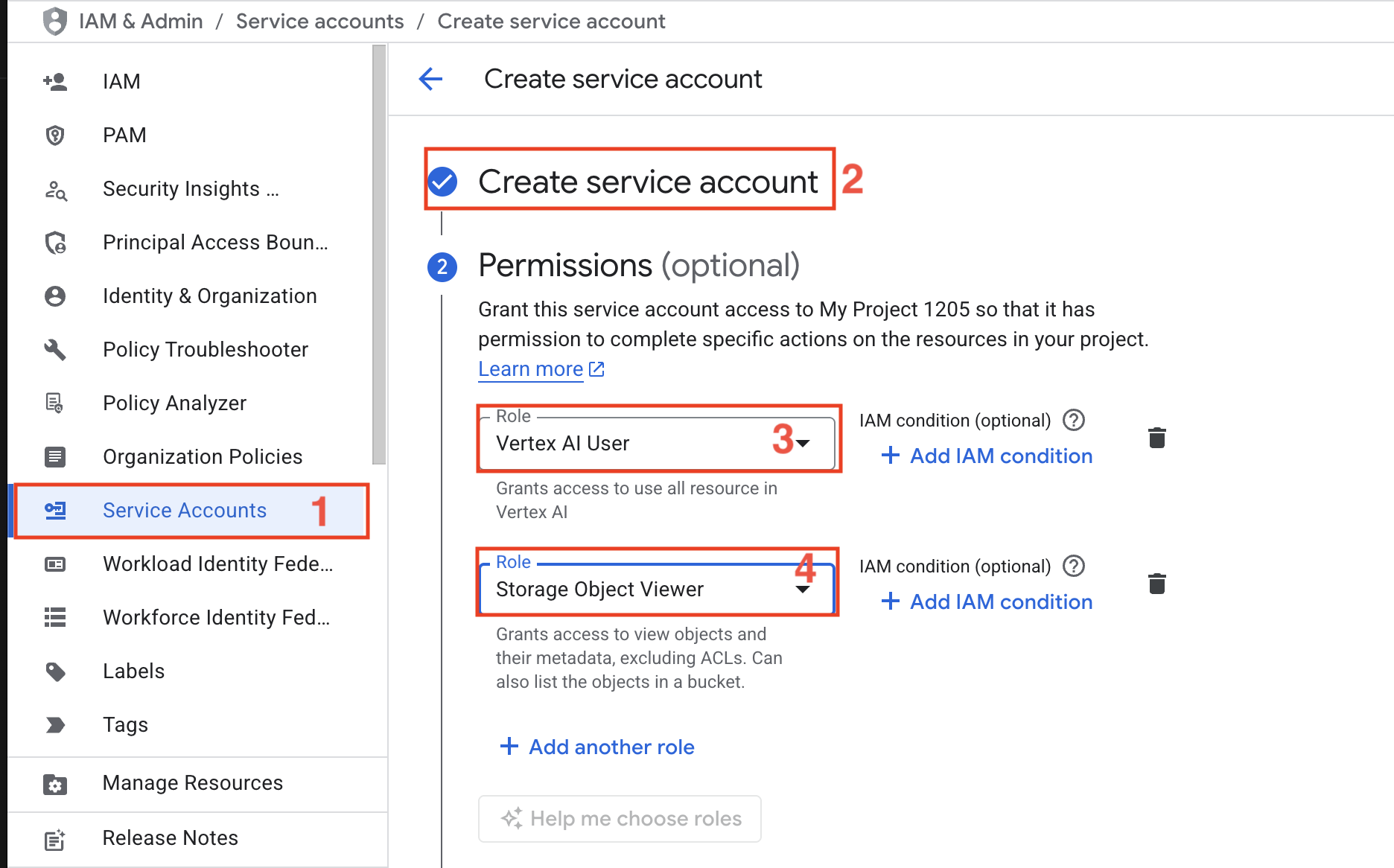
- 服务账号 – 创建一个拥有 Vertex AI User 和 Storage Object Viewer 角色的服务账号。
- Google ADK – 用于构建 AI 智能体的 Agent Development Kit;参见 文档。
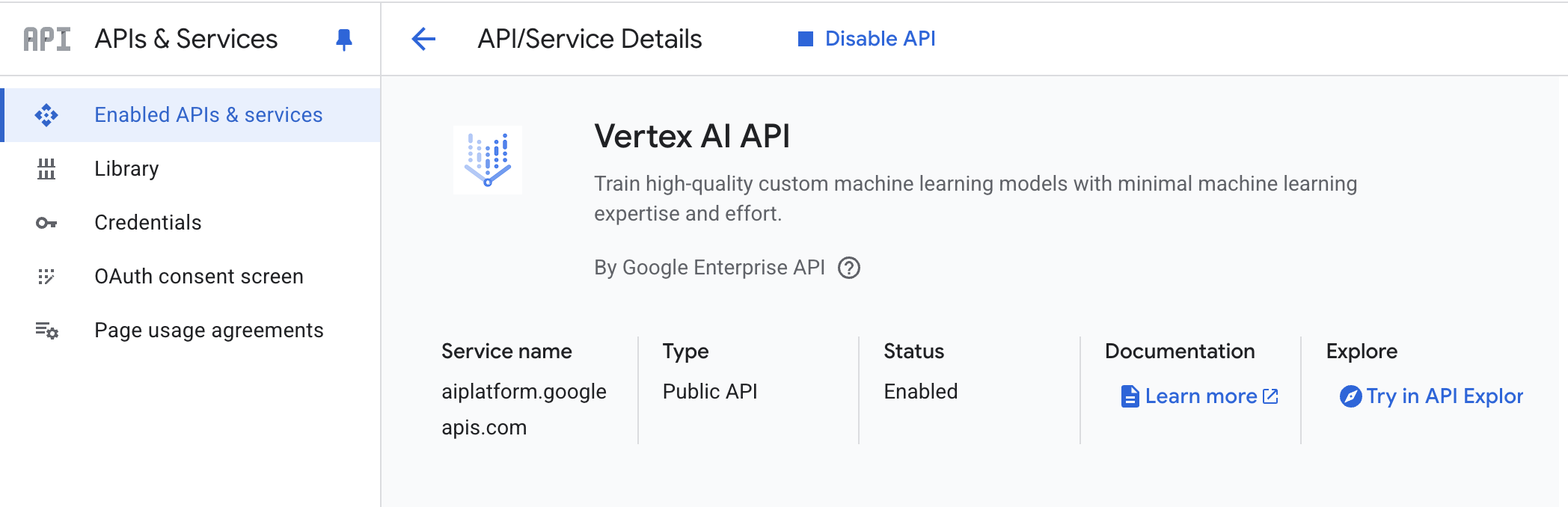
- Vertex AI API – 在你的 Google Cloud 项目中启用 Vertex AI API
- Python 虚拟环境 – 用于隔离依赖;参见
venv文档。
环境配置
创建项目目录并安装依赖:
python -m venv venv
# macOS/Linux: source venv/bin/activate
# Windows: venvScriptsactivate
pip install google-genai google-cloud-aiplatform google-cloud-storage langchain-google-vertexai pypdf python-dotenv pandas pillow
创建一个名为 rag_agent.py 的新文件并添加以下导入:
import os
import json
import PyPDF2
import fitz
import time
import vertexai
from google import genai
from vertexai.preview import rag
from pathlib import Path
from vertexai.preview.generative_models import GenerativeModel, Tool
from google.cloud import storage
from typing import List, Dict, Any, Optional
from datetime import datetime
from dotenv import load_dotenv
from google.api_core.exceptions import ResourceExhausted
from google.genai import types

load_dotenv()
创建 .env 文件并填入你的凭据:
GOOGLE_CLOUD_PROJECT="your-project-id"
GOOGLE_CLOUD_LOCATION="us-central1"
GOOGLE_APPLICATION_CREDENTIALS="path/to/service-account-key.json"
GENAI_API_KEY="your-genai-api-key"
GCS_BUCKET_NAME="your-bucket-name"
你需要:
- Project ID:在控制台中看到的 Google Cloud 项目标识符
- Location:Vertex AI 资源所在区域(推荐 us-east1)
- Service Account Key:从 IAM & Admin 下载的 JSON 密钥文件
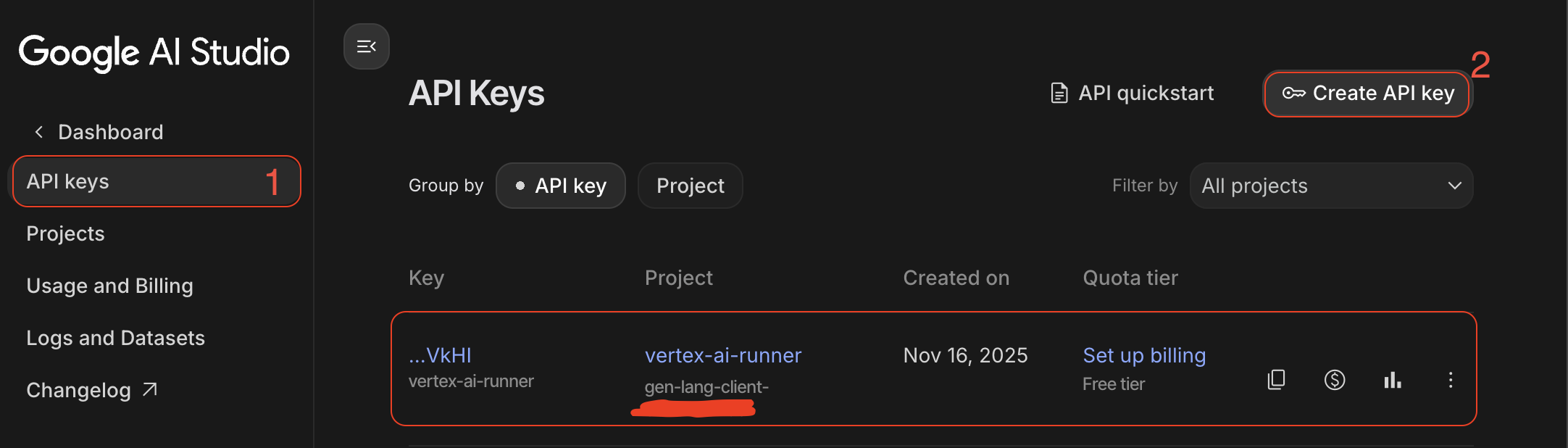
- GenAI API Key:在 Google AI Studio 中创建
- GCS Bucket:用于文档存储的 Cloud Storage 存储桶
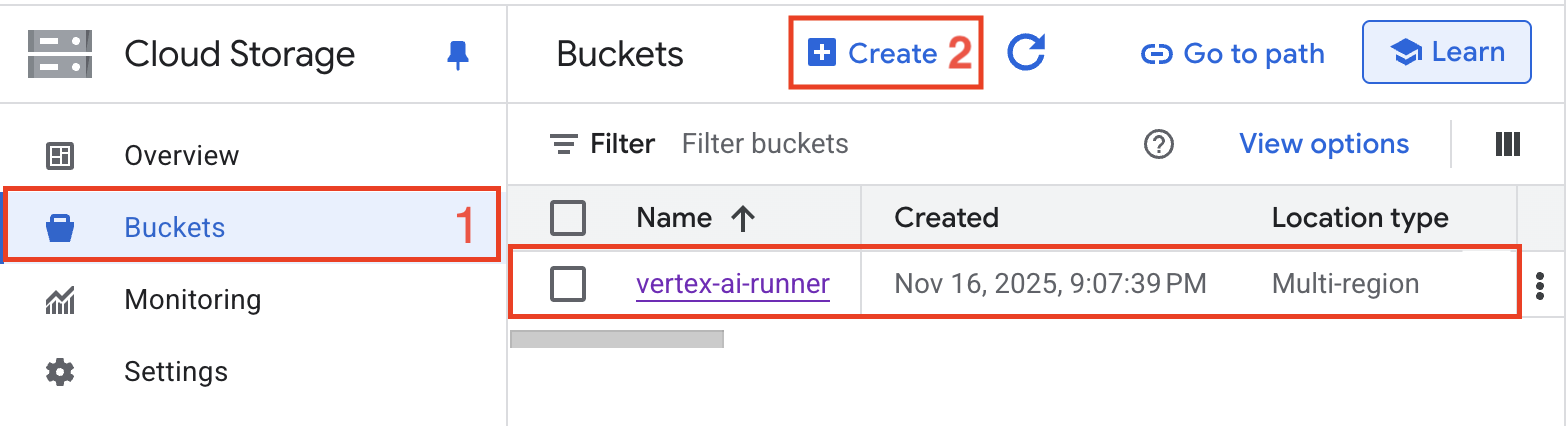
构建 RAG 智能体系统
步骤 1:Google ADK 初始化
配置 Google ADK 客户端,并使用正确的身份验证初始化 Vertex AI。客户端负责与 Google 生成式 AI 服务的所有交互。
def initialize_adk():
    """Initialize Vertex AI with proper authentication."""

    os.environ["GOOGLE_APPLICATION_CREDENTIALS"] = os.getenv("GOOGLE_APPLICATION_CREDENTIALS")

    vertexai.init(
        project=os.getenv("GOOGLE_CLOUD_PROJECT"),
        location=os.getenv("GOOGLE_CLOUD_LOCATION")
    )

    print(f"✓ Initialized Vertex AI")

# Initialize the system
initialize_adk()
初始化过程同时为智能体操作建立 GenAI 客户端连接,并为 RAG 能力初始化 Vertex AI。它会在继续之前验证凭据并确认项目配置。
步骤 2:Vertex AI RAG 引擎配置
创建一个 RAG 语料库(corpus),作为你的知识库基础。该语料库存储已索引文档、管理向量嵌入并处理检索查询。
def create_rag_corpus(corpus_name: str, description: str) -> str:
    """Create a new RAG corpus for document storage and retrieval."""

    try:
        corpus = rag.create_corpus(
            display_name=corpus_name,
            description=description,
            embedding_model_config=rag.EmbeddingModelConfig(
                publisher_model="publishers/google/models/text-embedding-004"
            )
        )

        corpus_id = corpus.name.split('/')[-1]

        print(f"✓ Created RAG corpus: {corpus_name}")
        print(f"✓ Corpus ID: {corpus_id}")
        print(f"✓ Embedding model: text-embedding-004")

        return corpus_id

    except Exception as e:
        print(f"Error creating corpus: {str(e)}")
        raise

def configure_retrieval_parameters(corpus_id: str) -> Dict[str, Any]:
    """Configure retrieval parameters for optimal search performance."""

    retrieval_config = {
        "corpus_id": corpus_id,
        "similarity_top_k": 10,
        "vector_distance_threshold": 0.5,
        "filter": {},
        "ranking_config": {
            "rank_service": "default",
            "alpha": 0.5
        }
    }

    print(f"✓ Configured retrieval parameters")
    print(f"  - Top K results: {retrieval_config['similarity_top_k']}")
    print(f"  - Distance threshold: {retrieval_config['vector_distance_threshold']}")
    print(f"  - Hybrid search alpha: {retrieval_config['ranking_config']['alpha']}")

    return retrieval_config
语料库创建时会使用 Google 的 text-embedding-004 模型来生成高质量语义嵌入。检索配置通过 alpha 参数在语义相似度和关键词匹配之间进行平衡,其中 0.5 表示两者权重相同。
步骤 3:文档摄取(Ingestion)流水线
构建健壮的文档摄取流水线,以处理多种文件格式、抽取干净文本,并保留用于增强检索效果的重要元数据。
def extract_text_from_pdf(file_path: str) -> Dict[str, Any]:
    """Extract text and metadata from PDF documents."""

    with open(file_path, 'rb') as file:
        pdf_reader = PyPDF2.PdfReader(file)

        metadata = {
            'source': file_path,
            'num_pages': len(pdf_reader.pages),
            'title': pdf_reader.metadata.get('/Title', ''),
            'author': pdf_reader.metadata.get('/Author', ''),
            'created_date': str(datetime.now())
        }

        text_content = []
        for page_num, page in enumerate(pdf_reader.pages):
            page_text = page.extract_text()
            text_content.append({
                'page': page_num + 1,
                'text': page_text,
                'char_count': len(page_text)
            })

        return {
            'metadata': metadata,
            'content': text_content,
            'full_text': ' '.join([p['text'] for p in text_content])
        }

def preprocess_document(text: str) -> str:
    """Clean and normalize document text for optimal indexing."""

    text = ' '.join(text.split())

    text = text.replace('x00', '')

    text = text.replace('rn', 'n')

    lines = text.split('n')
    cleaned_lines = [
        line for line in lines
        if len(line.strip()) > 3
        and not line.strip().isdigit()
    ]

    return 'n'.join(cleaned_lines)
分块策略会尽量在句子边界处分割,避免打断语义;通过重叠来在片段之间保留上下文;并保留关于分块位置的元数据以便精确引用。1000 字符的分块大小在检索精度和上下文完整性之间取得了平衡。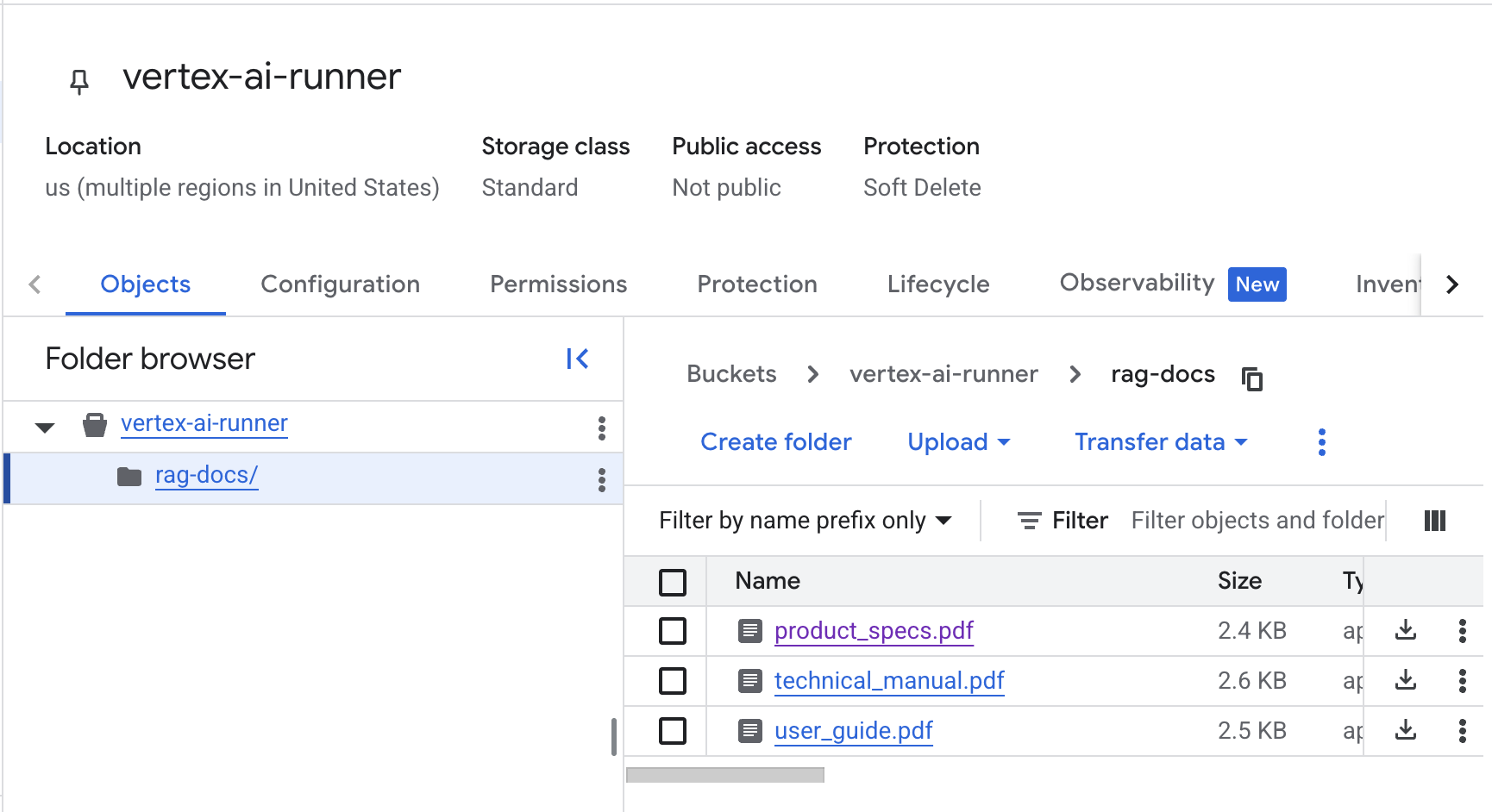
步骤 4:嵌入与索引
将文档上传到 RAG 语料库并生成用于语义搜索的向量嵌入。系统会自动完成嵌入生成和索引优化。
def chunk_document(text: str, chunk_size: int = 1000, overlap: int = 200) -> List[Dict[str, Any]]:
    """Split document into overlapping chunks for optimal retrieval."""

    chunks = []
    start = 0
    text_length = len(text)
    chunk_id = 0

    while start < text_length:
        end = start + chunk_size

        if end < text_length:
            last_period = text.rfind('.', start, end)
            if last_period != -1 and last_period > start:
                end = last_period + 1

        chunk_text = text[start:end].strip()

        if chunk_text:
            chunks.append({
                'chunk_id': chunk_id,
                'text': chunk_text,
                'start_char': start,
                'end_char': end,
                'char_count': len(chunk_text)
            })
            chunk_id += 1

        start = end - overlap

    print(f"✓ Created {len(chunks)} chunks with {overlap} char overlap")
    return chunks

def upload_file_to_gcs(local_path: str, gcs_bucket: str) -> str:
    """Upload document to Google Cloud Storage for RAG ingestion."""

    storage_client = storage.Client()
    bucket = storage_client.bucket(gcs_bucket)

    blob_name = f"rag-docs/{Path(local_path).name}"
    blob = bucket.blob(blob_name)

    blob.upload_from_filename(local_path)

    gcs_uri = f"gs://{gcs_bucket}/{blob_name}"
    print(f"✓ Uploaded to GCS: {gcs_uri}")

    return gcs_uri

def import_documents_to_corpus(corpus_id: str, file_uris: List[str]) -> str:
    """Import documents into RAG corpus and generate embeddings."""

    print(f"⚡ Starting import for {len(file_uris)} documents...")


    response = rag.import_files(
        corpus_name=f"projects/{os.getenv('GOOGLE_CLOUD_PROJECT')}/locations/{os.getenv('GOOGLE_CLOUD_LOCATION')}/ragCorpora/{corpus_id}",
        paths=file_uris,
        chunk_size=1000,
        chunk_overlap=200
    )


    try:
        if hasattr(response, 'result'):
            print("⏳ Waiting for import operation to complete (this may take a minute)...")
            response.result()
        else:
            print("✓ Import request sent.")

    except Exception as e:
        print(f"⚠️ Note on waiting: {e}")

    print(f"✓ Documents imported and indexing triggered.")

    return getattr(response, 'name', 'unknown_operation')

def create_vector_index(corpus_id: str, index_config: Dict[str, Any]) -> str:
    """Create optimized vector index for fast similarity search."""

    index_settings = {
        'corpus_id': corpus_id,
        'distance_measure': 'COSINE',
        'algorithm': 'TREE_AH',
        'leaf_node_embedding_count': 1000,
        'leaf_nodes_to_search_percent': 10
    }

    print(f"✓ Created vector index with TREE_AH algorithm")
    print(f"✓ Distance measure: COSINE similarity")
    print(f"✓ Optimized for {index_settings['leaf_nodes_to_search_percent']}% search coverage")

return corpus_id导入流程会自动处理文档解析、分块和嵌入生成。TREE_AH 算法在保持高召回率的同时提供快速的近似最近邻搜索。余弦相似度用于度量嵌入向量之间的角度距离,衡量语义相似性。
步骤 5:使用 ADK 进行智能体开发
创建核心智能体架构,用于管理上下文、处理用户查询,并协调检索与回答生成。
class RAGAgent:
    """Intelligent RAG agent with context management and grounding."""

    def __init__(self, corpus_id: str, model_name: str = "gemini-2.5-flash"):
        self.corpus_id = corpus_id
        self.model_name = model_name
        self.conversation_history = []

        self.rag_tool = Tool.from_retrieval(
            retrieval=rag.Retrieval(
                source=rag.VertexRagStore(
                    rag_corpora=[f"projects/{os.getenv('GOOGLE_CLOUD_PROJECT')}/locations/{os.getenv('GOOGLE_CLOUD_LOCATION')}/ragCorpora/{corpus_id}"],
                    similarity_top_k=5,
                    vector_distance_threshold=0.3
                )
            )
        )

        self.model = GenerativeModel(
            model_name=model_name,
            tools=[self.rag_tool]
        )

        print(f"✓ Initialized RAG agent with {model_name}")
        print(f"✓ Connected to corpus: {corpus_id}")

    def manage_context(self, query: str, max_history: int = 5) -> List[Dict[str, str]]:
        """Manage conversation context with history truncation."""

        self.conversation_history.append({
            'role': 'user',
            'content': query,
            'timestamp': datetime.now().isoformat()
        })

        if len(self.conversation_history) > max_history * 2:
            self.conversation_history = self.conversation_history[-max_history * 2:]

        formatted_history = []
        for msg in self.conversation_history:
            formatted_history.append({
                'role': msg['role'],
                'parts': [msg['content']]
            })

        return formatted_history

    def build_grounded_prompt(self, query: str, retrieved_context: List[Dict[str, Any]]) -> str:
        """Build prompt with explicit grounding instructions."""

        context_text = "nn".join([
            f"[Source {i+1}]: {ctx['text']}"
            for i, ctx in enumerate(retrieved_context)
        ])

        prompt = f"""You are a helpful AI assistant with access to a knowledge base.
        Answer the following question using ONLY the information provided in the context below.

        IMPORTANT INSTRUCTIONS:
        1. Base your answer strictly on the provided context
        2. If the context doesn't contain enough information, say so explicitly
        3. Cite specific sources using [Source X] notation
        4. Do not add information from your general knowledge
        5. If you're uncertain, acknowledge it

        CONTEXT:
        {context_text}

        QUESTION:
        {query}

        ANSWER:"""

        return prompt
智能体维护会话历史,以支持多轮对话;通过控制历史长度来避免超出 token 限制;并构建带有明确“grounding”指令的提示词,以减少幻觉。RAG 工具的集成则让模型在生成时可以自动执行检索。
步骤 6:查询处理与检索
实现将语义理解与关键词匹配相结合的混合搜索,以获得最佳检索准确度。
def hybrid_search(
    self,
    corpus_id: str,
    query: str,
    semantic_weight: float = 0.7,
    top_k: int = 10
) -> List[Dict[str, Any]]:
    """Perform hybrid search with automatic retry on quota limits."""

    rag_resource = rag.RagResource(
        rag_corpus=f"projects/{os.getenv('GOOGLE_CLOUD_PROJECT')}/locations/{os.getenv('GOOGLE_CLOUD_LOCATION')}/ragCorpora/{corpus_id}"
    )

    max_retries = 3
    base_delay = 90

    for attempt in range(max_retries):
        try:
            print(f"🔍 Searching corpus (Attempt {attempt + 1})...")

            results = rag.retrieval_query(
                rag_resources=[rag_resource],
                text=query,
                similarity_top_k=top_k,
                vector_distance_threshold=0.5
            )

            # If successful, process and return results
            retrieved_chunks = []
            for i, context in enumerate(results.contexts.contexts):
                retrieved_chunks.append({
                    'rank': i + 1,
                    'text': context.text,
                    'source': context.source_uri if hasattr(context, 'source_uri') else 'unknown',
                    'distance': context.distance if hasattr(context, 'distance') else 0.0
                })

            print(f"✓ Retrieved {len(retrieved_chunks)} relevant chunks")
            return retrieved_chunks

        except ResourceExhausted:
            wait_time = base_delay * (2 ** attempt)
            print(f"⚠️ Quota hit (Limit: 5/min). Cooling down for {wait_time}s...")
            time.sleep(wait_time)

        except Exception as e:
            print(f"❌ Retrieval error: {str(e)}")
            raise

    print("❌ Max retries reached. Retrieval failed.")
    return []

def rerank_results(
    self,
    results: List[Dict[str, Any]],
    query: str,
    model_name: str = "gemini-2.5-flash"
) -> List[Dict[str, Any]]:
    """Rerank retrieved results based on query relevance."""

    if not results:
        return []

    rerank_prompt = f"""Rate the relevance of each passage to the query on a scale of 0-10.

Query: {query}

Passages:
{chr(10).join([f"{i+1}. {r['text'][:200]}..." for i, r in enumerate(results)])}

Return only a comma-separated list of scores (e.g., 8,6,9,3,7)."""

    model = GenerativeModel(model_name)
    response = model.generate_content(rerank_prompt)

    if response.text:
        try:
            scores = [float(s.strip()) for s in response.text.strip().split(',')]
            for i, score in enumerate(scores[:len(results)]):
                results[i]['rerank_score'] = score

            results.sort(key=lambda x: x.get('rerank_score', 0), reverse=True)
            print(f"✓ Reranked results using LLM scoring")
        except Exception as e:
            print(f"Warning: Reranking failed, using original order: {str(e)}")

    return results
混合搜索首先通过向量相似度检索候选片段,然后再由大模型根据与查询的相关度进行重排。这种两阶段方式兼顾了效率与准确性。
步骤 7:回答生成与 Grounding
生成带有正确引用的回答,并通过严格的“grounding”验证机制来减少幻觉。
def generate_grounded_response(
    self,
    agent: 'RAGAgent',
    query: str,
    retrieved_context: List[Dict[str, Any]],
    temperature: float = 0.2
) -> Dict[str, Any]:
    """Generate response with citations and hallucination prevention."""

    grounded_prompt = agent.build_grounded_prompt(query, retrieved_context)

    chat = agent.model.start_chat()
    response = chat.send_message(
        grounded_prompt,
        generation_config={
            'temperature': temperature,
            'top_p': 0.8,
            'top_k': 40,
            'max_output_tokens': 1024
        }
    )

    return {
        'answer': response.text,
        'sources': retrieved_context,
        'query': query,
        'timestamp': datetime.now().isoformat()
    }

def verify_grounding(
    self,
    response: str,
    sources: List[Dict[str, Any]],
    model_name: str = "gemini-2.5-flash"
) -> Dict[str, Any]:
    """Verify response claims are grounded in source material."""

    verification_prompt = f"""Analyze if the following answer is fully supported by the provided sources.

SOURCES:
{chr(10).join([f"Source {i+1}: {s['text']}" for i, s in enumerate(sources)])}

ANSWER:
{response}

Check each claim in the answer. Respond with JSON:
{{
    "is_grounded": true/false,
    "unsupported_claims": ["claim1", "claim2"],
    "confidence_score": 0.0-1.0
}}"""

    model = GenerativeModel(model_name)
    verification_response = model.generate_content(verification_prompt)

    try:
        json_text = verification_response.text.strip()
        if '```json' in json_text:
            json_text = json_text.split('```json')[1].split('```')[0].strip()

        verification_result = json.loads(json_text)

        print(f"✓ Grounding verification complete")
        print(f"  - Grounded: {verification_result.get('is_grounded', False)}")
        print(f"  - Confidence: {verification_result.get('confidence_score', 0.0):.2f}")

        return verification_result

    except Exception as e:
        print(f"Warning: Grounding verification failed: {str(e)}")
        return {'is_grounded': True, 'confidence_score': 0.5}
grounding 验证会检查回答中的每个论断是否都能在源文档中找到依据。较低的 temperature(0.2)有助于减少“发挥想象”,提升事实准确性。
步骤 8:多模态 RAG 实现
扩展 RAG 系统以处理图片、表格等非文本内容,实现更全面的知识检索。
def extract_images_from_pdf(self, pdf_path: str, output_dir: str) -> List[Dict[str, Any]]:
        """Extract images from PDF documents for multi-modal indexing."""

        doc = fitz.open(pdf_path)
        images = []

        os.makedirs(output_dir, exist_ok=True)

        for page_num in range(len(doc)):
                page = doc[page_num]
                image_list = page.get_images()

                for img_index, img in enumerate(image_list):
                    xref = img[0]
                    base_image = doc.extract_image(xref)
                    image_bytes = base_image["image"]

                    # Save image
                    image_filename = f"page{page_num + 1}_img{img_index + 1}.png"
                    image_path = os.path.join(output_dir, image_filename)

                    with open(image_path, "wb") as img_file:
                        img_file.write(image_bytes)

                    images.append({
                        'page': page_num + 1,
                        'image_path': image_path,
                        'format': base_image['ext'],
                        'size': len(image_bytes)
                    })

        print(f"✓ Extracted {len(images)} images from PDF")
        return images

    def process_table_content(self, table_text: str) -> Dict[str, Any]:
        """Process and structure table data for enhanced retrieval."""

        lines = table_text.strip().split('n')
        if not lines:
                return {}

        headers = [h.strip() for h in lines[0].split('|') if h.strip()]

        rows = []
        for line in lines[1:]:
                cells = [c.strip() for c in line.split('|') if c.strip()]
                if len(cells) == len(headers):
                    row_dict = dict(zip(headers, cells))
                    rows.append(row_dict)

        return {
            'headers': headers,
            'rows': rows,
            'row_count': len(rows),
            'column_count': len(headers)
        }

    def create_multimodal_embedding(
        self,
        text: str,
        image_path: Optional[str] = None,
        table_data: Optional[Dict[str, Any]] = None
    ) -> Dict[str, Any]:
        """Create unified embedding for multi-modal content."""

        combined_text = text

        if table_data and table_data.get('rows'):
                table_desc = f"nTable with {table_data['row_count']} rows and columns: {', '.join(table_data['headers'])}n"
                combined_text += table_desc

        if image_path:
                combined_text += f"n[Image: {Path(image_path).name}]"

        return {
            'text': combined_text,
            'has_image': image_path is not None,
            'has_table': table_data is not None,
            'modalities': sum([bool(text), bool(image_path), bool(table_data)])
        }
多模态处理会同时抽取并索引图片和表格,以及其相关文本。统一嵌入方式会将所有模态的描述性信息组合成可检索文本,使得诸如“给我看 Q3 报告里的价格表”这一类查询可以同时检索到表格数据及其上下文。
步骤 9:Google ADK 智能体集成
集成 Google 的 Agent Development Kit(ADK),构建一个连接到 Vertex AI RAG 引擎后端的增强型智能体接口。ADK 提供了更强的智能体能力,包括工具调用、多轮对话以及结构化响应。
class ADKRAGAgent:
    """Google ADK Agent wrapper that uses Vertex AI RAG Engine as backend."""

    def __init__(self, corpus_id: str, project_id: str, location: str):
        """Initialize ADK Agent with RAG capabilities."""
        self.corpus_id = corpus_id
        self.project_id = project_id
        self.location = location

        self.rag_agent = RAGAgent(corpus_id)

        self.client = genai.Client(
            vertexai=True,
            project=project_id,
            location=location
        )

        self.model_name = "gemini-2.0-flash-001"

        print(f"✓ Initialized Google ADK Agent")
        print(f"  - Framework: Google ADK (genai.Client)")
        print(f"  - Backend: Vertex AI RAG Engine")
        print(f"  - Project: {project_id}")
        print(f"  - Location: {location}")
        print(f"  - RAG Corpus: {corpus_id}")

    def create_rag_search_tool(self) -> types.Tool:
        """Create RAG search tool for ADK agent."""

        def rag_search(query: str) -> str:
            """
            Search the RAG corpus and return grounded answers.

            Args:
                query: The user's question to search for

            Returns:
                A grounded answer with citations from the knowledge base
            """
            try:
                results = self.rag_agent.hybrid_search(
                    self.corpus_id,
                    query,
                    semantic_weight=0.7,
                    top_k=10
                )

                if not results:
                    return "No relevant information found in the knowledge base."

                reranked = self.rag_agent.rerank_results(results, query)

                response = self.rag_agent.generate_grounded_response(
                    self.rag_agent,
                    query,
                    reranked[:5]
                )

                verification = self.rag_agent.verify_grounding(
                    response['answer'],
                    response['sources']
                )

                answer = response['answer']
                if not verification.get('is_grounded', True):
                    answer += f"nn[Confidence: {verification.get('confidence_score', 0):.0%}]"

                return answer

            except Exception as e:
                return f"Error searching knowledge base: {str(e)}"

        rag_tool = types.Tool(
            function_declarations=[
                types.FunctionDeclaration(
                    name="rag_search",
                    description="Search the enterprise knowledge base using RAG (Retrieval-Augmented Generation) to find accurate, grounded answers to questions about technical documentation, product specifications, and user guides.",
                    parameters={
                        "type": "object",
                        "properties": {
                            "query": {
                                "type": "string",
                                "description": "The user's question or search query"
                            }
                        },
                        "required": ["query"]
                    }
                )
            ]
        )

        self.rag_search_function = rag_search

        return rag_tool

    def create_agent(self) -> Dict[str, Any]:
        """Create Google ADK Agent configuration with RAG tool."""

        rag_tool = self.create_rag_search_tool()

        agent_instructions = """You are an intelligent RAG (Retrieval-Augmented Generation) agent with access to an enterprise knowledge base.

Your capabilities:
- Search technical documentation, product specifications, and user guides
- Provide accurate, grounded answers with citations
- Handle multi-turn conversations with context awareness
- Verify information accuracy before responding

Guidelines:
1. Always use the rag_search tool to find information before answering
2. Provide specific, detailed answers based on retrieved documents
3. Include relevant citations and sources
4. If information is not found, clearly state that
5. Maintain conversation context across multiple queries

Be helpful, accurate, and professional in all responses."""

        agent_config = {
            'model': self.model_name,
            'instructions': agent_instructions,
            'tools': [rag_tool],
            'display_name': 'RAG Agent with Vertex AI (Google ADK + Vertex AI RAG Engine)'
        }

        print(f"✓ Created Google ADK Agent Configuration")
        print(f"  - Model: {self.model_name}")
        print(f"  - Tools: RAG Search (Vertex AI RAG Engine)")

        return agent_config

    def chat(self, agent_config: Dict[str, Any], query: str, session_id: str = "default") -> str:
        """Send a message to the ADK agent and get response using Google GenAI."""

        self.rag_agent.manage_context(query)

        try:
            response = self.client.models.generate_content(
                model=agent_config['model'],
                contents=query,
                config=types.GenerateContentConfig(
                    system_instruction=agent_config['instructions'],
                    tools=agent_config['tools'],
                    temperature=0.2
                )
            )

            if response.candidates and len(response.candidates) > 0:
                candidate = response.candidates[0]

                if candidate.content and candidate.content.parts:
                    for part in candidate.content.parts:
                        if hasattr(part, 'function_call') and part.function_call:
                            function_name = part.function_call.name
                            function_args = part.function_call.args

                            print(f"  → ADK Agent calling tool: {function_name}")

                            if function_name == "rag_search":
                                query_arg = function_args.get("query", query)
                                tool_result = self.rag_search_function(query_arg)

                                response = self.client.models.generate_content(
                                    model=agent_config['model'],
                                    contents=[
                                        types.Content(role="user", parts=[types.Part(text=query)]),
                                        types.Content(role="model", parts=[part]),
                                        types.Content(
                                            role="function",
                                            parts=[types.Part(
                                                function_response=types.FunctionResponse(
                                                    name=function_name,
                                                    response={"result": tool_result}
                                                )
                                            )]
                                        )
                                    ],
                                    config=types.GenerateContentConfig(
                                        system_instruction=agent_config['instructions'],
                                        tools=agent_config['tools'],
                                        temperature=0.2
                                    )
                                )

                        elif hasattr(part, 'text') and part.text:
                            answer = part.text

                            self.rag_agent.conversation_history.append({
                                'role': 'assistant',
                                'content': answer,
                                'timestamp': datetime.now().isoformat()
                            })

                            return answer

                if response.candidates and response.candidates[0].content.parts:
                    for part in response.candidates[0].content.parts:
                        if hasattr(part, 'text') and part.text:
                            answer = part.text

                            self.rag_agent.conversation_history.append({
                                'role': 'assistant',
                                'content': answer,
                                'timestamp': datetime.now().isoformat()
                            })

                            return answer

            return "No response generated."

        except Exception as e:
            error_msg = f"Error in ADK agent chat: {str(e)}"
            print(f"❌ {error_msg}")
            return error_msg
ADK 集成为你现有的 RAG 智能体引入了 Google 的智能体框架。ADKRAGAgent 类为智能体操作配置了 genai.Client,并复用你的 RAGAgent 进行检索。create_rag_search_tool 方法定义了一个可被智能体调用的函数,使其能够通过 Vertex AI RAG 引擎查询你的知识库。
工具调用机制可以让智能体根据用户查询自动决定何时需要搜索知识库。当需要搜索时,它会运行混合检索流水线、对结果进行重排、生成有依据的回答并在回答前检查准确性。chat 方法则管理整个对话流程,包括工具执行和多轮上下文维护。
步骤 10:使用 Bright Data 实时 Web 数据增强你的 RAG
虽然 RAG 系统非常擅长从内部知识库中检索信息,但企业级 AI 应用通常还需要来自外部源的最新实时数据。这时 Bright Data 的 Web 数据平台就非常有价值,它让你的 RAG 智能体可以访问全网实时信息,从而让你的知识库保持更新且更全面。
为什么要将 Bright Data 集成到 RAG 系统中?
1. 让你的知识库始终保持更新
- 自动用最新的产品信息、价格数据、竞品情报和市场趋势更新 RAG 语料库
- 消除导致 AI 回答过时的陈旧数据
- 通过定期调度数据刷新来保持准确性
2. 将能力扩展到内部文档之外
- 访问 120+ 热门网站(包括电商平台、新闻网站、社交媒体和行业垂直网站)的实时数据
- 在技术文档基础上,补充最新 API 文档、社区讨论和更新后的技术规格
- 引入客户评价、反馈和情绪数据,增强你的产品知识库
3. 支持动态查询增强
- 当 RAG 智能体检测到需要最新信息(价格、库存、近期新闻)的问题时,自动拉取实时数据
- 将内部知识与外部 Web 数据结合起来,给出更全面的回答
- 同时向用户提供历史上下文和最新信息
4. 轻松扩展数据采集
- 无需自己维护代理、处理验证码或对抗反爬系统
- Bright Data 负责所有基础设施、解封和数据质量
- 你可以专注于 AI 开发,而 Bright Data 来负责数据获取
实现:将 Bright Data 加入你的 RAG 流水线
我们将通过 Bright Data 的能力扩展你的 RAG 系统。下面会添加三种集成模式:用于预采集数据的数据集集成(Dataset Integration)、用于实时抓取的 Web Scraper API,以及用于增强智能的 AI Scrapers。
模式 1:数据集集成(历史数据)
使用 Bright Data 的 Dataset Marketplace,可快速用高质量结构化数据填充你的 RAG 语料库。
import requests
from typing import List, Dict
import json

class BrightDataRAGEnhancer:
    """Enhance RAG system with Bright Data web data capabilities."""

    def __init__(self, api_key: str, rag_agent: RAGAgent):
        self.api_key = api_key
        self.rag_agent = rag_agent
        self.base_url = "https://api.brightdata.com"

    def fetch_dataset_data(
        self,
        dataset_id: str,
        filters: Dict[str, Any] = None,
        limit: int = 1000
    ) -> List[Dict[str, Any]]:
        """Fetch data from Bright Data Dataset Marketplace."""

        headers = {
            "Authorization": f"Bearer {self.api_key}",
            "Content-Type": "application/json"
        }

        endpoint = f"{self.base_url}/datasets/v3/snapshot/{dataset_id}"

        params = {
            "format": "json",
            "limit": limit
        }

        if filters:
            params["filter"] = json.dumps(filters)

        response = requests.get(endpoint, headers=headers, params=params)
        response.raise_for_status()

        print(f"✓ Retrieved {len(response.json())} records from dataset {dataset_id}")
        return response.json()

    def ingest_dataset_to_rag(
        self,
        corpus_id: str,
        dataset_records: List[Dict[str, Any]],
        text_fields: List[str]
    ) -> None:
        """Process dataset records and add them to RAG corpus."""

        processed_chunks = []

        for record in dataset_records:
            # Combine specified text fields into searchable content
            combined_text = " ".join([
                str(record.get(field, ""))
                for field in text_fields
                if record.get(field)
            ])

            if combined_text.strip():
                # Add metadata for better retrieval
                metadata = {
                    "source": "bright_data_dataset",
                    "record_id": record.get("id", "unknown"),
                    "ingestion_date": datetime.now().isoformat(),
                    "data_type": "external_web_data"
                }

                # Chunk the content
                chunks = chunk_document(combined_text, chunk_size=1000, overlap=200)

                for chunk in chunks:
                    chunk['metadata'] = metadata
                    processed_chunks.append(chunk)

        print(f"✓ Processed {len(processed_chunks)} chunks from dataset")

        # Create temporary file for upload
        temp_file = "temp_dataset_content.txt"
        with open(temp_file, 'w') as f:
            for chunk in processed_chunks:
                f.write(chunk['text'] + "\n\n")

        # Upload to GCS and import to corpus
        gcs_uri = upload_file_to_gcs(temp_file, os.getenv('GCS_BUCKET_NAME'))
        import_documents_to_corpus(corpus_id, [gcs_uri])

        os.remove(temp_file)
        print(f"✓ Added dataset content to RAG corpus")
用例示例:为你的电商 RAG 填充商品数据
# Create a RAG corpus first
corpus_id = create_rag_corpus(
    corpus_name="bright_data_corpus",
    description="Corpus for Bright Data enhanced RAG"
)

# Initialize RAG agent with corpus
rag_agent = RAGAgent(corpus_id=corpus_id)

# Initialize enhancer
enhancer = BrightDataRAGEnhancer(
    api_key=os.getenv("BRIGHT_DATA_API_KEY"),
    rag_agent=rag_agent
)

print("✓ BrightDataRAGEnhancer initialized successfully!")

# Fetch Amazon product data
amazon_data = enhancer.fetch_dataset_data(
    dataset_id="gd_l7q7dkf244hwxr90h",  # Amazon products dataset
    filters={"category": "Electronics"},
    limit=5000
)

# Ingest into RAG corpus
enhancer.ingest_dataset_to_rag(
    corpus_id=corpus_id,
    dataset_records=amazon_data,
    text_fields=["title", "description", "features", "reviews"]
)
模式 2:实时 Web Scraper API 集成
对于动态、实时变动的信息,将 Bright Data 的 Web Scraper API 直接集成到你的 RAG 智能体查询流水线中。
def scrape_real_time_data(
    self,
    scraper_id: str,
    inputs: List[Dict[str, Any]],
    wait_for_completion: bool = True
) -> List[Dict[str, Any]]:
    """Execute real-time web scraping using Bright Data scrapers."""

    headers = {
        "Authorization": f"Bearer {self.api_key}",
        "Content-Type": "application/json"
    }

    # Trigger scraper
    trigger_url = f"{self.base_url}/dca/trigger"
    params = {
        "scraper": scraper_id,
        "queue_next": 1
    }

    response = requests.post(
        trigger_url,
        headers=headers,
        params=params,
        json=inputs
    )
    response.raise_for_status()

    snapshot_id = response.json().get("snapshot_id")
    print(f"✓ Scraper triggered. Snapshot ID: {snapshot_id}")

    if not wait_for_completion:
        return {"snapshot_id": snapshot_id, "status": "processing"}

    # Poll for results
    results_url = f"{self.base_url}/dca/dataset"
    params = {"id": snapshot_id}

    max_retries = 30
    for i in range(max_retries):
        time.sleep(10)  # Wait 10 seconds between polls

        results_response = requests.get(results_url, headers=headers, params=params)

        if results_response.status_code == 200:
            data = results_response.json()
            print(f"✓ Scraping complete. Retrieved {len(data)} records")
            return data
        elif results_response.status_code == 202:
            print(f"⏳ Still processing... ({i+1}/{max_retries})")
            continue
        else:
            print(f"❌ Error retrieving results: {results_response.status_code}")
            break

    return []

def create_dynamic_rag_tool(self) -> types.Tool:
    """Create RAG tool with real-time web data augmentation."""

    def augmented_rag_search(query: str, include_live_data: bool = False) -> str:
        """
        Search knowledge base with optional real-time web data enrichment.

        Args:
            query: The user's question
            include_live_data: Whether to fetch fresh web data

        Returns:
            Grounded answer combining internal and external data
        """
        # First, search internal knowledge base
        internal_results = self.rag_agent.hybrid_search(
            corpus_id=self.rag_agent.corpus_id,
            query=query,
            top_k=5
        )

        combined_results = internal_results

        # If query requires current information, fetch live data
        if include_live_data or self._requires_fresh_data(query):
            print("🌐 Fetching real-time web data...")

            # Example: Scrape pricing information
            if "price" in query.lower() or "cost" in query.lower():
                live_data = self.scrape_real_time_data(
                    scraper_id="your_product_scraper_id",
                    inputs=[{"url": "https://example.com/products"}],
                    wait_for_completion=True
                )

                # Convert live data to searchable chunks
                for record in live_data[:3]:  # Top 3 results
                    combined_results.append({
                        'rank': len(combined_results) + 1,
                        'text': f"{record.get('title', '')}: {record.get('price', '')} - {record.get('description', '')}",
                        'source': f"Live web data: {record.get('url', 'unknown')}",
                        'distance': 0.3  # High relevance for fresh data
                    })

        # Generate response with all available context
        response = self.rag_agent.generate_grounded_response(
            self.rag_agent,
            query,
            combined_results
        )

        return response['answer']

    return types.Tool(
        function_declarations=[
            types.FunctionDeclaration(
                name="augmented_rag_search",
                description="Search internal knowledge base and optionally fetch real-time web data for current information",
                parameters={
                    "type": "object",
                    "properties": {
                        "query": {"type": "string", "description": "User's question"},
                        "include_live_data": {"type": "boolean", "description": "Fetch fresh web data"}
                    },
                    "required": ["query"]
                }
            )
        ]
    )

def _requires_fresh_data(self, query: str) -> bool:
    """Determine if query requires real-time data."""
    fresh_data_keywords = [
        "latest", "current", "today", "now", "recent",
        "price", "cost", "available", "in stock"
    ]
    return any(keyword in query.lower() for keyword in fresh_data_keywords)
模式 3:AI Scraper 集成(增强智能)
利用 Bright Data 的 AI Scrapers(ChatGPT、Perplexity、Gemini 等),为你的 RAG 增加 AI 生成洞察和更全面的 Web 上下文。
def query_ai_scraper(
        self,
        scraper_type: str,
        prompt: str,
        country_code: str = "us"
    ) -> Dict[str, Any]:
        """Query AI scrapers (ChatGPT, Perplexity, etc.) for enriched context."""

        scraper_ids = {
            "chatgpt": "chatgpt_scraper_id",
            "perplexity": "perplexity_scraper_id",
            "gemini": "gemini_scraper_id"
        }

        inputs = [{
            "prompt": prompt,
            "country": country_code
        }]

        results = self.scrape_real_time_data(
            scraper_id=scraper_ids.get(scraper_type),
            inputs=inputs,
            wait_for_completion=True
        )

        if results:
            return {
                "answer": results[0].get("answer", ""),
                "sources": results[0].get("sources", []),
                "citations": results[0].get("citations", [])
            }

        return {}

    def create_hybrid_intelligence_agent(self) -> Dict[str, Any]:
        """Create agent that combines RAG with AI scraper intelligence."""

        def hybrid_search(query: str) -> str:
            """
            Combine internal RAG with external AI scraper intelligence.

            This provides:
            1. Internal knowledge base context
            2. Real-time AI-generated insights from the web
            3. Comprehensive, well-sourced answers
            """
            # Get internal knowledge
            internal_answer = self.rag_agent.hybrid_search(
                corpus_id=self.rag_agent.corpus_id,
                query=query,
                top_k=3
            )

            internal_context = "\n".join([r['text'][:200] for r in internal_answer])

            # Get AI scraper enrichment
            print("🤖 Fetching AI-enhanced web intelligence...")
            ai_insight = self.query_ai_scraper(
                scraper_type="perplexity",  # Known for well-sourced answers
                prompt=query
            )

            # Synthesize both sources
            synthesis_prompt = f"""Synthesize a comprehensive answer using both internal knowledge and external AI insights.

INTERNAL KNOWLEDGE BASE:
{internal_context}

EXTERNAL AI INSIGHTS:
{ai_insight.get('answer', 'No external insights available')}

SOURCES:
{json.dumps(ai_insight.get('citations', []), indent=2)}

QUESTION: {query}

Provide a complete answer that:
1. Prioritizes internal knowledge for company-specific information
2. Uses external insights for broader context and recent developments
3. Clearly cites all sources
4. Indicates when information comes from external vs internal sources"""

            model = GenerativeModel("gemini-2.0-flash-001")
            response = model.generate_content(synthesis_prompt)

            return response.text

        return {
            'search_function': hybrid_search,
            'description': 'Hybrid RAG + AI Scraper Intelligence System'
        }
运行你的 RAG 智能体系统
将所有组件整合到一个完整流程中,用于处理文档、处理查询并生成有依据的回答。同时,你可以从 GitHub 下载 你想处理的 PDF 文档,并将其放入 docs/ 文件夹中,以便 AI 为你的产品构建上下文。
def main():
    """Main execution flow for the RAG agent system."""

    print("=" * 60)
    print("RAG Agent System - Initialization")
    print("=" * 60)

    initialize_adk()

    corpus_id = create_rag_corpus(
        corpus_name="enterprise-knowledge-base-3",
        description="Multi-modal enterprise documentation and knowledge repository"
    )

    retrieval_config = configure_retrieval_parameters(corpus_id)
    print(f"n✓ Using retrieval config with top_k={retrieval_config['similarity_top_k']}")

    print("n" + "=" * 60)
    print("Document Ingestion Pipeline")
    print("=" * 60)

    document_paths = [
        "docs/technical_manual.pdf",
        "docs/product_specs.pdf",
        "docs/user_guide.pdf"
    ]

    gcs_uris = []
    all_chunks = []
    extracted_images = []

    for doc_path in document_paths:
        if os.path.exists(doc_path):
            extracted = extract_text_from_pdf(doc_path)
            print(f"n✓ Extracted {extracted['metadata']['num_pages']} pages from {Path(doc_path).name}")

            cleaned_text = preprocess_document(extracted['full_text'])
            print(f"✓ Preprocessed text: {len(cleaned_text)} characters")

            chunks = chunk_document(cleaned_text, chunk_size=1000, overlap=200)
            all_chunks.extend(chunks)
            print(f"✓ Document chunked into {len(chunks)} segments")

            gcs_uri = upload_file_to_gcs(doc_path, os.getenv('GCS_BUCKET_NAME'))
            gcs_uris.append(gcs_uri)

    print(f"n✓ Total chunks created: {len(all_chunks)}")
    print(f"✓ Total images extracted: {len(extracted_images)}")

    if gcs_uris:
        import_documents_to_corpus(corpus_id, gcs_uris)
        index_config = {"distance_measure": "COSINE", "algorithm": "TREE_AH"}
        create_vector_index(corpus_id, index_config)
        time.sleep(180)

    # ========================================================================
    # Initialize Google ADK Agent with Vertex AI RAG Engine
    # ========================================================================
    print("n" + "=" * 60)
    print("Google ADK Agent Initialization")
    print("=" * 60)

    adk_agent = ADKRAGAgent(
        corpus_id=corpus_id,
        project_id=os.getenv("GOOGLE_CLOUD_PROJECT"),
        location=os.getenv("GOOGLE_CLOUD_LOCATION")
    )

    agent = adk_agent.create_agent()

    for doc_path in document_paths:
        if os.path.exists(doc_path):
            try:
                images = adk_agent.rag_agent.extract_images_from_pdf(doc_path, "extracted_images")
                extracted_images.extend(images)
                if images:
                    print(f"✓ Extracted {len(images)} images for multi-modal processing")
            except Exception as e:
                print(f"⚠️ Image extraction skipped: {str(e)}")

    queries = [
        "What are the system requirements for installation?",
        "How do I configure the authentication settings?",
        "What are the pricing tiers and their features?"
    ]

    print("n" + "=" * 60)
    print("Google ADK Agent - Query Processing")
    print("=" * 60)
    print("Using: Google ADK + Vertex AI RAG Engine")
    print("=" * 60)

    session_id = f"session_{datetime.now().strftime('%Y%m%d_%H%M%S')}"

    for idx, query in enumerate(queries):
        print(f"n📝 Query {idx + 1}: {query}")
        print("-" * 60)

        try:
            answer = adk_agent.chat(agent, query, session_id)

            print(f"n💬 ADK Agent Response:n{answer}n")
            print(f"✓ Conversation history: {len(adk_agent.rag_agent.conversation_history)} messages")

        except Exception as e:
            print(f"❌ Error: {str(e)}")
            import traceback
            traceback.print_exc()

        print("-" * 60)

        if idx < len(queries) - 1:
            time.sleep(90)

    if extracted_images:
        print("n" + "=" * 60)
        print("Multi-Modal Processing Demo")
        print("=" * 60)

        sample_table = """Feature | Basic | Pro | Enterprise
Storage | 10GB | 100GB | Unlimited
Users | 1 | 10 | Unlimited
Price | $10 | $50 | Custom"""

        table_data = adk_agent.rag_agent.process_table_content(sample_table)
        print(f"n✓ Processed table with {table_data.get('row_count', 0)} rows")

        if all_chunks and extracted_images:
            multimodal_embed = adk_agent.rag_agent.create_multimodal_embedding(
                text=all_chunks[0]['text'][:500],
                image_path=extracted_images[0]['image_path'] if extracted_images else None,
                table_data=table_data
            )
            print(f"✓ Created multi-modal embedding with {multimodal_embed['modalities']} modalities")
            print(f"  - Has image: {multimodal_embed['has_image']}")
            print(f"  - Has table: {multimodal_embed['has_table']}")

    print("n" + "=" * 60)
    print(f"Google ADK RAG Agent System - Complete")
    print(f"✓ Architecture: Google ADK + Vertex AI RAG Engine")
    print(f"✓ Total conversation turns: {len(adk_agent.rag_agent.conversation_history)}")
    print("=" * 60)

if __name__ == "__main__":
    try:
        main()
    except Exception as e:
        print(f"n❌ Error: {str(e)}")
        import traceback
        traceback.print_exc()
运行 RAG 智能体系统:
python3 rag_agent.py在控制台中,你将看到智能体的处理流水线:
- 初始化 Google ADK 客户端和 Vertex AI 连接。
- 创建带有嵌入模型配置的 RAG 语料库。
- 抽取、清洗并分块文档。
- 将文件上传到 Cloud Storage 并导入到语料库中。
- 生成向量嵌入并构建搜索索引。
- 执行查询扩展、检索和重排。
- 生成带引用和验证的有依据回答。
- 基于相关性、完整性、准确性和清晰度对回答质量进行评分。
控制台输出会展示每一步的详细进度。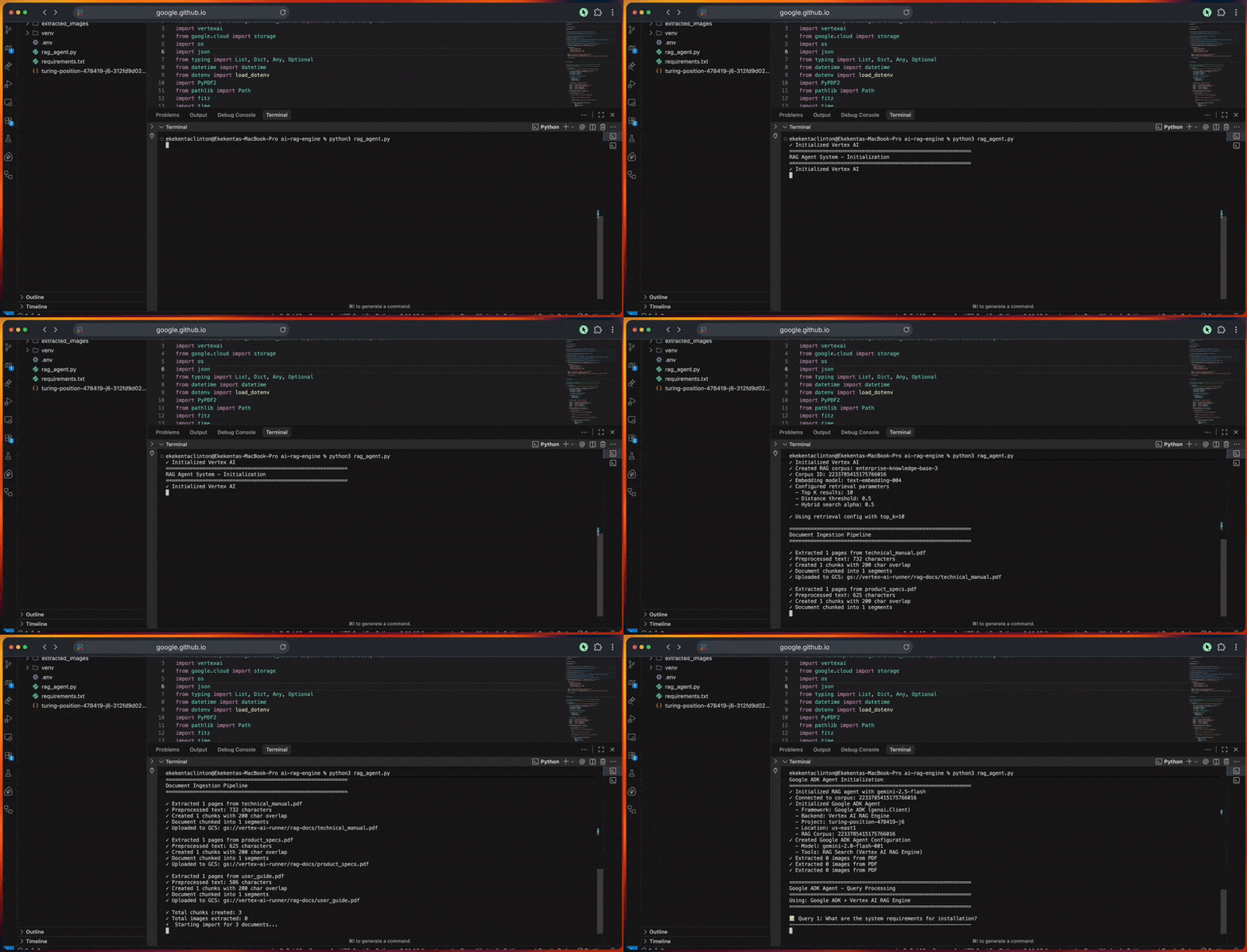
总结
现在,你已经拥有一个可用于生产环境的 RAG 智能体系统,它将 Google 的 Agent Development Kit 与 Vertex AI 结合起来。该系统可以摄取文档、通过混合搜索检索相关上下文,并生成带引用的准确回答。
你可以通过改进分块策略、加入反馈回路、集成更多数据源或启用实时监控等方式进一步增强该系统。由于整体架构是模块化设计,因此非常易于定制。
想要了解更多能力,可以探索 高级 AI 工作流 和 Bright Data 的 AI 基础设施。
创建一个免费的账号,开始构建吧。



技术写作者
Amitesh Anand 是一位开发者倡导者和技术写作者,分享有关 AI、软件和开发工具的内容,拥有 1 万粉丝和超过 40 万次观看。